
AI for business operations
AI for your role · Facts checked 22 October 2026
AI is good at operations legwork: the weekly ops review, first-draft SOPs, bottleneck analysis, capacity plans and vendor renewals. It misleads where definitions hide, because a first reply time in calendar hours and one in business hours look identical. Give Claude those definitions in a shared project, connect Jira, Confluence, Notion and Slack, and check each answer before it ships.
Context first: what Claude has to know about your ops numbers
Most bad AI ops numbers aren't hallucinations. They're a real figure measured a different way from the one your team uses. A reply time can run on the clock or on business hours. A ticket can be solved, closed or reopened, and a Jira item can be Done without being resolved. An assistant that doesn't know your conventions picks one silently. Write them down once, in the project, and Claude can say which one each figure uses.
| What differs | Why it changes the answer | What to write in the project |
|---|---|---|
| Business hours or calendar hours | Zendesk stores first reply time in both, and its pre-built Explore reports show calendar hours; business-hour metrics also skip scheduled holidays (Zendesk help, Understanding ticket reply time). A 4-hour business-hours target and a 4-hour calendar figure are different promises | "Every time metric says calendar or business hours. Our SLA targets are in [business hours, schedule name]." |
| Tickets an agent creates | When an agent opens a ticket, Zendesk's first reply clock runs to the agent's next public comment, not the first (Zendesk help). A team that logs phone calls as tickets gets first reply times that measure something else | "Report first reply time for customer-created tickets. Agent-created tickets ([channels]) are listed separately." |
| Solved, closed and reopened | A solved Zendesk ticket reopens when the customer replies; a closed one stays closed and the reply becomes a follow-up ticket. The default automation closes solved tickets after four days, and it can be set anywhere from one hour to 28 days (Zendesk help). First resolution time ends at the first solve, full resolution time at the most recent (Zendesk help) | "Resolution time means [first / full] resolution time. Follow-up tickets count as [new tickets / reopens]." |
| Done is not resolved | Jira treats a work item as resolved only when its Resolution field has a value, whatever its status, so Done items with no resolution show as unresolved in Jira's reports (Atlassian Support) | "Done means status category Done. List Done items with an empty resolution separately; don't drop them." |
| Where cycle time starts | Lead time runs from creation; cycle time from when work starts. The gap is however long items sit in the queue, and teams use both words loosely | "Cycle time runs from the first move to [In progress] until [Done]. Lead time runs from creation." |
| Which week | Google Sheets' WEEKNUM starts weeks on Sunday unless told otherwise, while ISOWEEKNUM uses Monday-start ISO weeks (Google Docs Editors Help). A busy Sunday lands in a different week in each | "Weeks are ISO weeks, Monday to Sunday, in [time zone]." |
| Summaries of summaries | Adding the median time in each stage doesn't give the median end-to-end time, and averaging weekly percentages doesn't give the month's | "Compute medians and rates from the underlying items, never from other summaries." |
| Capacity inputs | Contracted hours, shrinkage and handle time are your numbers. With none in the chat, a model reaches for one it remembers | "A full-time week is [37.5] hours, shrinkage is [x]%, handle time is [n] minutes per solved ticket from [source]." |
| Contract terms | Renewal dates, notice periods and auto-renewal live in the signed contract. The vendor register is a copy, and copies drift | "The signed contract wins over the register. Quote the clause and page." |
| Numbers with no source | Benchmarks are where a model fills gaps: industry reply times, shrinkage rates, "market" vendor prices. In one study 18% of GPT-4's citations were fabricated (Walters and Wilder, Scientific Reports, 2023) | "If a figure isn't in a connected tool or an attached file, write [NO DATA]." |
The definitions themselves are on first response time, resolution time, cycle time and lead time. The project instructions in the setup below turn this table into rules Claude follows.
The stack: Claude and Count in the middle, your tools around it
Most operations teams don't need another platform. Claude sits in the middle: a project holds the context above and a metric glossary, and official connectors reach the tools where the work already lives. Zendesk is the exception for now, so its reports come in as exports. Count sits beside Claude and checks the answers.
If your company runs ChatGPT instead.
ChatGPT Business costs the same ($25 a user monthly, $20 annually) and adds custom MCP servers from its plugins page, as long as each one is reachable at a public HTTPS address (OpenAI Developers). Atlassian's, Notion's and Slack's servers are hosted, so the same setup works there; check your workspace's settings first. The prompts below work in both.
Your tools
 Jira
JiraHow Claude reaches it
Sign in from Claude's connector settings, through Atlassian's Rovo MCP server
Good to know
Can create and edit work items, so approve each change. An Atlassian admin can block writing. Cross-product searches use Rovo credits
 Confluence
How Claude reaches it
The same Atlassian connector as Jira
Good to know
Can create and update pages, so approve each change. It reads only what your Atlassian account can see
 Asana
AsanaHow Claude reaches it
Connect from Claude's directory and sign in to your Asana workspace
Good to know
Can create projects, assign and update tasks, so approve each change. You may need an Asana admin's permission
 Notion
How Claude reaches it
Sign in from Claude's connector settings
Good to know
Can read and edit pages, so approve each change
 Slack
SlackHow Claude reaches it
Sign in from Claude's connector settings, after a Slack workspace admin approves it
Good to know
Searches messages and threads, and can also send messages and edit canvases, so approve each change
 Google Sheets
How Claude reaches it
Through Claude's Google Drive connector
Good to know
Reads Sheets as text. Editing a sheet needs the separate Google Sheets connector; on Team plans an Owner switches both on
 Zendesk
How Claude reaches it
Export a report from Zendesk Explore and upload it to the chat
Good to know
No official connector for reading tickets yet; Zendesk announced one in May 2026. The export drops filters, so put them in the file name
 ClaudeOperations project
 Count
CountHow Claude reaches it
Count's MCP server, added to Claude by the Count desktop app
Good to know
Audits every answer automatically, claim by claim: what came from a source, what was assumed, what was a guess. What Count is
See which ops claims rest on an assumption
Count audits every answer Claude gives you, automatically. Each claim gets a label and a reasoning chain, so a reply time on the wrong clock, a remembered benchmark or an SOP step no source shows turns up before your team acts on it.
Set it up once: the project, the connectors, the rules
None of this needs an engineer. The steps marked You happen in Claude's settings and take about forty minutes between them. Slack and Atlassian each want one approval from whoever administers them, and Zendesk reports arrive as CSV exports. Step 1 gives the project the context from the top of this page, so every workflow below starts from your definitions instead of a guess.
Admin settings (for whoever owns Claude, Slack and Atlassian)
- Claude Team or Enterprise: an Owner enables each connector for the organisation before members can sign in, including the Google Workspace connectors (Google Workspace connectors).
- Slack: a workspace admin approves the Slack MCP integration. On Enterprise Grid and Enterprise+, org admins can also choose whether read-only or write tools are available (Slack MCP server).
- Atlassian: in Atlassian Administration, Connectors > Atlassian MCP server, set Read, Write and Search per app. Allow Read and Search and block Write until the team trusts the setup (MCP server permissions). Searches across products use Rovo credits from your plan's allowance (how Rovo credits work).
- Notion: workspace owners can review and revoke connected clients under Settings > Notion MCP (Notion MCP).
Keep Claude reading, not changing, until you trust it.
Every connector on this page can make changes: Jira and Confluence create and edit, Asana assigns and updates tasks, Notion edits pages, Slack sends messages. When Claude asks to change something, approve it one at a time and never choose "Allow always". Claude's Research mode can act without asking, so turn off those tools' editing options in the chat's tools menu before you start a Research run. If your Atlassian admin blocks Write, Jira and Confluence stay read-only for everyone.
Setup walkthrough
About 20 minutes
- 1
Create a shared project and give it the context
You10 minIn Claude, open Projects and create one called "Operations", then share it with your team (how projects work; more in Claude projects). Download the file below: it's the context table from the top of this page plus the rules that go with it. Fill in the parts in brackets and paste it into the project's instructions. Then upload your last three weekly ops reviews, your SOP template and the current roster.
Operations project: context and rulesShow the full prompt (65 lines)Hide the prompt
You work with [Company]'s operations team. This file is the context and
the rules for every answer in this project. When you apply a rule, say so.

## Context: how our systems count
Every tool measures time and status its own way. Use this to label
figures, not to "correct" them.
- Business vs calendar hours. Zendesk stores first reply time in both;
  pre-built Explore reports show calendar hours. Business hours skip
  scheduled holidays. Our SLA targets are in [business hours, schedule].
- Agent-created tickets. Zendesk's first reply clock runs to the agent's
  next public comment. These tickets come from [channels]; report them
  separately.
- Solved, closed, reopened. A solved ticket reopens when the customer
  replies; a closed one creates a follow-up ticket. Ours close [4] days
  after solving. We report [first / full] resolution time and count
  follow-ups as [new tickets / reopens].
- Done vs resolved. Jira counts an item as resolved only when Resolution
  has a value. Done items with an empty resolution are listed, not dropped.
- Cycle time runs from the first move to [In progress] until [Done].
  Lead time runs from creation.
- Weeks are ISO weeks, Monday to Sunday, in [time zone]. Google Sheets'
  WEEKNUM starts on Sunday by default; use ISOWEEKNUM.
- Summaries. Medians and rates come from the underlying items, never from
  adding or averaging other summaries.
- Capacity. A full-time week is [37.5] hours. Shrinkage is [x]%. Handle
  time is [n] minutes per solved ticket, from [source].
- Contracts. The signed contract wins over the vendor register.

## Definitions
- Backlog = open items in [Jira project / Asana project] at [time] on
  Monday, not created minus resolved for the period.
- SLA achieved = tickets that met the [first reply] target / tickets with
  that target, for the period, from Zendesk's SLA data.
- Reopen rate = solved tickets reopened at least once / tickets solved.
- FTE = contracted hours / [37.5]. Headcount is people, not FTE.
- Spend = paid invoices by [payment / invoice] date, in [currency], from
  [AP export]. Contract value = the annual figure in the signed contract.

## Numbers
- Use connected tools or attached files only. If a figure isn't available,
  write [NO DATA]. Never estimate a benchmark, a shrinkage rate or a
  market price.
- Do calculations in code and show the code.
- Show the JQL, the Asana search or the file and filters behind every
  table.
- State the date range, time zone and clock (calendar or business hours)
  at the top of every table.

## Processes and SOPs
- Write a step only if a doc, ticket, thread or file in this chat shows
  it. Tag each step with its source.
- Where practice differs from the written process, show both. Don't pick.
- No owner, deadline or approval goes into an SOP unless a source names it.

## Tools
- Read only. Don't create, edit, assign, comment or send anything in Jira,
  Confluence, Asana, Notion or Slack unless my message asks for that exact
  change.
- If a tool returns a capped or paged result, say how many rows you got
  and whether there were more.

## When you're unsure
- Ask one clarifying question rather than choosing a definition yourself.
- Count audits every answer automatically. Keep the queries and files you
  used visible in the chat so it can check each claim against them.
- 2
Connect the tools that sign in from Claude
You2 min eachThese connect like any other app: open Customize > Connectors, pick the tool and sign in (connectors guide). On a Team plan, an Owner switches each one on for the company first. Jira and Confluence share one Atlassian connector. Slack needs a workspace admin to approve the integration before anyone can sign in, and an Atlassian admin can decide whether Claude may read, write or search. Google Sheets comes through the Google Drive connector. Tap a tool on the map above for its own guide.
- 3
Let Claude write your metric glossary from your docs
You15 minMost ops teams have three definitions of resolution time and nobody wrote any of them down in one place. In a new chat inside the project, with Confluence or Notion connected, paste the prompt below and attach the files it asks for. Claude reads your pages and returns a glossary as a file, with conflicts and gaps listed rather than settled. Settle them with the team, then upload the file to the project. There's more on turning a process into documents in the AI SOP generator guide.
Metric glossary from your docs and reportsShow the full prompt (24 lines)Hide the prompt
Build our operations metric glossary from the docs and reports we
already have, so I can add it to this project.

1. Search Confluence and Notion for pages about our ops metrics: the
   weekly ops review, SLA policies, support dashboards, capacity plans,
   process docs. Open the ten most relevant and list every URL you read.
2. Read the three attached weekly ops reviews and the attached Zendesk
   Explore export.
3. For every metric those pages and reports use, write:
   - The name we use, and any other names for the same thing.
   - The definition as written, quoted, with its URL.
   - Its unit and clock: calendar or business hours, which schedule.
   - Where the number comes from: tool, report or JQL, and its filters.
   - The owner, if a page names one.
4. Where two sources define the same metric differently, show both
   quotes side by side under "Conflicts". Don't choose between them.
5. Where a metric appears in a report but no page defines it, list it
   under "Undefined". Don't write a definition for it.
6. Only use what the pages and files say. Mark anything you're
   inferring with [INFERRED].
7. Give me the result as a file called ops-glossary.md, under 300
   lines, with one heading per metric in alphabetical order.

Read only. Don't create or edit anything in Confluence or Notion.
- 4
Connect Count
You2 minDownload the Count desktop app and follow its walkthrough; it adds Count to Claude for you. After that, Count audits every answer automatically, without leaving the chat. What Count is.
- 5
Save the Zendesk reports you export each week
You or a Zendesk admin10 minZendesk has announced its own MCP server but hasn't shipped one that lets Claude read your tickets, so the support numbers come from Explore. Build the reports once (tickets created and solved, first reply time in business hours, reopens, SLA achievement) and export each as CSV from the Save menu (exporting reports). The export drops your filters and formats, so put the date range and filters in the file name.
- 6
Try it on a week you already know
You10 minRun the first workflow on last week and compare it with the ops review you actually sent. If the numbers differ, the difference is usually a definition to add to the project instructions.
Workflow 1
AI for KPI dashboards: a weekly ops review you can defend
The meeting most ops teams prepare by hand every Monday. Claude reads the Zendesk exports, runs the JQL for your ops queue in Jira, and checks the targets in your KPI sheet, then lays this week against last with each metric's clock and definition printed beside it. What you get is a dashboard you could share, plus the queries behind it. For dashboards more generally, see AI dashboards.
Uses
- Zendesk
- Jira
- Google Sheets
Before you run it
- This week's and last week's Zendesk Explore exports, as CSV, with the date range and filters in the file names
- Jira connected (setup step 2), and the JQL that defines your ops queue
- Your KPI targets sheet in Google Sheets, with each target's clock written next to it
Show the full prompt (26 lines)Hide the prompt
Build this week's operations review.

Week: ISO week [42], [13 Oct] to [19 Oct], in our reporting time zone.

1. From the attached Zendesk exports, take tickets created, tickets
   solved, median first reply time and SLA achievement for this week and
   last. Read each column name and print whether it is calendar or
   business hours. If you can't tell, write [CLOCK UNKNOWN].
2. Count reopens: solved tickets this week that were reopened at least
   once. Reopen rate = reopened / solved.
3. In Jira, run [JQL for the ops queue] and count items created and
   resolved this week, and items open at 09:00 on Monday both weeks.
   List any Done items with an empty resolution separately.
4. Check the backlog: last week's open + created - resolved should equal
   this week's open. If it doesn't, show the gap.
5. Read the targets from [KPI sheet] and print each with its clock.
   Compare like with like: a business-hours target against a
   business-hours figure only.
6. Build one table: metric, this week, last week, change, target, clock
   and definition. Then a dashboard with four tiles, a weekly trend for
   the last eight weeks and the table.
7. Under the table, list the three biggest changes with both numbers.
   Don't explain why a number moved unless the data shows it; write
   "Cause not in the data" instead.
8. Show the JQL, the files and columns you used, and the code for every
   calculation.
Operations review, week 42 (13 to 19 October, Europe/London)ArtifactExample from sample data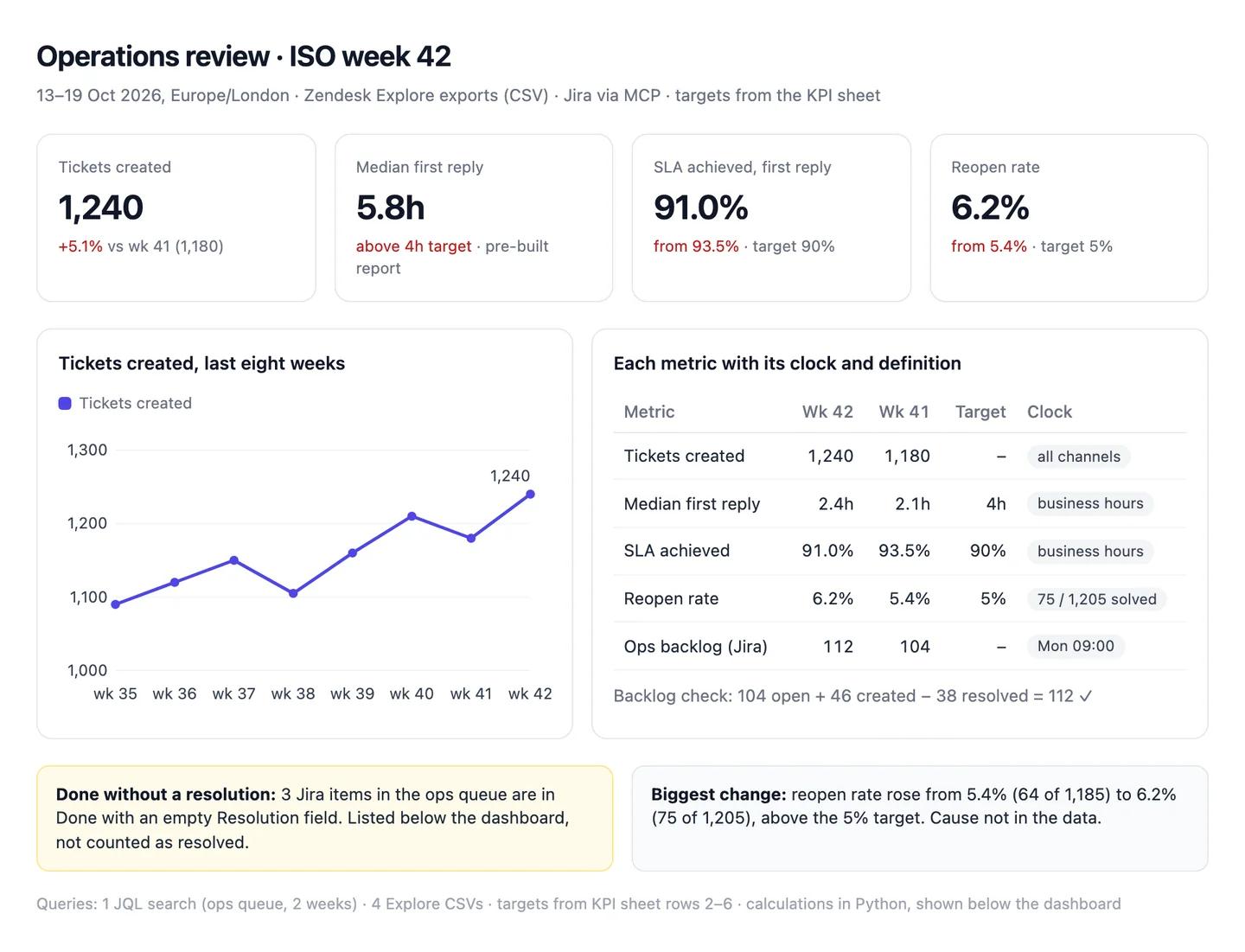
The numbers in this example
| Metric | This week | Last week | Target | Clock and definition |
|---|---|---|---|---|
| Tickets created | 1,240 | 1,180 | Zendesk, all channels | |
| Median first reply | 2.4h | 2.1h | 4h | Business hours, customer-created tickets |
| SLA achieved (first reply) | 91.0% | 93.5% | 90% | Business hours |
| Reopen rate | 6.2% | 5.4% | 5% | 75 of 1,205 solved; 64 of 1,185 |
| Ops backlog (Jira) | 112 | 104 | 104 + 46 created - 38 resolved |
- Done without a resolution: 3 Jira items, listed separately and not counted as resolved.
- Biggest change: reopen rate up from 5.4% to 6.2%, above the 5% target. Cause not in the data.
AI output auditRuns on every answerMedian first reply time was 5.8 hours this week, above the 4-hour target Assumption. Ticket volume rose 5.1% to 1,240, driven by Tuesday's pricing email Assumption. The ops backlog grew from 104 to 112 items Citation.
Assumption
First reply 5.8 hours, missing the target
The tile uses Zendesk's pre-built calendar-hours metric; the target is in business hours, where the median was 2.4 hours, as the table says. Shared as it is, a team that met its SLA looks like it missed by almost two hours.
Assumption
The pricing email caused the rise
Nothing in the ticket data links the rise to the email; Claude inferred it from the timing. Check the ticket tags before it goes in the review, or the next email gets blamed for nothing.
Citation
Backlog 104 to 112
Both counts come from the JQL in the chat, and 104 + 46 created - 38 resolved = 112. Safe to share.
Workflow 2
AI for SOPs: a procedure written from how the work is really done
An SOP drafted from the policy page describes the process someone wished for. This workflow starts from the evidence instead: the current doc in Confluence, the last twenty Jira tickets that ran the process, and the Slack channel where the exceptions get sorted out. Every step carries its source, and where practice and the written process differ, you see both. For SOP tools and templates, see the AI SOP generator guide.
Uses
- Confluence
- Jira
- Slack
Before you run it
- Confluence (or Notion), Jira and Slack connected (setup step 2)
- The process name, the existing doc's URL, and the JQL or label that finds tickets for it
- Your SOP template, uploaded to the project in setup step 1
Show the full prompt (23 lines)Hide the prompt
Draft an SOP for [process, e.g. refunds over £500] from how we actually
run it.

1. Read the current process doc at [Confluence or Notion URL]. Quote each
   step it lists.
2. In Jira, run [JQL] for the last [20] completed tickets of this process.
   For each, read the status history and comments, and list the steps
   that really happened, in order, with who did them.
3. In Slack, search [#channel] for the same period for messages about
   this process. Note approvals, hand-offs or workarounds, with links.
4. Write the SOP in our template. Each step gets one source tag: [Doc],
   [Jira: n of 20 tickets], [Slack: link] or [NOT FOUND]. A step tagged
   [NOT FOUND] stays out of the SOP and goes in a list underneath.
5. Owners, deadlines and approval limits only come from a source. If no
   source names an owner, write [OWNER?].
6. Add a section "Where practice differs from the doc": each difference,
   how many of the 20 tickets showed it, and an example link.
7. Don't smooth over exceptions. If 6 of 20 tickets skipped a step, say
   so; don't decide which way is right.
8. Draft in this chat only. Don't create or edit anything in Confluence,
   Jira or Slack.

Show the JQL and the Slack search you ran.
Draft SOP: refunds over £500, from 20 ticketsArtifactExample from sample data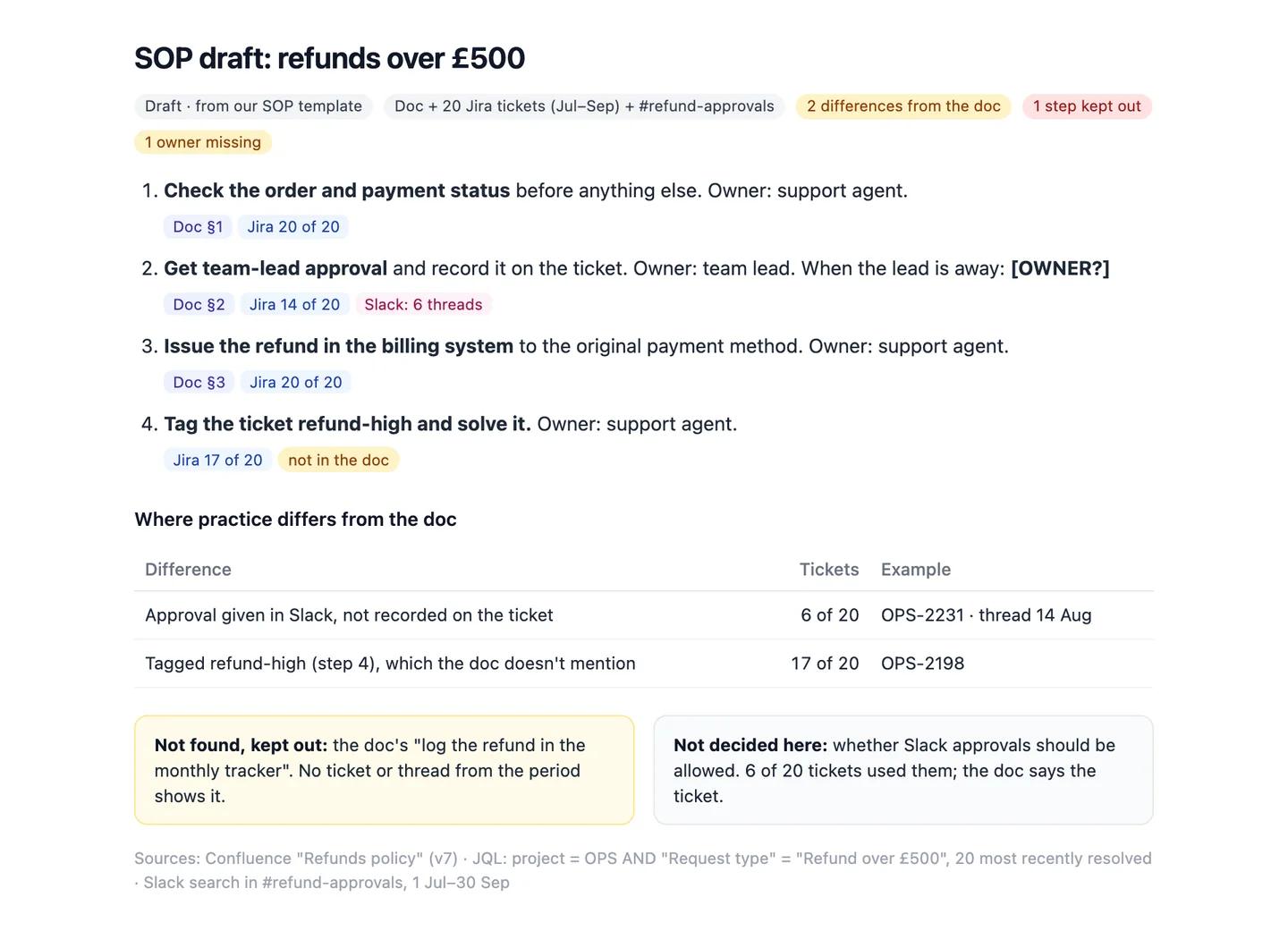
The numbers in this example
| Step | Owner | Source | In practice |
|---|---|---|---|
| 1. Check order and payment status | Support agent | Doc; Jira 20 of 20 | As written |
| 2. Team-lead approval | Team lead | Doc; Jira 14 of 20; Slack | 6 approved in Slack only |
| 3. Issue refund in the billing system | Support agent | Doc; Jira 20 of 20 | As written |
| 4. Tag ticket refund-high and solve | Support agent | Jira 17 of 20 | Not in the doc |
- Not found, kept out: the doc's "log the refund in the monthly tracker". No ticket or thread from the period shows it.
- Owner missing: who approves when the team lead is away. Written as [OWNER?].
AI output auditRuns on every answerRefunds over £500 need team-lead approval, which in practice is given in the #refund-approvals Slack channel Assumption. Finance then confirms each refund within 24 hours Hallucination. In 6 of the last 20 tickets Citation, approval was recorded only in Slack.
Hallucination
Finance confirms refunds within 24 hours
No doc, ticket or thread mentions a 24-hour finance step. Put it in the SOP and agents will wait a day for a confirmation that never comes.
Assumption
Approvals happen in #refund-approvals
Claude searched one channel. Approvals in direct messages or another channel are invisible to it, so the SOP may name the wrong place to look.
Citation
6 of 20 tickets approved only in Slack
Counted from the 20 tickets the JQL returned, each linked in the draft. Safe to use.
Workflow 3
AI for process improvement: where work waits, from Jira status history
Everyone has a theory about where a process gets stuck. Jira's status history has the answer: how long every item sat in every status. Claude pulls that history for a quarter, works out time in each stage from the items themselves, and shows where the waiting is. It's the first map a process-mining tool would draw, without buying one. More in AI for process improvement.
Uses
- Jira
- Asana
- Google Sheets
Before you run it
- Jira (or Asana) connected, with the project and issue type for the process
- The statuses in order, and which one starts cycle time (from the project instructions)
- A quarter's worth of completed items: 50 or more gives medians worth reading
Show the full prompt (22 lines)Hide the prompt
Find where [process, e.g. vendor onboarding] waits, using Jira status
history for [Q3].

1. Run [JQL] for items in [project] resolved in the period. Page
   through all results; report how many you retrieved and confirm none
   were left. List Done items with an empty resolution separately.
2. For each item, read the status changes and compute days in each
   status, in calendar days. Keep items that skipped a status.
3. For each status, give the median days, the 85th percentile, and the
   number of items that spent more than [5] days there.
4. Compute each item's end-to-end time from [first In progress] to
   [Done], then the median of those. Don't add the stage medians
   together; they don't sum to the end-to-end median.
5. Find items that went backwards (for example, Legal review back to
   Security review) and count them.
6. Build one table: status, median days, 85th percentile, items over
   [5] days. Then a dashboard: a bar chart of median and 85th percentile
   by status, a tile for the end-to-end median and one for item count.
7. Name the slowest stage with its numbers. Don't propose a cause or a
   fix unless a comment in the tickets states it; quote the comment.

Show the JQL and the code for every calculation.
Vendor onboarding, Q3: time in each status, 64 itemsArtifactExample from sample data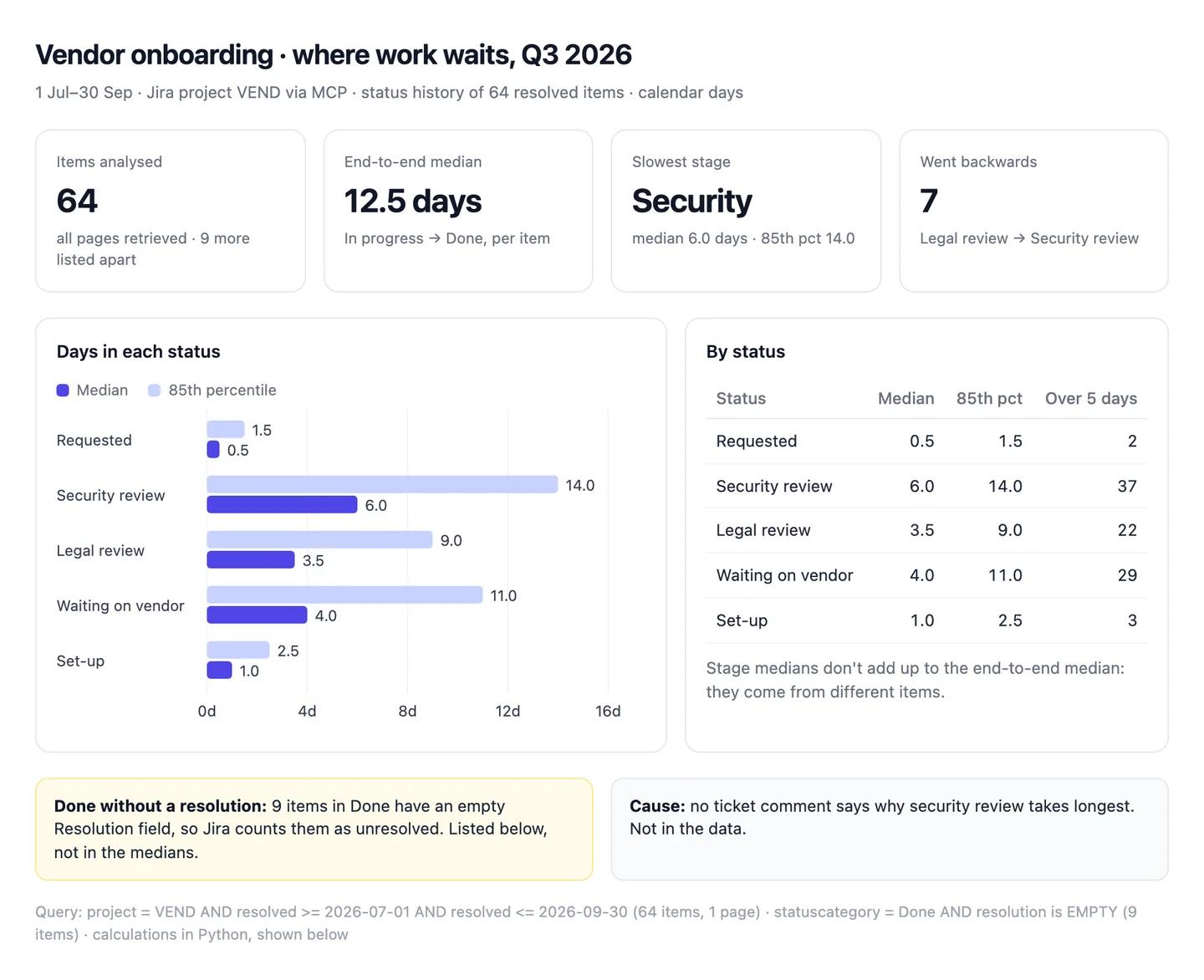
The numbers in this example
| Status | Median days | 85th percentile | Items over 5 days |
|---|---|---|---|
| Requested | 0.5 | 1.5 | 2 |
| Security review | 6.0 | 14.0 | 37 |
| Legal review | 3.5 | 9.0 | 22 |
| Waiting on vendor | 4.0 | 11.0 | 29 |
| Set-up | 1.0 | 2.5 | 3 |
- End-to-end median: 12.5 days, from each item's own start and finish. The stage medians add up to 15.0, which is not the same thing.
- Excluded: 9 items in Done with no resolution, listed separately.
AI output auditRuns on every answerVendor onboarding took a median of 15.0 days Assumption in Q3. Security review is the bottleneck: 37 of 64 items waited there more than five days Citation. A second reviewer would cut cycle time by a third Model knowledge.
Assumption
Median onboarding time 15.0 days
Claude added the five stage medians. The median of each item's own end-to-end time is 12.5 days, the figure on the dashboard. Shared as it is, onboarding looks 20% slower than it is.
Model knowledge
A second reviewer cuts cycle time by a third
A rule of thumb, not your data. Nothing shows security review is slow for lack of reviewers rather than waiting on the vendor's answers. A hiring case built on it has nothing under it.
Citation
37 of 64 items over five days in security review
Counted from the status history of all 64 items the JQL returned. Safe to share.
Workflow 4
AI capacity planning: support staffing for next quarter from ticket volume
Capacity planning is arithmetic on three numbers: how many tickets are coming, how long each takes, and how many productive hours an agent has. Claude is quick at the arithmetic. The risk is the inputs, because a model will fill a missing shrinkage rate or handle time with one it remembers. This workflow takes every input from your files and shows the plan's sensitivity to the one you're least sure of.
Uses
- Zendesk
- Google Sheets
Before you run it
- Twelve months of weekly ticket volume from Zendesk Explore, as CSV
- The roster sheet in Google Sheets: names, contracted hours, planned leave
- Your handle time and shrinkage figures, with where each came from, in the project instructions
Show the full prompt (23 lines)Hide the prompt
Plan support staffing for [Q1 2027].

1. From the attached Zendesk export, take tickets created per ISO week
   for the last 12 months. Report the weeks you got and any missing.
2. Forecast weekly tickets for each month of the quarter: the same
   month last year, times the year-on-year growth of the last full
   quarter. Show the growth calculation.
3. Read handle time and shrinkage from the project instructions. If
   either is missing, stop and ask me. Don't use a benchmark.
4. Productive hours per FTE per week = contracted hours x (1 -
   shrinkage). Required FTE = weekly tickets x handle time / productive
   hours.
5. From [roster sheet], count FTE available each month after planned
   leave. FTE = contracted hours / [37.5].
6. Build one table: month, forecast tickets a week, hours needed,
   required FTE, rostered FTE, gap. Then a dashboard: required against
   rostered FTE by month, and tiles for the largest gap.
7. Show how the largest gap changes if shrinkage is 5 points higher or
   lower, and if handle time is 2 minutes longer or shorter.
8. Don't recommend hiring, overtime or outsourcing. List the gaps; the
   decision is ours.

Show the code for every calculation and the cells you read.
Support capacity, Q1 2027 (18 min handle time, 30% shrinkage)ArtifactExample from sample data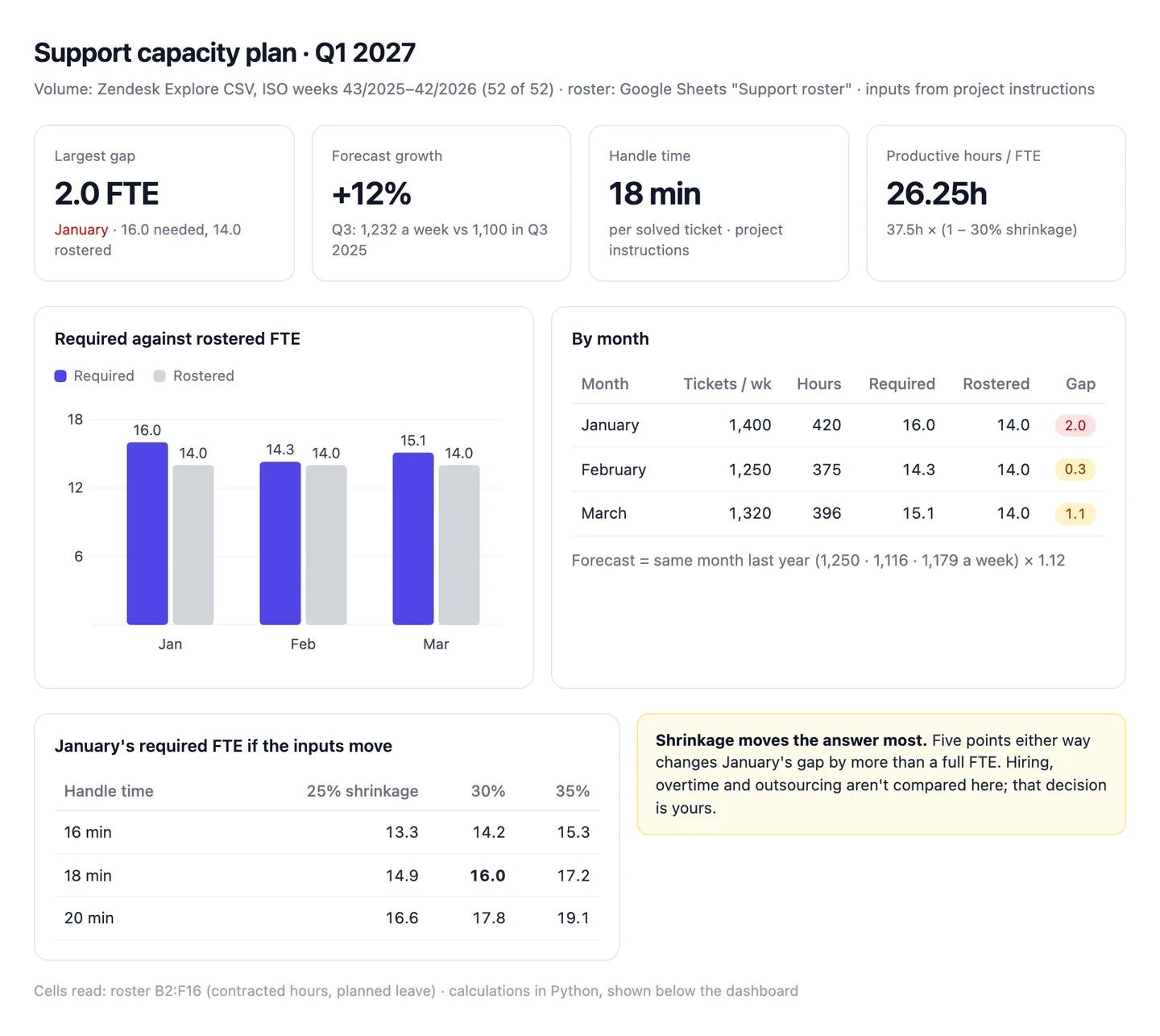
The numbers in this example
| Month | Tickets a week | Hours needed | Required FTE | Rostered FTE | Gap |
|---|---|---|---|---|---|
| January | 1,400 | 420 | 16.0 | 14.0 | 2.0 |
| February | 1,250 | 375 | 14.3 | 14.0 | 0.3 |
| March | 1,320 | 396 | 15.1 | 14.0 | 1.1 |
- Forecast: last year's weekly volume (1,250, 1,116 and 1,179) plus 12% growth, from Q3's 1,232 a week against 1,100 a year earlier.
- Sensitivity: at 35% shrinkage January needs 17.2 FTE, a gap of 3.2.
AI output auditRuns on every answerJanuary needs 16.0 FTE against 14.0 rostered, a gap of 2.0. The forecast uses last January's 1,250 tickets a week Citation plus 12% growth Assumption. Support teams typically run at about 30% shrinkage Model knowledge, so each agent gives 26.25 productive hours a week.
Model knowledge
Shrinkage is about 30%
Not your figure; Claude filled the gap with a benchmark it remembers. If yours is 35% in January, the month needs 17.2 FTE and the gap is 3.2, not 2.0. That's a hire, not a rota change.
Assumption
January grows 12% on last year
Claude applied Q3's year-on-year growth to January. If last January was inflated by a one-off outage, the plan builds the outage in twice.
Citation
Last January averaged 1,250 tickets a week
Read from the Zendesk export, four ISO weeks averaged. Safe to use.
Workflow 5
AI vendor management: renewals and spend from your contracts and invoices
Missed notice periods are the most expensive admin mistake in operations, because most contracts renew for a year. This workflow reads the signed contracts, the vendor register and twelve months of paid invoices, then lists what renews in the next 90 days, when notice is due, and where you're paying more than the contract says. The contract wins every disagreement with the register, and Claude quotes the clause.
Uses
- Google Sheets
 Excel
Excel- Notion
Before you run it
- The vendor register in Google Sheets (or Notion): vendor, owner, renewal date, notice period
- Twelve months of paid invoices from your accounts payable export, as Excel or CSV
- The signed contracts for anything renewing in the next 90 days, as PDFs
Show the full prompt (23 lines)Hide the prompt
Review vendor renewals for the next 90 days, from [today's date].

1. From [vendor register], list every vendor whose renewal date falls in
   the window. Report how many rows the register has.
2. For each, open the attached contract and quote the renewal clause:
   term, renewal date, notice period, how notice must be given, and
   whether it auto-renews. Give the page number.
3. Where the contract and the register disagree, use the contract and
   list the disagreement. If there's no contract, write [NO CONTRACT].
4. Notice deadline = renewal date minus the notice period, in calendar
   days. Mark any deadline already passed as "Notice window closed".
5. From the attached invoice export, total paid in the last 12 months by
   vendor, by payment date, in [currency]. Match vendor names carefully
   and list any you couldn't match.
6. Compare paid with annual contract value. Flag any vendor more than
   [5]% over, with both numbers.
7. Build one table: vendor, annual contract value, paid last 12 months,
   difference, renewal date, notice by, auto-renews. Then a dashboard
   with a timeline of notice deadlines and tiles for value renewing.
8. Don't quote market prices or benchmarks. If I need one, I'll attach
   it.

Show the clauses you quoted and the code for every calculation.
Renewals, 22 October 2026 to 20 January 2027ArtifactExample from sample data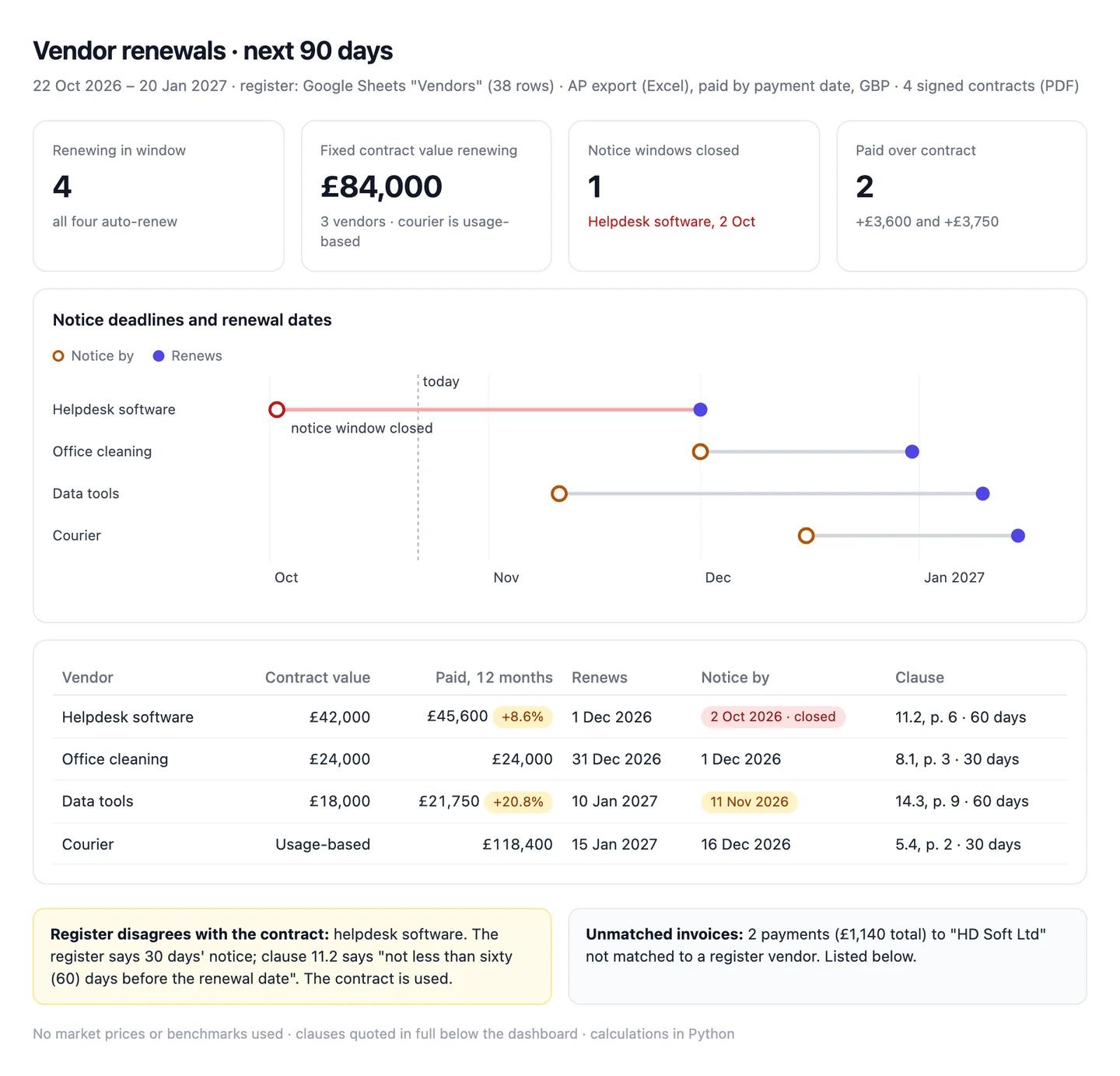
The numbers in this example
| Vendor | Contract value | Paid, 12 months | Renews | Notice by | Auto-renews |
|---|---|---|---|---|---|
| Helpdesk software | £42,000 | £45,600 (+8.6%) | 1 Dec 2026 | 2 Oct 2026, closed | Yes, 60 days |
| Office cleaning | £24,000 | £24,000 | 31 Dec 2026 | 1 Dec 2026 | Yes, 30 days |
| Data tools | £18,000 | £21,750 (+20.8%) | 10 Jan 2027 | 11 Nov 2026 | Yes, 60 days |
| Courier | Usage-based | £118,400 | 15 Jan 2027 | 16 Dec 2026 | Yes, 30 days |
- Fixed contract value renewing: £84,000 across three vendors.
- Register disagrees with contract: helpdesk software. Register says 30 days' notice; the contract (clause 11.2, page 6) says 60.
AI output auditRuns on every answerHelpdesk software renews on 1 December with 30 days' notice, so we have until 1 November Assumption to renegotiate. Data tools was paid £21,750 against an £18,000 contract, 20.8% over Citation. Prices for tools like this have fallen about 15% this year Hallucination, which gives us room to push.
Assumption
Notice for helpdesk software is due 1 November
Claude took the register's 30 days over the contract's 60 (clause 11.2). Notice was due on 2 October and the window has closed. Acting on this, you'd send a cancellation a month late and be locked in for another year.
Hallucination
Market prices fell about 15%
No source in the chat; Claude produced the figure. Quoted to the vendor in a negotiation, it's the first thing they'll ask you to back up.
Citation
Data tools 20.8% over contract
Twelve months of invoices from the AP export against the contract's annual value. Safe to share.
Common pitfalls, team rules and the check before anything ships
Prompts reduce errors; they don't remove them. In a 2026 study of 14 models, the best produced working links more than 94% of the time, yet only 39 to 77% of their claims were accurate (Onweller et al., Cited but Not Verified, May 2026). Ops answers fail the same way. The query runs, the table looks right, and the definition underneath is wrong.
Common pitfalls
- Mixing clocks. A calendar-hours reply time against a business-hours target makes a team that met its SLA look like it missed.
- Adding medians. The median time in each stage doesn't sum to the median end-to-end time. Work from the items.
- Trusting Done. Jira items moved to Done without a resolution vanish from resolved counts.
- SOPs that describe the ideal. A draft built from the policy page alone leaves out the workaround everyone uses, and adds steps nobody does.
- Remembered benchmarks. A shrinkage rate or a "typical" reply time from the model's memory quietly sets your headcount.
- The register over the contract. Notice periods in a spreadsheet drift from the signed version, and missing one costs a year.
Rules for the team
- Definitions live in the project. Change them there, once, not in individual chats.
- No SOP ships until the person who does the work has read it. They'll spot the invented step in a minute.
- Read-only by default. Write access is switched on for a named job, then off again.
- Capacity and vendor numbers get a human owner. A plan that changes headcount or a contract has a name next to it.
- Customer and staff data stay in the Team workspace, never a personal account.
One check before anything leaves operations
Count audits every answer automatically, inside the chat, and it checks more than the numbers. For each claim it asks: did this come from a source, and does the source really say it? Does the reasoning hold, or does a conclusion go further than the data? Was a definition or a formula assumed without saying so? Is a statement from the model's memory rather than anything in the chat? It replies with a canvas where each claim is labelled a citation, an assumption, model knowledge or a hallucination, with the reasoning chain under it. A reply time on the wrong clock, a shrinkage rate remembered from somewhere and an approval step nobody performs all show up for what they are. Each workflow above shows an example.
Questions people ask
How do I use AI for business operations?
Start with one shared assistant connected to the tools you already use, not a new platform. Write your definitions into a Claude project (clocks, statuses, weeks, capacity inputs), connect Jira, Confluence, Notion and Slack, then run the same few workflows each week: the ops review, SOPs, bottlenecks, capacity and vendor renewals.
How much does it cost to set up AI for an operations team?
The Claude side is a subscription: Claude Pro is $20 a month ($17 billed annually), and a Team standard seat is $25 a month or $20 billed annually (claude.com/pricing). The connectors for Jira, Confluence, Asana, Notion and Slack aren't sold separately; you need an account with each tool. Searches across Jira and Confluence through Atlassian's connector use Rovo credits from your Atlassian plan's allowance.
Can Claude connect to Jira, Slack and Zendesk?
Jira and Confluence, yes, through Atlassian's Rovo MCP server. Slack, yes, once a workspace admin approves it. Zendesk announced its own MCP server in May 2026 but hasn't released one that lets Claude read tickets, so export reports from Explore as CSV for now.
Can AI write SOPs?
It drafts them well when it works from evidence: the current doc, recent tickets and the threads where exceptions get handled. From a policy page alone it describes the ideal process. Tag every step with a source and have the person who does the work read it. Tools and templates are in AI SOP generator.
Why does AI give a different first reply time from Zendesk?
Usually a different clock or a different set of tickets. Zendesk stores first reply time in calendar and business hours, its pre-built reports show calendar hours, and agent-created tickets run to the agent's next public comment. Name the clock and the ticket set in your project instructions.
Sources
- Anthropic Help Centre: What are projects? (checked 22 October 2026)
- Anthropic Help Centre: Getting started with custom connectors using remote MCP (checked 22 October 2026)
- Anthropic Help Centre: Use Google Workspace connectors (checked 22 October 2026)
- Anthropic: Claude pricing (checked 22 October 2026)
- Atlassian Support: Getting started with the Atlassian Rovo MCP server (checked 22 October 2026)
- Atlassian Support: Configure Atlassian MCP server permissions (checked 22 October 2026)
- Atlassian Support: How Rovo credits work (checked 22 October 2026)
- Atlassian Support: Best practices on using the Resolution field in Jira Cloud (checked 22 October 2026)
- Asana: Claude + Asana (checked 22 October 2026)
- Notion: Notion MCP (checked 22 October 2026)
- Slack Developer Docs: Connect the Slack MCP server to Claude (checked 22 October 2026)
- Slack Developer Docs: Slack MCP server (checked 22 October 2026)
- Zendesk help: Understanding ticket reply time (checked 22 October 2026)
- Zendesk help: About native Support time duration metrics (checked 22 October 2026)
- Zendesk help: What is the difference between a solved ticket and a closed ticket? (checked 22 October 2026)
- Zendesk help: Exporting dashboard tabs and reports (checked 22 October 2026)
- Zendesk help: Current and upcoming early access programs (checked 22 October 2026)
- Zendesk newsroom: Relate 2026 announcements, Zendesk MCP Server in early access (19 May 2026) (checked 22 October 2026)
- Google Docs Editors Help: WEEKNUM (checked 22 October 2026)
- Google Docs Editors Help: ISOWEEKNUM (checked 22 October 2026)
- OpenAI Developers: Connect a custom MCP server to ChatGPT (checked 22 October 2026)
- OpenAI: ChatGPT pricing (checked 22 October 2026)
- Walters and Wilder: Fabrication and errors in the bibliographic citations generated by ChatGPT, Scientific Reports (September 2023) (checked 22 October 2026)
- Onweller et al.: Cited but Not Verified (May 2026) (checked 22 October 2026)