
AI for data analytics teams
AI for data and analytics · Facts checked 22 October 2026
AI is good at a data team's legwork: drafting SQL, profiling new tables, reviewing dbt models and explaining why a metric moved. It misleads when it picks a definition for you, because every warehouse handles time zones, weeks and division its own way. Give Claude your definitions in a shared project, connect your warehouse and dbt read-only, and check each answer before it ships.
Context first: what Claude has to know about your warehouse
Most wrong AI answers from a warehouse aren't syntax errors. The query runs, returns a tidy number and answers a slightly different question from the one you asked. Every warehouse makes its own choices about time zones, weeks and arithmetic, and an assistant that doesn't know yours picks one silently. Write the differences down once, in the project, and Claude can say which one each figure uses.
| What differs | Why it changes the answer | What to write in the project |
|---|---|---|
| Time zones | A Snowflake session uses America/Los_Angeles unless someone has changed the TIMEZONE parameter (Snowflake docs). BigQuery's CURRENT_DATE uses UTC when no zone is given (BigQuery docs). "Yesterday" can be a different day in each |
"Our reporting time zone is [zone]. Convert timestamps to it before truncating to a date, and say that you did." |
| When a week starts | In BigQuery, WEEK begins on Sunday; ISOWEEK begins on Monday (BigQuery docs). Snowflake's default WEEK_START of 0 uses what it calls "ISO-like semantics" (Snowflake docs). A Sunday's sign-ups can land in different weeks on the same chart |
"Weeks start on [Monday]. Name the week function you used under every weekly table." |
| Integer division | In PostgreSQL, dividing integers "truncates the result towards zero", so 5 / 2 is 2 (PostgreSQL docs). A conversion rate written as conversions / trials comes back as 0 |
"Cast to numeric before dividing, and show the formula." |
| Approximate counts | APPROX_COUNT_DISTINCT returns a HyperLogLog estimate. Snowflake's own example gives 1,007 where the exact count is 1,024 (Snowflake docs) |
"Use exact COUNT(DISTINCT) for any figure that leaves the team. If you approximate, label it." |
| Governed metric or new SQL | Through dbt's MCP server, Claude can ask the Semantic Layer for a metric, and dbt compiles the SQL from the definition your team wrote. Or it can write fresh SQL against tables, which is a new definition every time (dbt docs) | "Use a governed metric where one exists. If you wrote SQL instead, say so at the top of the answer." |
| Dashboard caching | Looker reuses cached query results for an hour by default: persist_for defaults to "1 hour" (Looker docs). A dashboard and a fresh query can disagree with nothing wrong in either |
"When a dashboard and a query disagree, check the dashboard's cache and refresh time first." |
| Stale sources | dbt build "does not include source freshness checks" (dbt docs). Every model can pass while the data behind it stopped loading yesterday |
"Check source freshness before explaining a drop." |
| Capped results | Google's BigQuery MCP server returns at most 3,000 rows per query and cancels queries after three minutes (Google Cloud docs). Totals added up from a capped pull are silently short | "Aggregate in SQL. If a result has exactly the row cap, say it was truncated." |
| Numbers with no source | Ask for a benchmark or a "typical" churn rate with nothing connected and a model will supply one. In one study, 18% of GPT-4's citations were fabricated (Walters and Wilder, Scientific Reports, 2023) | "If a figure isn't in a query result or an attached file, write [NO DATA]." |
The metric definitions themselves are on monthly active users, churn rate and net revenue retention. The project instructions in the setup below turn this table into rules Claude follows.
The stack: Claude and Count in the middle, your tools around it
Most data teams don't need another platform. Claude sits in the middle: a project holds the context above and your metric glossary, and official MCP servers connect it to the warehouse, dbt and the tools where questions arrive. Count sits beside it and checks the answers. You'll only need one warehouse from the map; pick yours.
If your company runs ChatGPT instead.
ChatGPT Business costs the same ($25 a user monthly, $20 annually) and adds custom MCP servers from its plugins page, as long as each server is reachable at a public HTTPS address (OpenAI Developers). Snowflake, BigQuery, Databricks and dbt all host theirs, so the same warehouse setup works there; only the redirect address in each OAuth client changes. The project instructions below paste into a ChatGPT project as they are.
Your tools
 Snowflake
How Claude reaches it
Snowflake's own server, created in your account by an admin
Good to know
SQL is read-only by default. Claude sees whatever the connecting role can see, so give it a role of its own
 BigQuery
How Claude reaches it
Google's hosted server; an admin creates the sign-in and the roles
Good to know
One tool can write, so block it with a deny policy. Results stop at 3,000 rows
 Databricks
How Claude reaches it
Databricks' managed servers, once an admin sets up the sign-in
Good to know
The SQL server is in beta and runs with your own permissions, writes included. Genie One is generally available
 dbt
dbtHow Claude reaches it
Add your dbt MCP address as a custom connector and sign in
Good to know
Sign-in is in beta on Starter, Enterprise and Enterprise+. It can't run dbt commands but can start and cancel jobs
 Looker
How Claude reaches it
Looker's managed server, in preview; a Looker admin switches tools on and registers Claude
Good to know
Every tool starts off, and each is marked read or write. Claude gets the Looker access of whoever signs in
 GitHub
How Claude reaches it
Claude's GitHub integration: sign in and add the dbt repository to the project
Good to know
Syncs files from one branch, not pull requests or history, so paste a pull request's diff into the chat
 Slack
SlackHow Claude reaches it
Sign in from Claude's connector settings; a Slack admin may need to approve it
Good to know
Can also send messages and edit canvases, so approve each change
 PostgreSQL
How Claude reaches it
Export a query result as CSV and upload it to the chat
Good to know
No official MCP server. The old reference server has a published SQL-injection flaw; our Postgres MCP guide covers the community option
 ClaudeData team project
 Count
CountHow Claude reaches it
Count's MCP server, added to Claude by the Count desktop app
Good to know
Audits every answer automatically, claim by claim: what came from a source, what was assumed, what was a guess. What Count is
See which claims rest on an assumption
Count audits every answer Claude gives you, automatically. Each claim gets a label and a reasoning chain, so a definition Claude chose for you, a join that double counts, or a cause the data doesn't support shows up before a stakeholder finds it.
Which Claude surface for which data job, and why dbt work belongs in Claude Code
A stakeholder messages at 4pm: trial conversions fell last week, why? The same afternoon an analytics engineer needs a new dbt model for it, finance sends a spreadsheet that disagrees with the warehouse, and someone wants three charts for tomorrow's meeting. Four jobs. Claude has a different surface for each, and picking the wrong one is the commonest reason a data team decides Claude "isn't good with data".
| Job | Claude surface | Why this one | Plan |
|---|---|---|---|
| Answer a business question from the warehouse | Chat, inside a project with read-only connectors | The project holds your definitions; official MCP servers run the queries | Pro, Max, Team, Enterprise |
| Write or change dbt models and SQL files | Claude Code, in your repo | It "reads your codebase, edits files, runs commands" in the terminal, your IDE or the browser | Pro, Max, Team, Enterprise |
| Work on a workbook someone sent you | Claude for Excel | Answers "with cell-level citations"; generally available | Pro, Max, Team, Enterprise |
| A few charts for a meeting | Claude Dashboards (beta) | Writes a SQL query per chart and shows it, with the last refresh time | Pro, Max, Team, Enterprise |
| Analyse a CSV export | Chat with code execution | Runs Python on the file; see Claude data analysis | All plans |
| Read up on a method or a vendor's docs | Research | Multi-step search with citations; it can call connector tools without asking | Paid plans |
Sources: claude.com/pricing, the Claude Code docs, Anthropic's Excel and Dashboards help pages, all checked 22 October 2026. Free has no Claude Code, Research, Dashboards or Microsoft 365 add-ins, so a data team needs Pro at least, and Team once more than one person shares projects and connectors.
Our default: analysts live in a project, analytics engineers live in Claude Code, and everyone uses the Excel add-in when a spreadsheet arrives. Dashboards is the newest piece and the least proven. Anthropic itself calls it "made for quick questions about your data", which is the right way to use it.
SQL and dbt work belongs in Claude Code
Ask Claude in a chat to "write a model for weekly active customers" and you get SQL in a code block, cut off from your sources, macros, tests and naming rules. Ask Claude Code the same thing from inside the dbt repo and it reads models/, finds the staging model you already have, follows your conventions and writes the file where it belongs. That difference is most of the case for using it.
What Anthropic's docs say it does, and the parts that matter for data work:
- It works in the repo. Claude Code "reads your codebase, edits files, runs commands, and integrates with your development tools". It runs in the terminal, in VS Code and JetBrains, and on the web at claude.ai/code.
- It asks first, by default. In Manual mode it asks before editing a file or running a shell command, apart from a built-in set of read-only commands such as
ls,catandgrep. Plan mode goes further: Claude "reads files and runs read-only shell commands to explore but doesn't edit your source files". Use Plan mode for the first pass on any model you care about. - It reads a
CLAUDE.mdevery session. Put your SQL style, layer conventions and test rules in./CLAUDE.mdat the repo root;/initdrafts one from the codebase. Anthropic suggests keeping it under 200 lines, and warns that Claude treats it "as context, not enforced configuration". A rule written there is a request, not a lock. - It takes MCP servers too.
claude mcp add --transport http <name> <url>adds a remote server;--scope projectwrites it to.mcp.jsonso the whole team shares it, and Claude Code asks for approval before using a project-scoped server.
How good is it at dbt work specifically? The best public evidence is Spider 2.0's dbt track, which asks agents to complete tasks inside real dbt projects. Its best score is 65.6 (Spider 2.0 leaderboard, read October 2026). Impressive, and also one task in three not done. So keep the loop you already trust: Claude Code writes on a branch, you run dbt build against a dev target, and a person reviews the pull request. It's faster at the typing. It isn't a reviewer.
Set it up once: the project, the connectors, the rules
Most of this happens in Claude's settings and takes about half an hour. The warehouse is the exception. Snowflake, BigQuery, Databricks and Looker all want an admin to create the sign-in and a read-only role first, so that step goes to whoever owns the warehouse, and CSV exports cover the gap until it's done. Step 1 gives the project the context from the top of this page, so every workflow below starts from your definitions instead of a guess.
Technical steps for Snowflake, BigQuery, Databricks and Looker (for the admin)
- Snowflake. Create the server with
CREATE MCP SERVERand leaveread_only: trueon anySYSTEM_EXECUTE_SQLtool (the default). It doesn't support dynamic client registration, so create an OAuth security integration withOAUTH_CLIENT_TYPE = 'PUBLIC', redirect URIhttps://claude.ai/api/mcp/auth_callback,OAUTH_USE_SECONDARY_ROLES = NONEandALLOWED_ROLES_LISTset to a role withSELECTonly (Snowflake docs). - BigQuery. The server is at
https://bigquery.googleapis.com/mcp. Grantroles/mcp.toolUser,roles/bigquery.jobUserandroles/bigquery.dataViewer(on reporting datasets only, if you can), create a web OAuth client with the same Claude redirect URI, and add an IAM deny policy on read-write MCP tools soexecute_sqlis blocked (BigQuery MCP docs). - Databricks. Add an app connection with the
ai-gatewayscope and both Claude redirect URLs. Genie One is generally available;system.ai.dbsqlneeds the Unity Gateway beta and runs with the caller's own permissions, so give the Claude groupSELECTonly (Databricks docs). - Looker. The Looker-managed MCP server is in preview for Looker-hosted instances. Every tool is off by default: in Admin > Platform > MCP, switch on the read tools you need, then register Claude as an OAuth client through the API Explorer (Looker docs).
- Then in Claude. A Team Owner adds each server under Organization settings > Connectors, choosing "Use your own OAuth client" where needed; each person then signs in with their own account.
Keep Claude reading, not changing, until you trust it.
Snowflake's SQL tool is read-only by default and BigQuery's write tool can be blocked by policy, but Databricks' SQL server can do whatever the person signing in can do, so the grants are the control. dbt's remote server can't run dbt commands, yet it can start and cancel jobs; switch those tools off in the chat's tools menu if you don't need them. Slack can post and Looker tools can edit content, so approve each change one at a time and never choose "Allow always". Claude's Research mode can use connector tools without asking, so turn off anything that writes before you start a Research run.
Setup walkthrough
About 20 minutes
- 1
Create a shared project and give it the context
You10 minIn Claude, open Projects and create one called "Data team", then share it with the team (how projects work; more in Claude projects). Download the file below: it's the context table from the top of this page plus the rules that go with it. Fill in the parts in brackets and paste it into the project's instructions. Then add the twenty questions from last month's request queue whose answers you already know.
Data team project: context and rulesShow the full prompt (63 lines)Hide the prompt
You work with [Company]'s data team. This file is the context and the
rules for every answer in this project. When you apply a rule, say so.

## Context: how our warehouse counts
Every warehouse makes its own choices. Use this to label figures and write
correct SQL, not to "correct" numbers someone else produced.
- Time zones. Snowflake sessions default to America/Los_Angeles unless
  TIMEZONE is set (ours: [setting]). BigQuery's CURRENT_DATE uses UTC when
  no zone is given. Our reporting time zone is [zone]: convert before
  truncating to a date.
- Weeks. BigQuery's WEEK starts on Sunday, ISOWEEK on Monday. Snowflake's
  WEEK_START defaults to 0 (ISO-like); ours is [setting]. Our weeks start
  on [Monday].
- Division. PostgreSQL truncates integer division (5 / 2 = 2). Cast to
  numeric before dividing, in every warehouse.
- Approximate counts. APPROX_COUNT_DISTINCT is an estimate. Use exact
  COUNT(DISTINCT) for anything that leaves the team.
- Governed metrics. The dbt Semantic Layer holds our definitions. A
  query_metrics result uses them; SQL you write doesn't.
- Dashboards. Looker caches results ([cache policy]; the default is one
  hour). Check cache time before explaining a mismatch.
- Freshness. dbt build doesn't check source freshness. Check it before
  explaining a drop.
- Row caps. The BigQuery MCP server returns at most 3,000 rows. Aggregate
  in SQL.

## Definitions
- Use metric-glossary.md (in this project) for every metric. Quote the
  definition before the number.
- Active user = [event] by a non-internal account within [window].
- Revenue = [MRR / invoiced / recognised], in [currency], from [model].
- Internal and test accounts are flagged by [column]; exclude them.
- Our fiscal year starts on [date].

## Numbers
- Sources, in order: governed metrics (query_metrics), then read-only SQL
  against [database].[schema], then attached files. Never use memory for
  a number about our business. If you have none, write [NO DATA].
- Before any number, state the metric, the time window and zone, the
  filters and the grain.
- Show every query in full under the table it produced.
- Do arithmetic in SQL or code and show it. Never add distinct counts
  across days or segments, and never average ratios.
- After each join, say whether the grain changed.

## Claims
- Don't name a cause the data doesn't show. Write "Cause not in the data".
  Things that happened at the same time (a release, a Slack post) are
  context, labelled as such.
- No benchmarks or "typical" rates unless a source is attached.

## Tools
- Read only. Never run a statement that creates, updates or deletes
  anything, and don't trigger or cancel dbt jobs, post in Slack or edit
  Looker content unless my message asks for that exact change.
- If a result is capped or paged, say how many rows you got and whether
  there were more.

## When you're unsure
- Ask one clarifying question (which "customers", which "quarter") rather
  than choosing a definition yourself.
- Count audits every answer automatically. Keep the queries and files you
  used visible in the chat so it can check each claim against them.
- 2
Let Claude write your metric glossary from your dbt project
You15 minA glossary is the file Claude reads before every number, and it can draft one from the definitions you already have. Add your dbt repository to the project from GitHub (+ > GitHub; how the GitHub integration works), paste the prompt below, and Claude gives you back a markdown file. Read it, settle every line marked UNCLEAR with its owner, then add the file to the project. More on why definitions matter in semantic layers for AI.
Metric glossary from your dbt projectShow the full prompt (22 lines)Hide the prompt
Read our dbt project (attached from GitHub) and write a metric glossary I can upload to this project. 1. Open every semantic model and metric definition, and every schema.yml under models/marts. List each file you read. 2. For each metric, write: - Name, and the one-sentence description from the YAML if there is one. - The formula in plain words: what is counted or summed, from which model, and any filters (for example, excludes internal accounts). - Grain and time column: one row per what, and which date it uses. - Owner, if the YAML names one. 3. Quote the YAML for each definition. Don't fill gaps from the column names: if the meaning isn't clear from the code, write "UNCLEAR: ask [owner]". 4. List metrics that look like the same thing defined twice (two kinds of "active user", two revenue models), with both definitions. 5. List the twenty marts models people query most often, if the project shows it, with their grain. 6. Write it all as one markdown file called metric-glossary.md, under 400 lines, so I can download it and add it to the project's files. Use only files from the repository. Mark anything you inferred. - 3
Connect the tools that sign in from Claude
You2 min eachOpen Customize > Connectors. Slack is in the directory: pick it and sign in. For dbt, copy your MCP address from Account settings > Access URLs in dbt, add it as a custom connector and sign in (dbt's remote MCP guide). On a Team plan, an Owner adds custom connectors for the company first (connectors guide), and a Slack admin may need to approve the connection. Tap a tool on the map above for its own guide.
- 4
Connect Count
You2 minDownload the Count desktop app and follow its walkthrough; it adds Count to Claude for you. After that, Count audits every answer automatically, without leaving the chat. What Count is.
- 5
Connect your warehouse and BI tool
Warehouse or Looker adminAbout an hourThe warehouse servers are official and hosted, but each needs an admin to create a sign-in for Claude and a role that can only read. Send whoever owns yours the technical steps below; once they're done, it connects like any other tool. Until then, export query results as CSV and upload them to the chat. Our guides to Snowflake MCP, BigQuery MCP and Databricks MCP go step by step.
- 6
Try it on a week you already reported
You15 minRun the KPI workflow on last week and compare it with the numbers you actually sent, then ask five of your twenty test questions. If an answer differs, the difference is usually a definition to add to the glossary or the project instructions.
Workflow 1
AI for root cause analysis: why a metric moved, with the query behind each driver
The question that fills a data team's week: why did this number go down? Claude splits the change into mix (the segments shifted) and rate (a segment got better or worse), runs a query for each piece, and checks that the pieces add back up to the total. What it won't do, if the project rules hold, is name a cause the data doesn't show. More prompt patterns in prompts for data analysis.
Uses
- Snowflake
- dbt
- Slack
Before you run it
- Your warehouse and dbt connected (setup steps 3 and 5), or the metric's daily table as a CSV
- The metric's definition from the glossary, and the two periods to compare
- Slack connected, if you want releases and incidents from the same weeks listed as context
Show the full prompt (22 lines)Hide the prompt
Explain why [metric] moved from [period A] to [period B].

1. Use the governed metric from the dbt Semantic Layer if there is one.
   Quote its definition and the filters it applies. If there isn't one,
   say so, then write the SQL and show it.
2. Confirm source freshness for the models behind it. If any source is
   late, stop and tell me before analysing anything.
3. Split the metric by [dimensions, e.g. channel, plan, region]. For each
   segment and period give the count, the rate and the share of the total.
4. Decompose the change into a mix effect (segment shares moved) and a
   rate effect (rates within segments moved), per segment. Show the
   formula and do the arithmetic in SQL or code.
5. Check that mix plus rate equals the total change. If it doesn't,
   say by how much and why.
6. Rank the drivers by size, with the numbers for both periods.
7. Search Slack for releases, incidents or campaign launches in
   [channels] during [period B]. List them under "Context", with the
   message link and date. Don't connect them to a driver.
8. Show every query you ran, in order.

Don't explain why a segment moved unless the data shows it. Write
"Cause not in the data" instead.
Trial-to-paid conversion, August against SeptemberArtifactExample from sample data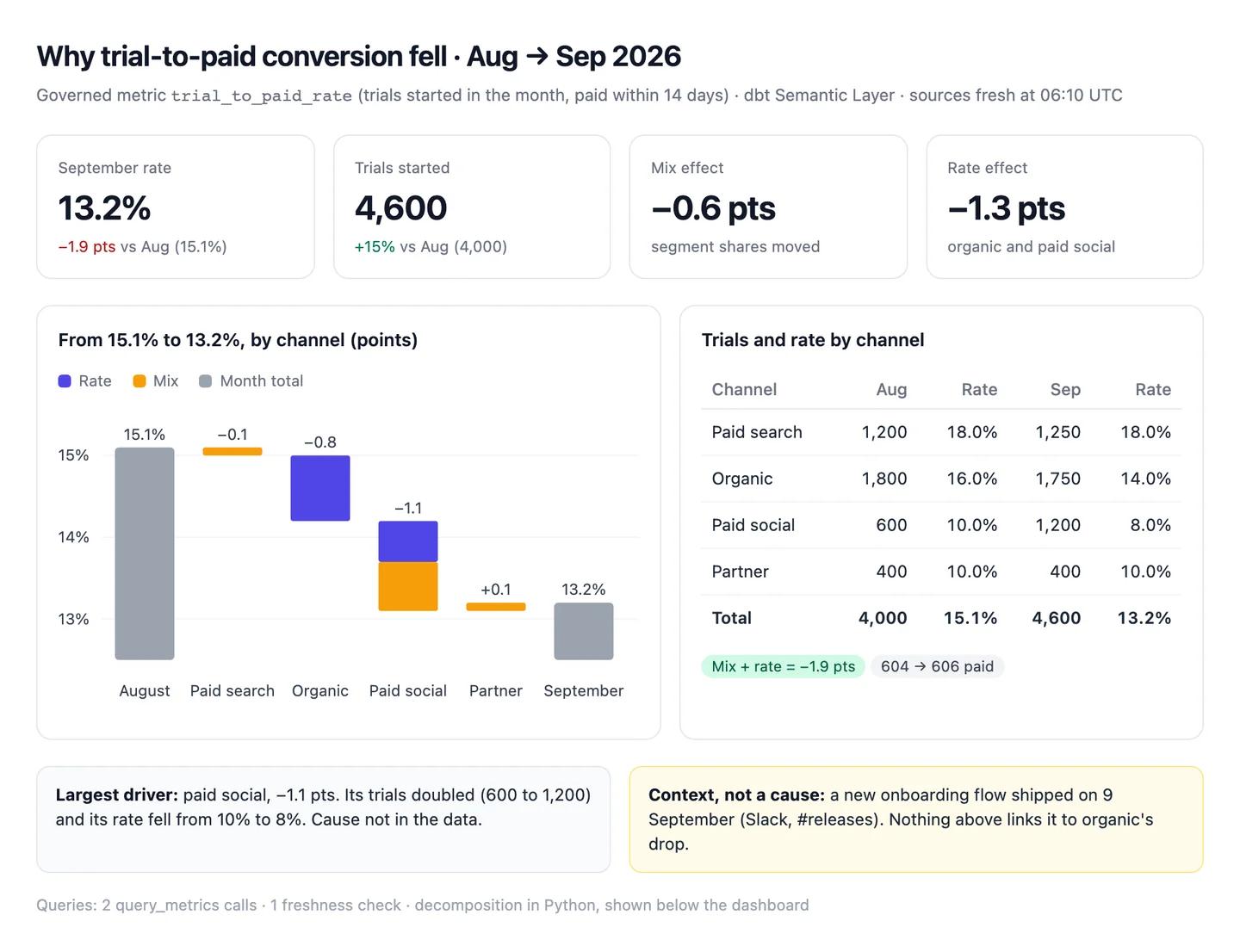
The numbers in this example
| Channel | Aug trials | Aug rate | Sep trials | Sep rate | Effect on total |
|---|---|---|---|---|---|
| Paid search | 1,200 | 18.0% | 1,250 | 18.0% | −0.1 pts, mix |
| Organic | 1,800 | 16.0% | 1,750 | 14.0% | −0.8 pts, mostly rate |
| Paid social | 600 | 10.0% | 1,200 | 8.0% | −1.1 pts: rate −0.5, mix −0.6 |
| Partner | 400 | 10.0% | 400 | 10.0% | +0.1 pts, mix |
| Total | 4,000 | 15.1% | 4,600 | 13.2% | −1.9 pts |
- Mix: −0.6 pts. Paid social doubled its trials and converts below average.
- Rate: −1.3 pts, from organic (16.0% to 14.0%) and paid social (10.0% to 8.0%).
- Context, not a cause: a new onboarding flow shipped on 9 September (Slack, #releases).
AI output auditRuns on every answerTrial-to-paid conversion fell from 15.1% in August to 13.2% in September Citation. A third of the drop is mix: paid social doubled its trials. Organic fell from 16% to 14% because the new onboarding flow shipped on 9 September Assumption, and some of the rest is the usual September dip Model knowledge.
Assumption
The onboarding flow caused organic's drop
The Slack post shows when the flow shipped; nothing in the data links it to organic conversion. Shared as a cause, the product team may roll back a change that didn't do it. Test it by splitting organic trials before and after 9 September.
Model knowledge
Conversion usually dips in September
No query looked at previous Septembers. It's the model's general expectation, and it explains away part of a drop nobody has checked.
Citation
Conversion fell from 15.1% to 13.2%
604 of 4,000 and 606 of 4,600, both from the governed metric. Safe to share.
Workflow 2
AI for data quality: a profile and a dbt test plan for a new source
A new source lands and someone has to find out what's actually in it before it feeds a dashboard. Claude profiles the table with queries (row counts, null rates, duplicate keys, date ranges, load gaps) and turns each finding into a dbt test you can add. The checks are queries, so each result traces to SQL you can rerun.
Uses
- Snowflake
- BigQuery
- dbt
Before you run it
- Read-only access to the new source's schema through your warehouse connector
- What the table should be, in a sentence: "one row per invoice, loaded hourly from billing"
- The dbt project in the Claude project (setup step 2), so the tests match your conventions
Show the full prompt (22 lines)Hide the prompt
Profile [database].[schema].[table] and propose dbt tests for it.
What it should be: [one row per X, loaded how often, from where].

1. Row count, and the min and max of every date or timestamp column,
   in our reporting time zone.
2. Rows loaded per day for the last 30 days. Flag any day below half
   the median.
3. For every column: null count and rate, distinct count, and the five
   most common values for text columns. Use exact counts, not APPROX_.
4. Check the expected key: total rows against distinct keys. If they
   differ, list ten example keys that repeat and how many times.
5. Check each foreign key against its parent model in our dbt project
   and count rows with no match.
6. Flag rows that look like test data, and say exactly what rule you
   used to flag them. Don't drop anything.
7. Turn each finding into a dbt test (unique, not_null,
   accepted_values, relationships, source freshness), with the YAML,
   and say whether it would pass today.
8. Show every query under the result it produced.

Don't compare the table with another system unless you queried it in
this chat.
Profile of raw_billing.invoices, 22 OctoberArtifactExample from sample data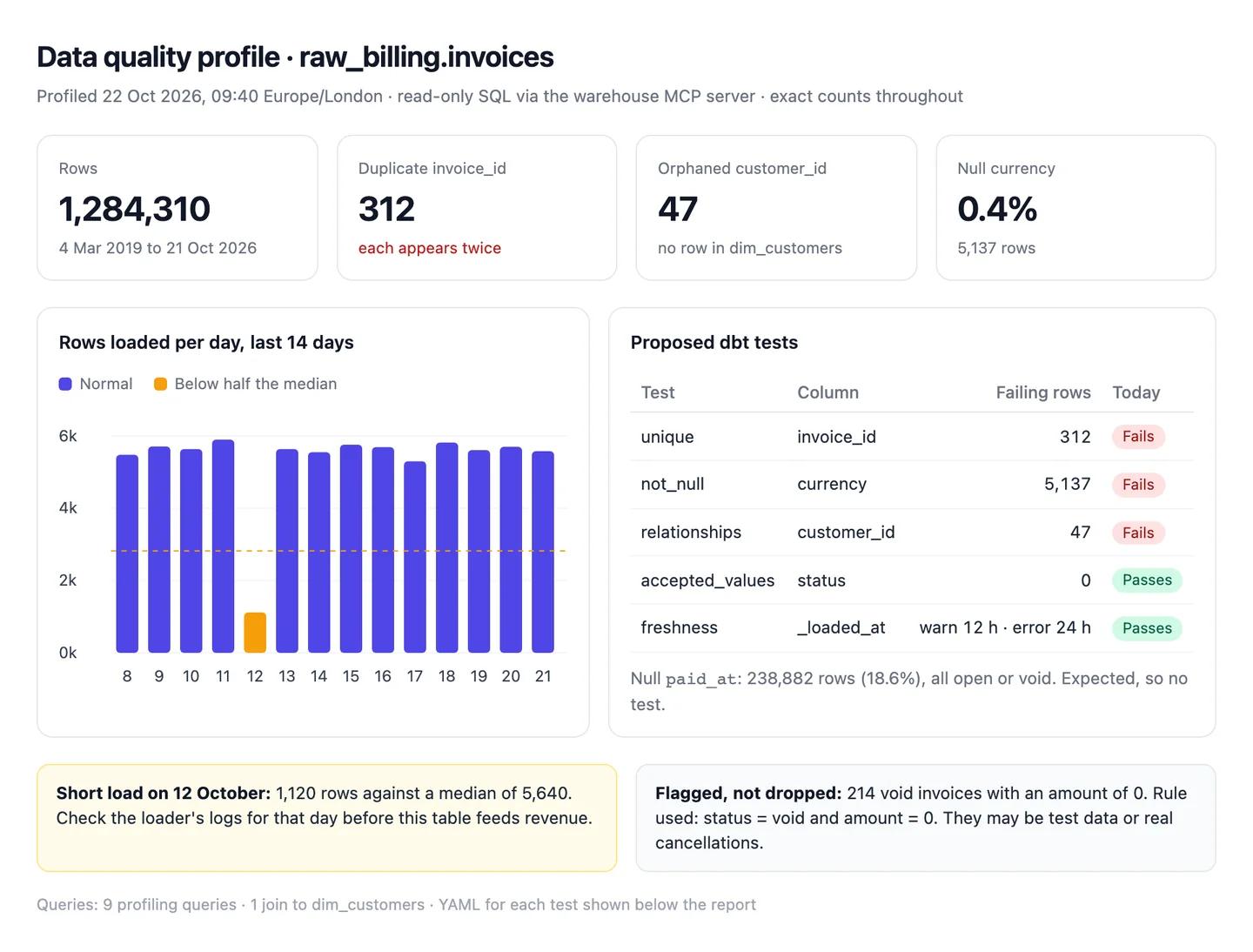
The numbers in this example
| Check | Result | Proposed dbt test | Today |
|---|---|---|---|
Unique invoice_id |
1,284,310 rows, 1,283,998 distinct: 312 keys appear twice | unique |
Fails |
Null currency |
5,137 rows (0.4%) | not_null |
Fails |
Null paid_at |
238,882 rows (18.6%), all status open or void | None: expected | |
customer_id without a customer |
47 rows | relationships to dim_customers |
Fails |
status values |
draft, open, paid, void, uncollectible | accepted_values |
Passes |
| Daily loads | 12 October: 1,120 rows against a median of 5,640 | Source freshness, warn 12 h, error 24 h | Passes now |
- Not dropped: 214 void invoices with an amount of 0, flagged as possible test data by that rule only.
AI output auditRuns on every answerThe table holds 1,284,310 invoices, matching the billing system's own count Hallucination. 312 invoice_id values appear twice Citation. The 214 void invoices with an amount of 0 are test records and can be filtered out Assumption.
Hallucination
The row count matches the billing system
Claude never queried the billing system; there's no count to match. Signed off on this line, a missing day of invoices goes unnoticed until finance finds it.
Assumption
Zero-value void invoices are test records
A rule Claude chose, not something the data says. Some may be real cancelled orders, and filtering them changes void-rate reporting.
Citation
312 duplicate invoice IDs
1,284,310 rows against 1,283,998 distinct keys, from the query shown. Safe to act on.
Workflow 3
AI for SQL: queries that start from your dbt definitions
Claude writes SQL quickly, and on a schema it hasn't seen it will choose join keys and filters that run but answer a different question. This workflow makes it look for a governed metric first, write SQL only for what the metric can't answer, and reconcile the two when both exist. Why that order matters is in text-to-SQL and dbt MCP.
Uses
- dbt
- BigQuery
Before you run it
- dbt connected through its remote MCP server, with the Semantic Layer set up
- Your warehouse connected read-only, for anything the metrics don't cover
- The question in one sentence, with the period and the split you want
Show the full prompt (20 lines)Hide the prompt
Answer: [question, e.g. monthly active users by plan for September].

1. Call list_metrics and look for a governed metric that answers this.
   If you find one, quote its definition and dimensions, then use
   query_metrics. Give the result and stop at step 5.
2. If there's no governed metric, say so. List the tables and columns
   you plan to use, the join keys, and the grain of each table (one row
   per what) before writing anything.
3. Write the query. After every join, check whether the row count or
   the count of distinct keys changed, and say why.
4. Run it and give the result with the definition you used in brackets.
5. If a governed metric exists and I ask for a split it doesn't support,
   write SQL for the split and reconcile its total with the metric.
   List every difference (filters, internal accounts, joins, time zone)
   and the number of rows each explains, until the gap is zero or you
   say what's left.
6. Show every query and tool call in full.

Never invent a definition. If the question is ambiguous (which users,
which month), ask before querying.
Monthly active users by plan, SeptemberArtifactExample from sample data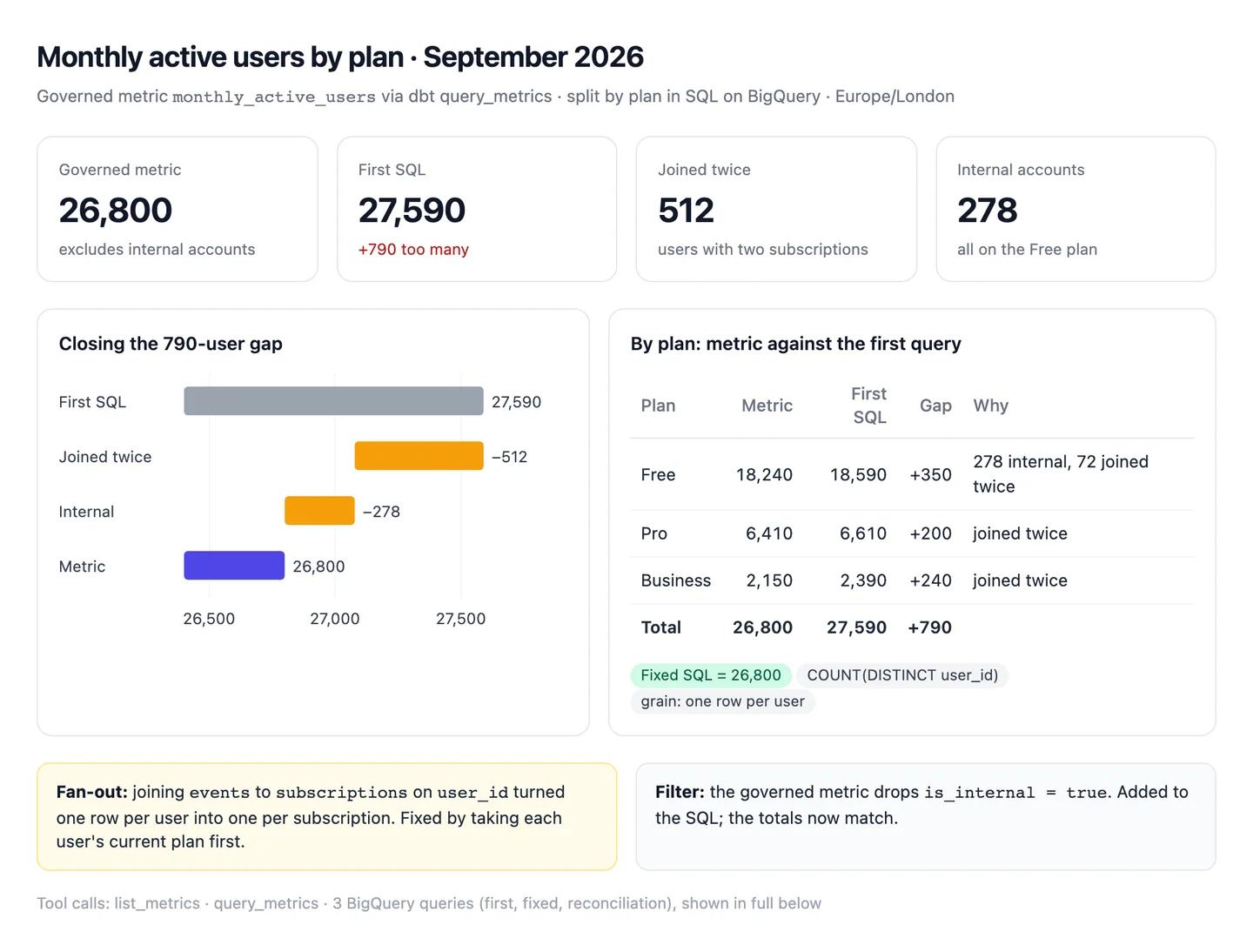
The numbers in this example
| Plan | Governed metric | First SQL | Gap | Explained by |
|---|---|---|---|---|
| Free | 18,240 | 18,590 | +350 | 278 internal accounts, 72 users joined twice |
| Pro | 6,410 | 6,610 | +200 | 200 users joined twice |
| Business | 2,150 | 2,390 | +240 | 240 users joined twice |
| Total | 26,800 | 27,590 | +790 | 278 + 512 |
- Fan-out: the join to
subscriptionscounted 512 users with two subscriptions twice. - Filter: the governed metric excludes internal accounts; the first query didn't.
- Reconciled: both fixes bring the SQL to 26,800, matching the metric.
AI output auditRuns on every answer26,800 users were active in September Citation, from the governed monthly_active_users metric. My first query overcounted by 790 because of the join to subscriptions Assumption. Business users are the most engaged plan Assumption.
Assumption
Business users are the most engaged
A count of active users says nothing about engagement, and Business is the smallest plan here. In a deck, someone will ask for an engagement metric that was never run.
Assumption
The join caused the 790 overcount
The join explains 512 of the 790. The other 278 are internal accounts the metric excludes. Fix only the join and the next query is still wrong.
Citation
26,800 monthly active users
Straight from query_metrics on the governed definition. Safe to share.
Workflow 4
AI for data modelling: a dbt model review before the pull request merges
A second reader for every model change: Claude reads the diff, finds what changes the grain, the joins or a metric, checks lineage for what sits downstream, and writes the tests that would catch the problem. Claude's GitHub integration syncs files from a branch but not pull requests, so you paste the diff. The dbt MCP guide covers what the remote server can see.
Uses
- GitHub
- dbt
- Snowflake
Before you run it
- The dbt repository added to the project from GitHub (setup step 2), synced to the main branch
- The pull request's diff, pasted or attached (add .diff to the pull request's URL to get it)
- dbt connected, for lineage, and the warehouse, if you want row counts from the dev build
Show the full prompt (21 lines)Hide the prompt
Review this dbt change before it merges. The diff is attached; the
main branch is in the project.

1. Summarise what the change does in three sentences.
2. For each changed model, state the grain before and after (one row
   per what). Quote the lines that change it.
3. List joins that could duplicate or drop rows, filters that drop
   nulls, and changed column types or names. Give the file and line
   for each, and why it matters.
4. Use get_lineage to list every downstream model, metric and exposure.
   For each, say whether this change alters its numbers.
5. If I've built the branch in dev ([dev schema]), compare row counts
   and the sum of [key measure] between dev and prod for each changed
   model. Show the queries.
6. Check schema.yml for the tests that cover each changed model. Quote
   them. Don't say a test exists unless you can quote it.
7. Propose the tests that would catch each risk, as YAML.
8. Rate the change: safe to merge, merge after fixes, or needs a
   rethink, with the reason in one line.

Don't rewrite the model. Don't comment on style unless it hides a bug.
Review of a change to fct_ordersArtifactExample from sample data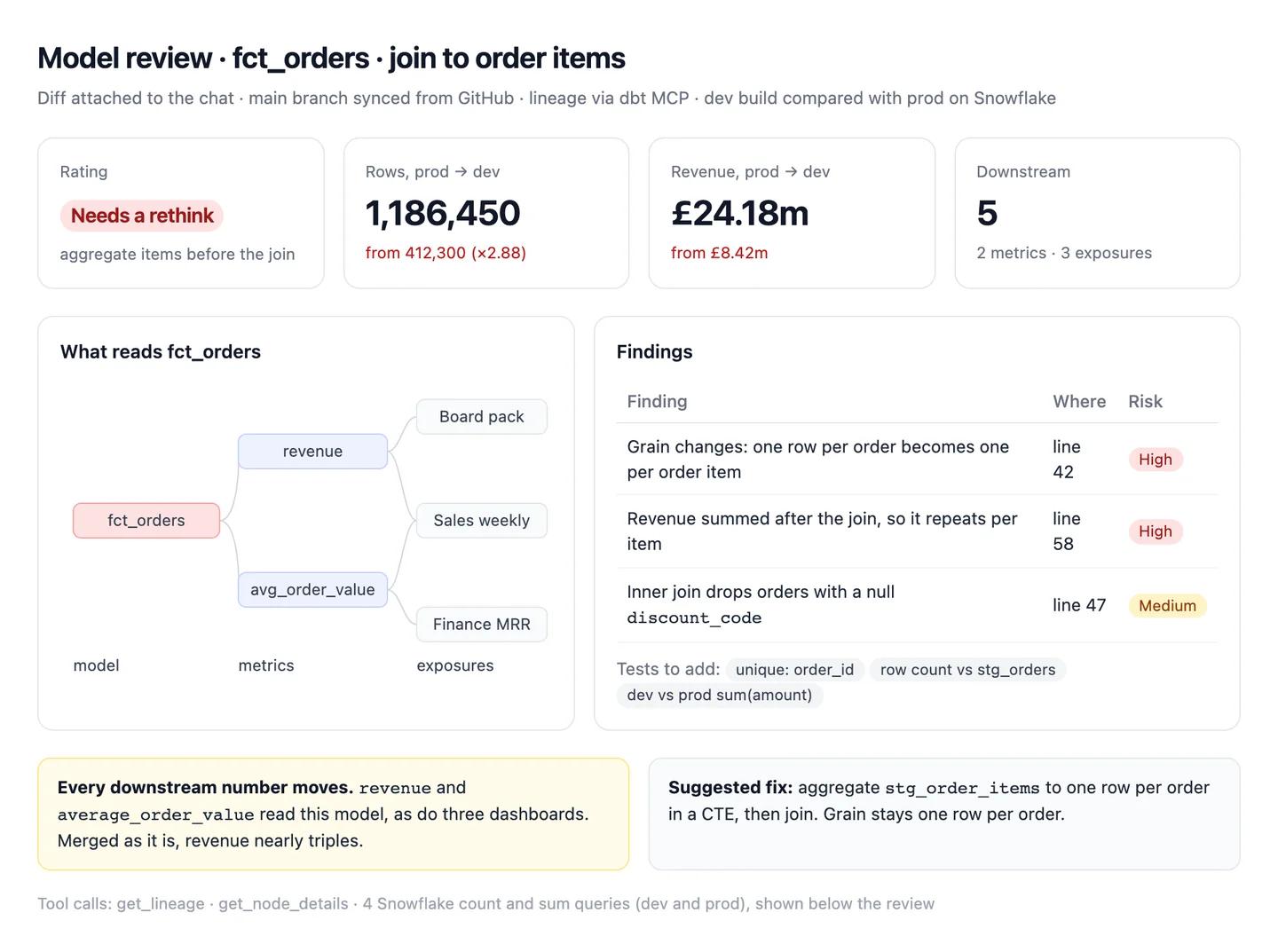
The numbers in this example
| Finding | Where | Risk | Test to add |
|---|---|---|---|
| Grain changes from one row per order to one per order item | fct_orders.sql, line 42: join to stg_order_items |
High | unique on order_id |
| Revenue summed after the join, so it repeats per item | Line 58 | High | Dev against prod sum of amount |
discount_code nulls dropped by an inner join |
Line 47 | Medium | Row count check against stg_orders |
- Dev against prod: 412,300 rows became 1,186,450; revenue went from £8,420,000 to £24,180,000.
- Downstream: 2 metrics (
revenue,average_order_value) and 3 exposures readfct_orders. - Rating: needs a rethink. Aggregate the items before the join.
AI output auditRuns on every answerThe join on line 42 changes fct_orders from one row per order to one row per order item, since order_items has one row per product Assumption. The existing unique test on order_id would catch this in CI Hallucination. Row count rises from 412,300 to 1,186,450 in dev Citation.
Hallucination
A unique test on order_id already exists
There's no such test in schema.yml; Claude expected one. Believe it and the change merges, and revenue on three dashboards nearly triples overnight.
Assumption
order_items is one row per product per order
Read from the model's name, not its SQL. If it's one row per unit, the fan-out is worse than the review says.
Citation
Rows rise from 412,300 to 1,186,450
Two count queries against dev and prod, both shown. Safe to put in the pull request.
Workflow 5
AI for KPI dashboards: a weekly metrics pack that traces to the warehouse
The pack that goes to leadership every Monday. Claude pulls each KPI from the governed metric, compares it with the week before, builds the dashboard as an artifact and drafts the Slack post, with the query under every tile. It's also where the most visible mistakes happen, because a tile shows one number with no working beside it. More on building them in AI dashboards.
Uses
- Snowflake
- dbt
- Slack
Before you run it
- dbt and your warehouse connected, with the KPIs defined as governed metrics where possible
- Last week's pack attached, so Claude matches the layout and the metric list
- Slack connected, to draft the post (Claude drafts; you send)
Show the full prompt (24 lines)Hide the prompt
Build this week's KPI dashboard for [week, Monday to Sunday] in
our reporting time zone.

KPIs: weekly active users, new trials, MRR, logo churn rate.

1. Pull each KPI from the governed metric with query_metrics. Quote each
   definition once. If a KPI has no governed metric, write the SQL,
   show it, and mark the tile "SQL, not governed".
2. Weekly active users is a distinct count over the whole week. Never
   add daily counts together.
3. For each KPI give this week, last week, the change and the 8-week
   trend. Do the arithmetic in code and show it.
4. Check source freshness for every model behind the KPIs. If anything
   is late, put a banner at the top and don't publish the pack.
5. Build it as an artifact: one tile per KPI with the definition under
   the number, the 8-week chart, and a table with the same figures as
   the tiles.
6. Check that every tile matches its row in the table. List any that
   don't.
7. Draft a five-line Slack post for [channel] with the four numbers and
   the biggest change. Don't send it.
8. Show every query and tool call.

No benchmarks, and no causes unless the data shows them.
KPIs, week to 19 October (Europe/London)ArtifactExample from sample data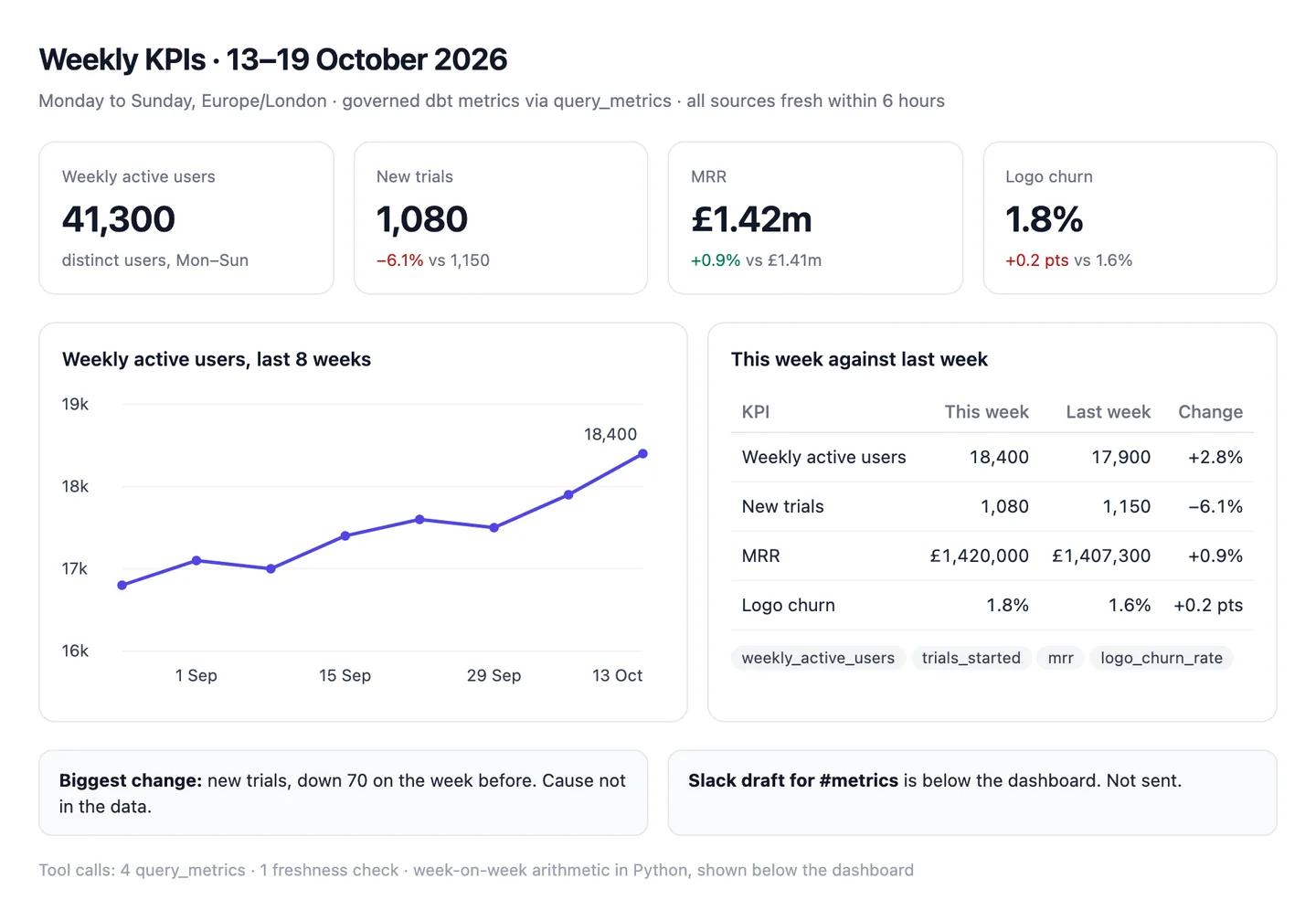
The numbers in this example
| KPI | This week | Last week | Change | Source |
|---|---|---|---|---|
| Weekly active users | 18,400 | 17,900 | +2.8% | weekly_active_users metric |
| New trials | 1,080 | 1,150 | −6.1% | trials_started metric |
| MRR | £1,420,000 | £1,407,300 | +0.9% | mrr metric |
| Logo churn | 1.8% | 1.6% | +0.2 pts | logo_churn_rate metric |
- Freshness: all sources loaded within 6 hours of the week's end.
- Biggest change: new trials, down 70 on the week before. Cause not in the data.
AI output auditRuns on every answerWeekly active users reached 41,300 Assumption in the week to 19 October. Average daily users were 32% of weekly users, healthy stickiness for a B2B product Model knowledge. MRR was £1.42m, up 0.9% on the week before Citation.
Assumption
Weekly active users 41,300
Worked out by adding seven daily counts, so anyone active on three days is counted three times. The distinct count in the table is 18,400. Shared as it is, leadership sees more than twice the users you have.
Model knowledge
32% is healthy stickiness for B2B
A benchmark from the model's memory, with no source in the chat. Put it in the pack and it becomes a target nobody chose.
Citation
MRR £1.42m, up 0.9%
£1,420,000 against £1,407,300, both from the governed mrr metric. Safe to share.
Common pitfalls, team rules and the check before anything ships
Prompts reduce errors; they don't remove them. In a 2026 study of 14 models, the best produced working links more than 94% of the time, yet only 39 to 77% of their claims were accurate (Onweller et al., Cited but Not Verified, May 2026). A query that runs is the easy part.
Common pitfalls
- Trusting a query because it ran. Valid SQL that answers a different question is the commonest failure. Read the
FROM, the joins and theWHEREbefore the number. - Joins that fan out. Join users to subscriptions and anyone with two subscriptions is counted twice. Compare the row count before and after each join.
- Adding distinct counts. Seven daily active user counts don't add up to weekly actives. Neither do monthly uniques across plans that people move between.
- Truncating dates in the wrong zone. A timestamp cut to a date in UTC and reported in London time puts late-evening events on the wrong day.
- Summarising a capped pull. A result of exactly 3,000 rows from BigQuery's MCP server means there were more. Aggregate in the warehouse.
- Benchmarks from memory. "Healthy" retention or "typical" stickiness with no source is the model's memory. Treat it as a question, not a fact.
Rules for the team
- No number without a definition. An answer that doesn't say what it counted doesn't get forwarded.
- Governed metric first, SQL second, memory never. It's in the project instructions so nobody has to remember it.
- Read-only by default. Write access is switched on for a named job, then off again.
- The query travels with the number. If Claude wrote SQL, the SQL goes wherever the result goes.
- Keep twenty test questions. Questions from last month's queue with known answers. Rerun them when the model, the glossary or the schema changes.
One check before anything leaves the data team
Count audits every answer automatically, inside the chat, and it checks more than the numbers. For each claim it asks: did this come from a query or a file, and does the result really say it? Does the reasoning hold, or does a conclusion go further than the data? Was a definition, a join or a formula assumed without saying so? Is a statement from the model's memory rather than anything in the chat? It replies with a canvas where each claim is labelled a citation, an assumption, model knowledge or a hallucination, with the reasoning chain under it. A weekly active users tile built by adding daily counts, a cause read into a coincidence and a "healthy" benchmark nobody sourced all show up for what they are. Each workflow above shows an example.
Questions people ask
How do I use AI for data analytics?
Start with one shared assistant connected to the warehouse you already have, not a new platform. Write your definitions into a Claude project, connect dbt and your warehouse read-only, then run the same few workflows each week: explaining why a metric moved, profiling new sources, writing SQL from governed metrics, reviewing dbt changes and building the KPI pack.
How much does it cost to set up AI for a data team?
The Claude side is a subscription: Claude Pro is $20 a month ($17 billed annually), and a Team standard seat is $25 a month or $20 billed annually (claude.com/pricing). The official MCP servers for Snowflake, BigQuery, Databricks and dbt aren't sold separately, but the queries Claude runs use warehouse compute like any other query, and dbt's sign-in route needs a Starter, Enterprise or Enterprise+ account.
Can Claude connect to Snowflake, BigQuery or Databricks?
Yes, through each vendor's own MCP server, added to Claude as a custom connector. Each needs an admin to create an OAuth sign-in first. Snowflake's SQL tool is read-only by default, BigQuery's write tool can be blocked with an IAM deny policy, and Databricks' SQL server runs with the user's own permissions.
Can Claude Code be used for data analysis and dbt?
Yes. Claude Code reads your repository, edits files and runs commands, so it can write dbt models, tests and documentation in place. By default it asks before editing files or running shell commands. Run dbt build against a dev target yourself and review the pull request as you would any other.
Is Claude good at SQL?
It writes syntactically good SQL quickly. The risk is SQL that runs and answers a slightly different question: the wrong join key, date column or filter. Ask it to state the grain and join keys before it writes the query, and see text to SQL for the benchmarks.
Which Claude plan do I need for data work?
Pro at least. Free has no Claude Code, Research, Dashboards or Microsoft 365 add-ins. Pro is $20 a month ($17 billed annually); Team is $25 per standard seat monthly or $20 billed annually, and lets an Owner add connectors for everyone (claude.com/pricing, October 2026).
Can AI replace a data analyst?
Not the part that decides which question is worth answering or which definition the business uses. It speeds up the SQL, the profiling and the first draft of a write-up. There's more on where the line sits in AI data analyst.
Why does AI give a different number from our dashboard?
Usually a definition, a time zone or a cache. Claude may have written its own SQL instead of using the governed metric, truncated dates in UTC, or compared against a Looker dashboard serving results cached for up to an hour by default. Ask it which metric, zone and filters it used, then compare.
Sources
- Anthropic Help Centre: What are projects? (checked 22 October 2026)
- Anthropic Help Centre: Getting started with custom connectors using remote MCP (checked 22 October 2026)
- Anthropic Help Centre: Use the GitHub integration (checked 22 October 2026)
- Anthropic: Claude pricing (checked 22 October 2026)
- Snowflake: Snowflake-managed MCP server (checked 22 October 2026)
- Snowflake: Parameters (TIMEZONE, WEEK_START) (checked 22 October 2026)
- Snowflake: APPROX_COUNT_DISTINCT (checked 22 October 2026)
- Google Cloud: Use the BigQuery MCP server (checked 22 October 2026)
- Google Cloud: BigQuery date functions (CURRENT_DATE, WEEK) (checked 22 October 2026)
- Databricks: Databricks-provided MCP servers (checked 22 October 2026)
- dbt Labs: Set up remote MCP (checked 22 October 2026)
- dbt Labs: About the dbt MCP server (checked 22 October 2026)
- dbt Labs: dbt-mcp on GitHub (tool list) (checked 22 October 2026)
- dbt Labs: Source freshness (checked 22 October 2026)
- Google Cloud: Looker-managed MCP server (Preview) (checked 22 October 2026)
- Google Cloud: Looker admin settings, Model Context Protocol (checked 22 October 2026)
- Google Cloud: Looker persist_for parameter (default 1 hour) (checked 22 October 2026)
- Slack Developer Docs: Slack MCP server overview (checked 22 October 2026)
- PostgreSQL documentation: Mathematical functions and operators (checked 22 October 2026)
- PostgreSQL documentation: COPY (checked 22 October 2026)
- Datadog Security Labs: SQL injection in the PostgreSQL MCP server (21 August 2025)
- OpenAI Developers: Connect a custom MCP server to ChatGPT (checked 22 October 2026)
- OpenAI: ChatGPT pricing (learn.chatgpt.com) (checked 22 October 2026)
- Walters and Wilder: Fabrication and errors in the bibliographic citations generated by ChatGPT, Scientific Reports (September 2023)
- Onweller et al.: Cited but Not Verified (May 2026)
- Anthropic: Claude Code overview (checked 22 October 2026)
- Anthropic: Claude Code, configure permissions (checked 22 October 2026)
- Anthropic: Claude Code, how Claude remembers your project (checked 22 October 2026)
- Anthropic: Claude Code, connect to tools via MCP (checked 22 October 2026)
- Anthropic: Use Claude for Excel (checked 22 October 2026)
- Anthropic Help Centre: Get started with Claude Dashboards (checked 22 October 2026)
- Anthropic: Claude Artifacts, Dashboards FAQ (checked 22 October 2026)
- Anthropic Help Centre: Using Research on Claude
- Lei et al.: Spider 2.0 (ICLR 2025)
- Spider 2.0 leaderboards, including Spider 2.0-DBT (read October 2026)