
AI for product managers
AI for your role · Facts checked 22 October 2026
AI is good at a product manager's legwork: reading metrics, writing up experiments, sorting feedback and drafting specs. It misleads where a definition decides the answer, because every analytics tool counts an active user its own way. Give Claude that context in a shared project, connect your analytics tool, Linear or Jira and Intercom, and check each answer before it reaches the roadmap.
Context first: what Claude has to know about your product numbers
Most wrong AI product numbers aren't hallucinations. They're a real figure answering a slightly different question: a different idea of who is active, which week, which users. Analytics tools make these choices by default, and an assistant that doesn't know your choices picks one silently. Write them down once, in the project, and Claude can say which one each figure uses.
| What differs | Why it changes the answer | What to write in the project |
|---|---|---|
| Who counts as active | In Amplitude, by default "an active user has logged at least one event during your selected interval", unless you mark an event inactive (Amplitude Docs). Mixpanel and PostHog count users who did the event you pick, and their weekly and monthly actives are rolling 7 and 30 days, not calendar weeks (Mixpanel Docs; PostHog Docs) | "Name the active events and the window for every user count. 'Weekly' means [calendar week from Monday / rolling 7 days]." |
| One person, two users | If Amplitude can't merge an anonymous visitor with the account they sign up to, it "counts the user twice in active and new user counts" (Amplitude Docs). Mixpanel's merge of the two IDs "may take up to 24 hours" to reach every report (Mixpanel Docs). PostHog leaves anonymous events out of lifecycle charts (PostHog Docs) | "Say whether a count includes anonymous users. Don't compare user counts across tools." |
| Retention mode | Mixpanel's retention defaults to "On or After"; PostHog's defaults to "On", the share who came back in that exact period (Mixpanel Docs; PostHog Docs). Amplitude treats a day as "a rolling 24-hour window by default", not a calendar day (Amplitude Docs). The same chart name gives very different numbers | "Retention means [On / N-day], in [calendar / 24-hour] periods. Print the mode on every retention figure." |
| Time zones | Amplitude's project time zone defaults to UTC and sets the day boundaries in every chart; Mixpanel records events in UTC and reports them in the project's time zone (Amplitude Docs; Mixpanel Docs) | "State the date range and project time zone at the top of every table." |
| Internal and test users | Amplitude warns that "internal user events can falsely inflate your product's metrics" (Amplitude Docs). In PostHog, defining internal users "does not switch them on by itself": the filter is set per insight (PostHog Docs) | "Say how internal users were excluded, or write [INTERNAL NOT EXCLUDED]." |
| Recent and sampled data | Late events keep arriving: in Amplitude "the user count can increase" after the fact, and Mixpanel says the same report can return different numbers from one day to the next (Amplitude Docs; Mixpanel Docs). Amplitude and Mixpanel can also answer from a 10% sample of users and scale it up (Amplitude Docs; Mixpanel Docs) | "Flag the last [2] days as incomplete. Never report a sampled figure without saying so." |
| Experiment statistics | Amplitude and Mixpanel default to sequential testing, which allows looking early; PostHog defaults to Bayesian "chance to win" (Amplitude Docs; Mixpanel Docs; PostHog Docs). A fixed-horizon test checked every day "inflates the false positive rate" (PostHog Docs) | "Report the method and confidence level from the experiment's settings. Give the difference in points first, relative lift second." |
| Conversations and tickets | Intercom includes merged conversations "in all report metrics by default" (Intercom Help), and a Zendesk merge closes one ticket and tags it (Zendesk Help). Neither tool counts customers | "Feedback counts are conversations or tickets, never customers, unless you count distinct companies." |
| Themes with no quote | In a study of stakeholder interviews, GPT-4's coding agreed with human coders 96% of the time on broad themes but 78% on specific ones (Liu and Sun, 2023). The specific themes are the ones a roadmap rests on | "No theme without a verbatim quote, participant ID and timestamp. If a figure isn't in a connected tool or an attached file, write [NO DATA]." |
The metrics themselves are defined on weekly active users, daily active users and cohort retention analysis. The project instructions in the setup below turn this table into rules Claude follows.
The stack: Claude and Count in the middle, your tools around it
Most product teams don't need another AI tool. Claude sits in the middle: a project holds the context above, a skill holds your metric glossary, and official MCP servers connect it to the analytics, issue and support tools you already pay for. You only need the ones your team uses; most teams have one analytics tool, not three. Count sits beside Claude and checks the answers. Specialist options are compared in best AI tools for product managers.
If your company runs ChatGPT instead.
ChatGPT Business costs the same ($25 a user monthly, $20 annually) and adds custom MCP servers from its plugins page, as long as the server is reachable at a public HTTPS address (OpenAI Developers). Every connector on this page is a hosted server, so the setup carries over; the prompts work unchanged.
Your tools
 Amplitude
How Claude reaches it
Sign in from Claude's connector settings; EU projects add it as a custom connector with the EU address
Good to know
Can also create charts, dashboards, cohorts, flags and experiments if your Amplitude role allows writes, so approve each change
 Mixpanel
How Claude reaches it
Sign in from Claude's connector settings; EU and India projects use a custom connector
Good to know
On most accounts an organisation admin switches MCP on first. It can create and edit dashboards and cohorts, so approve each change
 PostHog
How Claude reaches it
Sign in from Claude's connector settings; it finds your US or EU project itself
Good to know
Can create feature flags and manage experiments, so approve each change. Some of its tools are billed as PostHog AI usage
 Linear
How Claude reaches it
Sign in from Claude's connector settings
Good to know
Can create and edit issues. Start with its read-only address, which only has read tools
 Jira
JiraHow Claude reaches it
Jira and Confluence both come through Atlassian's Rovo MCP server; sign in from Claude's connector settings
Good to know
Can create and edit work items and pages; delete tools stay off unless an admin turns them on. Uses Rovo credits
 Notion
How Claude reaches it
Sign in from Claude's connector settings
Good to know
Works on every Notion plan, for members but not guests. Can read and edit pages, so approve each change
 Intercom
How Claude reaches it
Sign in from Claude's connector settings; EU workspaces add a custom connector with the EU address
Good to know
Not available for Australian-hosted workspaces. Can add internal notes and edit help articles, but can't reply to customers
 Slack
SlackHow Claude reaches it
A workspace admin approves the connector once, then you sign in from Claude
Good to know
Can send messages and create canvases as you, so approve each one
 Zendesk
How Claude reaches it
Export a ticket view as CSV and upload it to the chat
Good to know
No generally available official connector yet; Zendesk has announced one in early access. Exports need a Team plan or higher and an unfiltered view
 ClaudeProduct project
 Count
CountHow Claude reaches it
Count's MCP server, added to Claude by the Count desktop app
Good to know
Audits every answer automatically, claim by claim: what came from a source, what was assumed, what was a guess. What Count is
See which claims rest on an assumption
Count audits every answer Claude gives you, automatically. Each claim gets a label and a reasoning chain, so a metric on the wrong definition, a theme no customer mentioned, or a conclusion the data doesn't support shows up before it reaches the roadmap.
Set it up once: the project, the connectors, the rules
You don't need to be technical for this. Most steps happen in Claude's settings and take under an hour between them. Two tools need an admin to say yes first: Slack always does, and Mixpanel does on most older accounts. Step 1 gives the project the context from the top of this page, so every workflow below starts from your definitions instead of a guess.
Keep Claude reading, not changing, until you trust it.
Every analytics connector here can also write: Amplitude, Mixpanel and PostHog can create charts, cohorts, feature flags and experiments. Linear, Jira, Notion and Slack can create issues, pages and messages. Use Linear's read-only address, approve each change one at a time and never choose "Allow always". Claude's Research mode can act without asking, so turn off those tools' editing options in the chat's tools menu before you start a Research run.
Setup walkthrough
About 20 minutes
- 1
Create a shared project and give it the context
You10 minIn Claude, open Projects and create one called "Product", then share it with your team (how projects work; more in Claude projects). Download the file below: it's the context table from the top of this page plus the rules that go with it. Fill in the parts in brackets and paste it into the project's instructions. Then upload your strategy doc, your PRD template and last month's product review.
Product project: context and rulesShow the full prompt (66 lines)Hide the prompt
You work with [Company]'s product team. This file is the context and the
rules for every answer in this project. When you apply a rule, say so.

## Context: how our analytics tools count
Every tool decides who is active and who is one user. Use this to label
figures, not to "correct" them.
- Active users. Amplitude: any event makes a user active unless the event
  is marked inactive. Mixpanel and PostHog: users who did the chosen event.
  Our active events: [events]. "Weekly" means [calendar week from
  Monday / rolling 7 days].
- Identity. Anonymous visitors who aren't merged with their account are
  counted twice in Amplitude. Mixpanel's merge can take up to 24 hours.
  Our counts include [identified users only / anonymous too].
- Retention. Mixpanel defaults to "On or After", PostHog to "On",
  Amplitude to rolling 24-hour days. Ours: [On / N-day], [calendar /
  24-hour] periods, return event [event].
- Time zone. Our project time zone is [zone]. Amplitude defaults to UTC.
- Internal users. Excluded by [filter / data view / blocked at
  ingestion]. In PostHog the filter is per insight; check it's on.
- Recent and sampled data. The last [2] days may still be receiving
  events. Amplitude and Mixpanel can sample 10% of users; say when a
  figure is sampled.
- Experiments. Our tool is [tool], method [sequential / Bayesian /
  frequentist], confidence [95%]. Read both from the experiment's settings.
- Feedback. Intercom conversations and Zendesk tickets are not customers.
  Merged conversations count unless filtered out.

## Definitions
- Use the metric-glossary skill for every metric. If a metric isn't in
  it, ask; don't define it yourself.
- Activation = [event] within [7] days of sign-up.
- Sign-ups = [event]. Customers = [paying accounts / workspaces].
- Rates are shown with their counts (813 of 2,140), never alone.

## Numbers
- Use connected tools or attached files only. If a figure isn't
  available, write [NO DATA]. Never use a benchmark from memory.
- Do calculations in code and show the code.
- Show the chart, query or API call (with its URL) under every table.
- State the date range and time zone at the top of every table.
- A KPI tile always uses the same figure and definition as the table.

## Experiments
- Report against the test plan: its primary metric, guardrails and length.
- Run a sample ratio check before reporting a result.
- Give differences in percentage points first, relative lift second.
- Don't forecast annual impact unless I give you the volumes to use.

## Research and feedback
- Every theme needs verbatim quotes with participant ID and timestamp,
  and a count of interviews it came up in.
- Mentions in fewer than 3 interviews are "Not a theme yet".
- Say who wasn't in the research. Don't infer why customers churn
  unless a churned customer said so.

## Tools
- Read only. Don't create, edit or send anything in Amplitude, Mixpanel,
  PostHog, Linear, Jira, Confluence, Notion, Intercom or Slack unless my
  message asks for that exact change.
- If a tool returns a capped or paged result, say how many rows you got
  and whether there were more.

## When you're unsure
- Ask one clarifying question rather than choosing a definition yourself.
- Count audits every answer automatically. Keep the queries and files you
  used visible in the chat so it can check each claim against them.
- 2
Connect the tools that sign in from Claude
You2 min eachThese connect like any other app: open Customize > Connectors, pick the tool and sign in (connectors guide). On a Team plan, an Owner switches each one on for the company first. Jira and Confluence arrive together through Atlassian's Rovo MCP server. Linear has a read-only address; start with that one. If your Amplitude, Mixpanel or Intercom data is hosted in the EU, add it as a custom connector with the EU address from the vendor's guide. Tap a tool on the map above for its own guide.
- 3
Let Claude write your metric glossary from your analytics tool
You15 minA skill is a short file Claude reads whenever it's relevant, and Claude can write this one for you. In a new chat with your analytics tool connected and code execution on, paste the prompt below with the names of the dashboards your team actually uses. Claude reads every chart on them and gives you back a glossary of what each metric really counts, with conflicts marked. Fix anything that's wrong, then upload it under Customize > Skills (how to add a skill). More on skills in Claude skills.
Metric glossary from your analytics toolShow the full prompt (31 lines)Hide the prompt
Build a metric glossary for our product team from our analytics tool, and package it as a skill I can upload to Claude. 1. In [Amplitude / Mixpanel / PostHog], list the dashboards our team uses most: [dashboard names or links]. Open each one and list every chart on it, with the chart's URL. 2. For each metric those charts show, write down exactly what it counts: - The events it uses, by their raw names, and any filters. - Whether it counts users or events, and which users: identified only, or anonymous too. Whether internal and test users are excluded. - The time window: daily, weekly, rolling 30 days or calendar month. - For retention: N-day (active in that period) or unbounded (active in that period or later), and the return event. - The project time zone. 3. Where two charts call the same thing by different names, or the same name counts different things, list both and mark it [CONFLICT]. Don't choose between them. 4. List events that look renamed or duplicated (for example "Signed Up" and "sign_up"), with their volumes for the last 30 days. 5. Write it as a skill: a file called SKILL.md that starts with --- name: metric-glossary description: [Company]'s product metric definitions. Use whenever answering a question about product metrics, retention, activation or experiments. --- then one entry per metric: name, plain-English definition, events, window, the chart it comes from (URL). 6. Read only. Don't create or change any chart, dashboard or cohort. Package it as metric-glossary.zip (a metric-glossary folder containing SKILL.md) so I can upload it under Customize > Skills. - 4
Connect Count
You2 minDownload the Count desktop app and follow its walkthrough; it adds Count to Claude for you. After that, Count audits every answer automatically, without leaving the chat. What Count is.
- 5
Ask your admins to approve Slack and Mixpanel
Slack or Mixpanel admin5 min eachSlack's connector only works once a workspace admin has approved it. Mixpanel's needs an organisation admin to switch MCP on under Settings > Org, unless your account is on a free or Growth plan and was created after 1 August 2026. Send each admin the vendor's guide from the map above; there's nothing for them to install. Until then, Zendesk and Mixpanel reports can come in as CSV exports.
- 6
Try it on a week you already know
You10 minRun the first workflow on last week and compare it with the numbers in your last product review. If they differ, the difference is usually a definition to add to the project instructions or the glossary.
Workflow 1
AI for product analytics: a weekly metrics review with the definitions printed
The numbers every product review opens with: active users, activation, retention and adoption of whatever you shipped last. Claude pulls them from your analytics tool and prints the definition, time zone and filters next to each one, so nobody argues about what "active" meant. The definitions behind each metric are on weekly active users, user activation rate and user retention rate.
Uses
- Amplitude
- Mixpanel
- PostHog
Before you run it
- Your analytics tool connected (setup step 2), or the charts exported as CSV
- The metric-glossary skill installed (setup step 3)
- Last week's product review attached, so Claude can match its layout
Show the full prompt (29 lines)Hide the prompt
Build this week's product metrics review.

Week: [Monday DD Month] to [Sunday], in the project's time zone.
Use the metric-glossary skill for every definition.

1. Weekly active users: identified users with at least one active event,
   excluding internal and test users. Print the events counted as
   active and the filter that removes internal users.
2. Activation: of users who signed up in the week before last, the
   share who [activation event] within 7 days. Give the count and the
   denominator, not only the rate.
3. Retention: week-4 retention for the cohort that signed up four weeks
   ago, using N-day retention (active in week 4). Print the return event
   and say whether weeks are calendar weeks or 7-day windows from
   sign-up. Show the previous cohort too.
4. Adoption of [feature]: users who did [feature event] this week,
   divided by WAU.
5. Build one table: metric, this week, last week, change (points for
   rates, % for counts), definition. Every KPI tile must use the same
   figure and definition as the table.
6. Say if the last two days may still be receiving late events.
7. Under the table, list the three biggest changes against the attached
   review, with both weeks' numbers.
8. Show each chart or query you ran, with its URL, and the code you used
   for any calculation.

Don't explain why a number moved unless the data shows it. Write
"Cause not in the data" instead. Don't compare with industry
benchmarks unless I attach one.
Product metrics, week of 12 October (Europe/London)ArtifactExample from sample data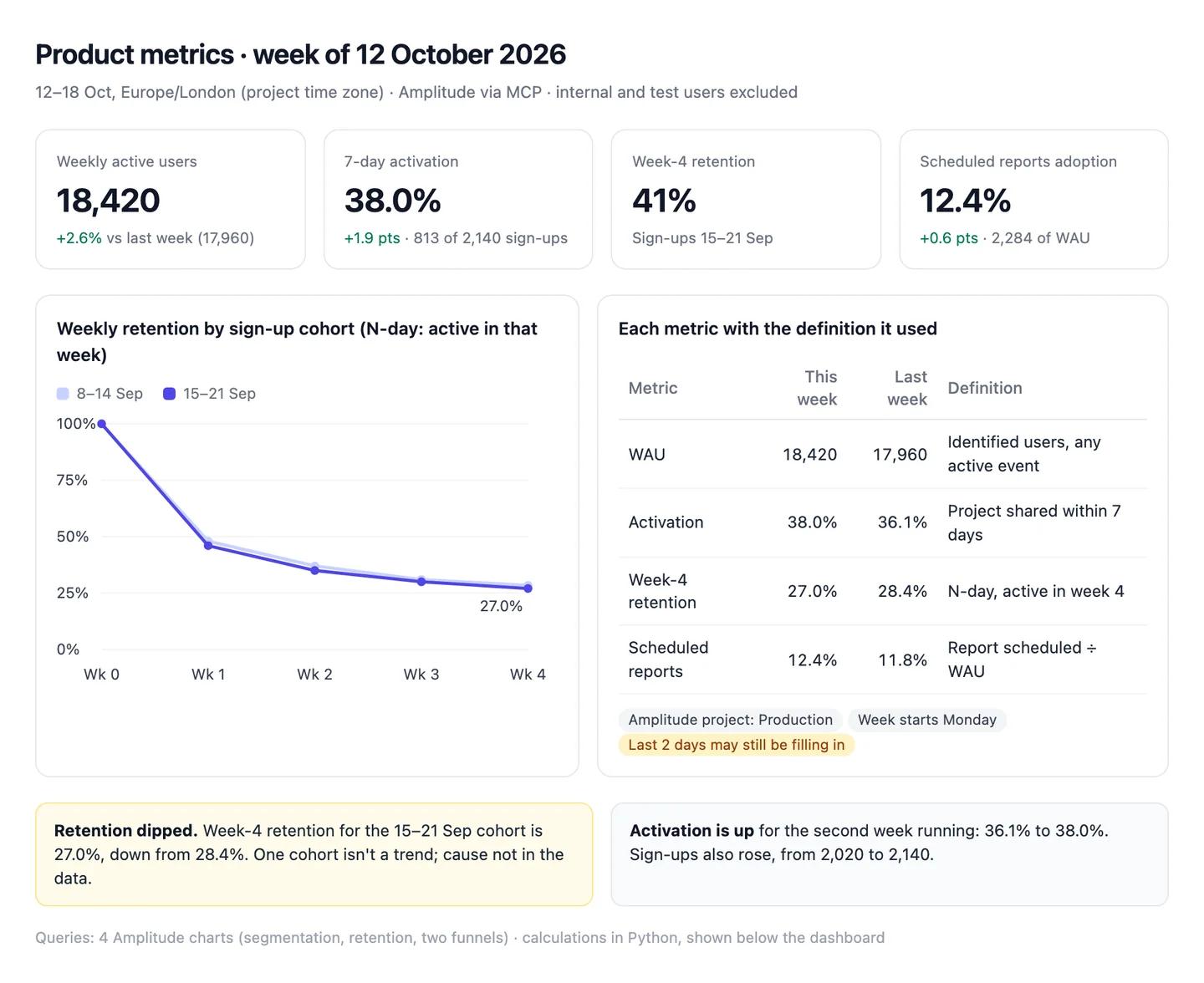
The numbers in this example
| Metric | This week | Last week | Change | Definition |
|---|---|---|---|---|
| Weekly active users | 18,420 | 17,960 | +2.6% | Identified users, any active event |
| 7-day activation | 38.0% (813 of 2,140) | 36.1% (729 of 2,020) | +1.9 pts | Project shared within 7 days |
| Week-4 retention | 27.0% | 28.4% | −1.4 pts | N-day, active in week 4 |
| Scheduled reports adoption | 12.4% (2,284) | 11.8% (2,119) | +0.6 pts | Report scheduled ÷ WAU |
- Retention: one cohort down 1.4 points. Cause not in the data.
- Late events: the last two days may still be filling in.
AI output auditRuns on every answerWeekly active users rose 2.6% to 18,420. Week-4 retention held at 41% Assumption, in line with the 40% typical for B2B SaaS products Model knowledge. Activation was 38.0%: 813 of 2,140 new sign-ups Citation.
Assumption
Week-4 retention 41%
The tile was built as unbounded retention: anyone active in week 4 or later. Your glossary and the chart below use N-day, active in week 4: 27.0%, down from 28.4%. Shared as it is, retention looks 14 points better and the dip disappears.
Model knowledge
40% is typical week-4 retention for B2B SaaS
No benchmark was attached or searched; this is from Claude's memory, with no source and no definition. Repeated in a board pack, it sets a target nobody can trace.
Citation
Activation 38.0%
813 ÷ 2,140, both from the Amplitude funnel Claude linked. Safe to share.
Workflow 2
AI for A/B testing: an experiment readout that says what it can't conclude
Writing up a test is mostly arithmetic and discipline: the planned metric, the planned length, a sample ratio check and an honest interval. Claude does the arithmetic in code and reads the experiment's own settings, so the readout reports the test you planned rather than the most flattering cut of it. It also keeps percentage points and relative lift apart, which is where most readouts go wrong.
Uses
- PostHog
- Amplitude
- Mixpanel
Before you run it
- Your experimentation tool connected (PostHog, Amplitude or Mixpanel)
- The test plan: primary metric, guardrail metrics, planned run length and threshold
- Code execution switched on, so the statistics are computed rather than estimated
Show the full prompt (25 lines)Hide the prompt
Write the readout for the experiment [name / link].

The plan: primary metric [metric], guardrails [metrics], planned length
[days], threshold [95%]. Report against this plan only.

1. Read the experiment's settings: start and end dates, variants,
   traffic split, statistical method and confidence level. Print them.
   If the test stopped before the planned length, say so first.
2. Pull exposures and conversions for each variant for the primary
   metric and each guardrail. Exclude internal and test users and say
   how.
3. Run a sample ratio check against the planned split (chi-square).
   If p < 0.01, stop and report the mismatch instead of a result.
4. For each metric: the rate in each variant with counts, the
   difference in percentage points, the relative lift, and the 95%
   interval for the difference in points. Compute these in code.
5. Label each result "Significant", "No clear change" or "Worse", from
   the interval, not from the point estimate.
6. Don't report segments, metrics or date ranges that weren't in the
   plan. List any you were tempted to under "Not in the plan".
7. Write a two-line ship recommendation that uses points, not relative
   lift, and says what the test can't tell us.
8. Show the API calls and the code.

Don't forecast annual impact unless I give you the volumes to use.
Onboarding checklist test, 28 Sep to 11 OctArtifactExample from sample data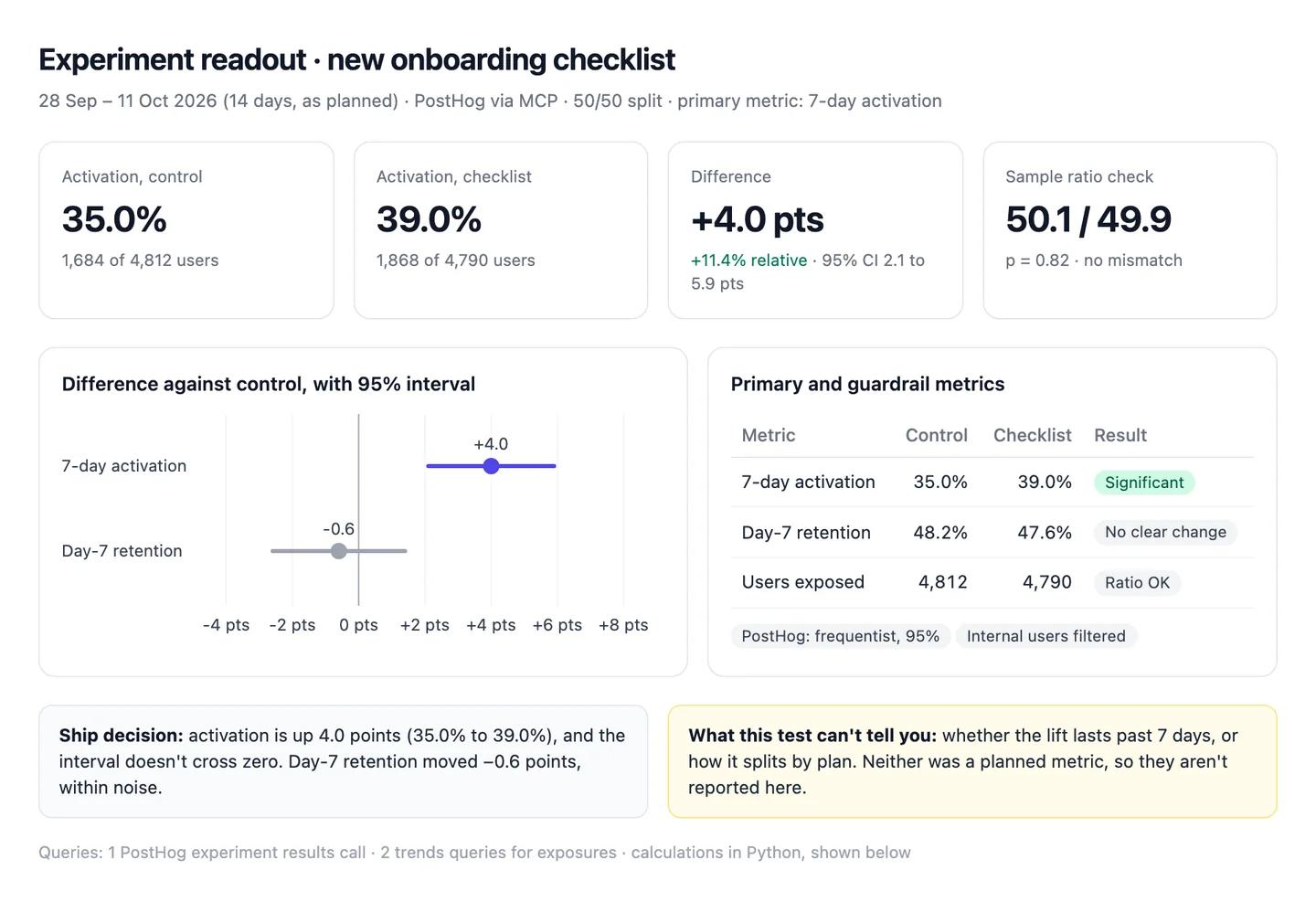
The numbers in this example
| Metric | Control | Checklist | Difference (95% CI) | Result |
|---|---|---|---|---|
| 7-day activation | 35.0% (1,684 of 4,812) | 39.0% (1,868 of 4,790) | +4.0 pts (2.1 to 5.9) | Significant |
| Day-7 retention | 48.2% | 47.6% | −0.6 pts (−2.6 to 1.4) | No clear change |
- Relative lift: +11.4% on activation. The ship note uses the 4.0 points.
- Sample ratio: 50.1 / 49.9, p = 0.82. No mismatch.
AI output auditRuns on every answerThe new checklist lifted 7-day activation by 11.4 points Assumption, from 35.0% to 39.0%. Rolled out to everyone, it would add about 4,300 activated users a year Hallucination. The sample split was 50.1 / 49.9 Citation, so assignment worked as planned.
Assumption
Activation up 11.4 points
11.4% is the relative lift. In points it's 4.0 (35.0% to 39.0%). Read as points, any forecast built on it is nearly three times too big.
Hallucination
About 4,300 extra activated users a year
No sign-up volume was queried or attached, so this number has no source in the chat. It's the kind of figure that ends up in a roadmap slide.
Citation
Sample split 50.1 / 49.9
4,812 and 4,790 exposures from PostHog; the chi-square check gave p = 0.82. Safe to share.
Workflow 3
AI for user research: interview themes where every claim has a quote
Give Claude twelve transcripts and you'll have five confident themes in a minute. The risk is the theme nobody said and the single loud customer who becomes "users". This workflow makes every theme carry its quotes, timestamps and the participants who disagreed, and keeps one-off mentions out of the findings. For prompts beyond this one, see AI prompts for product managers.
Uses
- Notion
- Claude
Before you run it
- Notion connected, with transcripts in one database (or the transcripts attached as files)
- The research question and who you interviewed: segment and role for each participant
- Your codebook, if you have one, so themes use your names for things
Show the full prompt (25 lines)Hide the prompt
Synthesise the interviews in [Notion database / attached files] for the
research question: [question].

1. Read every transcript in full. List them with participant ID,
   segment and role, and say if any couldn't be read.
2. Find the themes: problems or needs that come up in at least 3
   interviews. For each, give:
   - a plain-English name,
   - how many interviews it came up in (of the total),
   - every supporting quote, word for word, with participant ID and
     transcript timestamp,
   - which segments it comes from,
   - participants who said the opposite, with their quotes.
3. Anything mentioned in only 1 or 2 interviews goes under "Not a theme
   yet", with the quote. Keep it out of the findings.
4. Quotes must match the transcript exactly. If you paraphrase, say so
   and don't use quotation marks.
5. Say what this research can't tell us: who wasn't interviewed (for
   example churned customers or non-buyers).
6. Don't attach numbers that aren't in the transcripts, and don't say
   why customers churn unless a churned customer said so.
7. Build a one-page summary: a chart of interviews per theme, a theme
   table, and the quotes for the top theme.

Read only. Don't change anything in Notion.
Reporting workflows research, 12 interviewsArtifactExample from sample data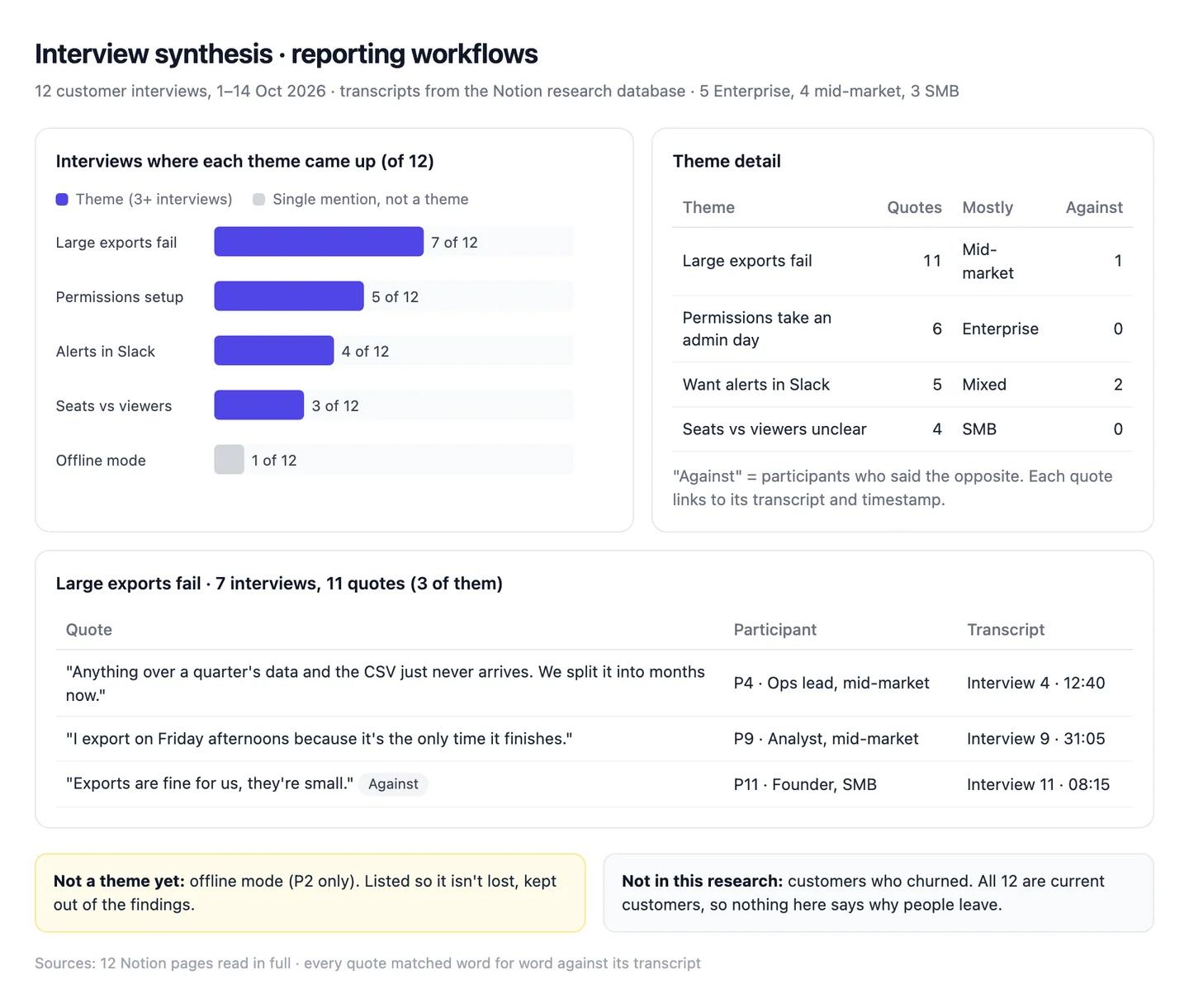
The numbers in this example
| Theme | Interviews | Quotes | Mostly | Against |
|---|---|---|---|---|
| Large exports fail | 7 of 12 | 11 | Mid-market | 1 |
| Permissions take an admin day | 5 of 12 | 6 | Enterprise | 0 |
| Want alerts in Slack | 4 of 12 | 5 | Mixed | 2 |
| Seats vs viewers unclear | 3 of 12 | 4 | SMB | 0 |
- Not a theme yet: offline mode (P2 only).
- Not in this research: churned customers. All 12 are current customers.
AI output auditRuns on every answerEnterprise customers want SSO before anything else Hallucination. Mid-market teams churn because large exports fail Assumption. Seven of twelve participants raised export failures Citation, with eleven quotes between them.
Hallucination
Enterprise customers want SSO first
No transcript mentions SSO. The Enterprise theme in the data is permissions setup. A roadmap item built on this answers a request nobody made.
Assumption
Export failures cause mid-market churn
All 12 participants are current customers, so nothing here says why anyone leaves. A complaint has become a churn cause.
Citation
7 of 12 raised export failures
Seven transcripts, eleven quotes, each matched word for word with its timestamp. Safe to share.
Workflow 4
AI for customer feedback analysis: support conversations sorted into themes you can count
Support conversations are the largest pile of product feedback most teams have, and the least read. Claude can read all of them through Intercom's connector, sort them into themes with written rules, count each theme against the previous period and match it to the issue already open in Linear or Jira. Zendesk has no generally available official connector yet, so Zendesk teams export a view as CSV.
Uses
- Intercom
- Zendesk
- Linear
Before you run it
- Intercom connected, or a Zendesk view exported as CSV (with ticket descriptions)
- Linear or Jira connected, to match themes to existing issues
- Two periods of the same length, so counts compare like with like
Show the full prompt (22 lines)Hide the prompt
Sort our support conversations from [date] to [date] into themes, and
compare them with the [same length] period before.

1. From Intercom, search conversations in both periods. Page through
   every result until there's no next page. Report how many you
   retrieved for each period and confirm none were left.
2. Read each conversation's first customer message and the agent's
   reply. Assign it to one theme using written rules: give the rule for
   each theme (what's in, what's out) before the counts.
3. Conversations that fit no theme go in "Not themed". Don't force
   them into the nearest theme.
4. Build one table: theme, conversations this period, previous period,
   change (%), share of all conversations. Shares add up to 100%.
5. Say clearly that these are conversations, not customers. If you can
   count distinct companies per theme, add that column.
6. For each theme, search Linear for an open issue that matches it and
   give its ID, or "None".
7. Link five example conversations for each theme.
8. Show the search filters and the code you used for the counts.

Don't explain why a theme grew unless the conversations say so. Read
only: don't add notes or tags in Intercom or create issues in Linear.
Support themes, 13 Sep to 12 OctArtifactExample from sample data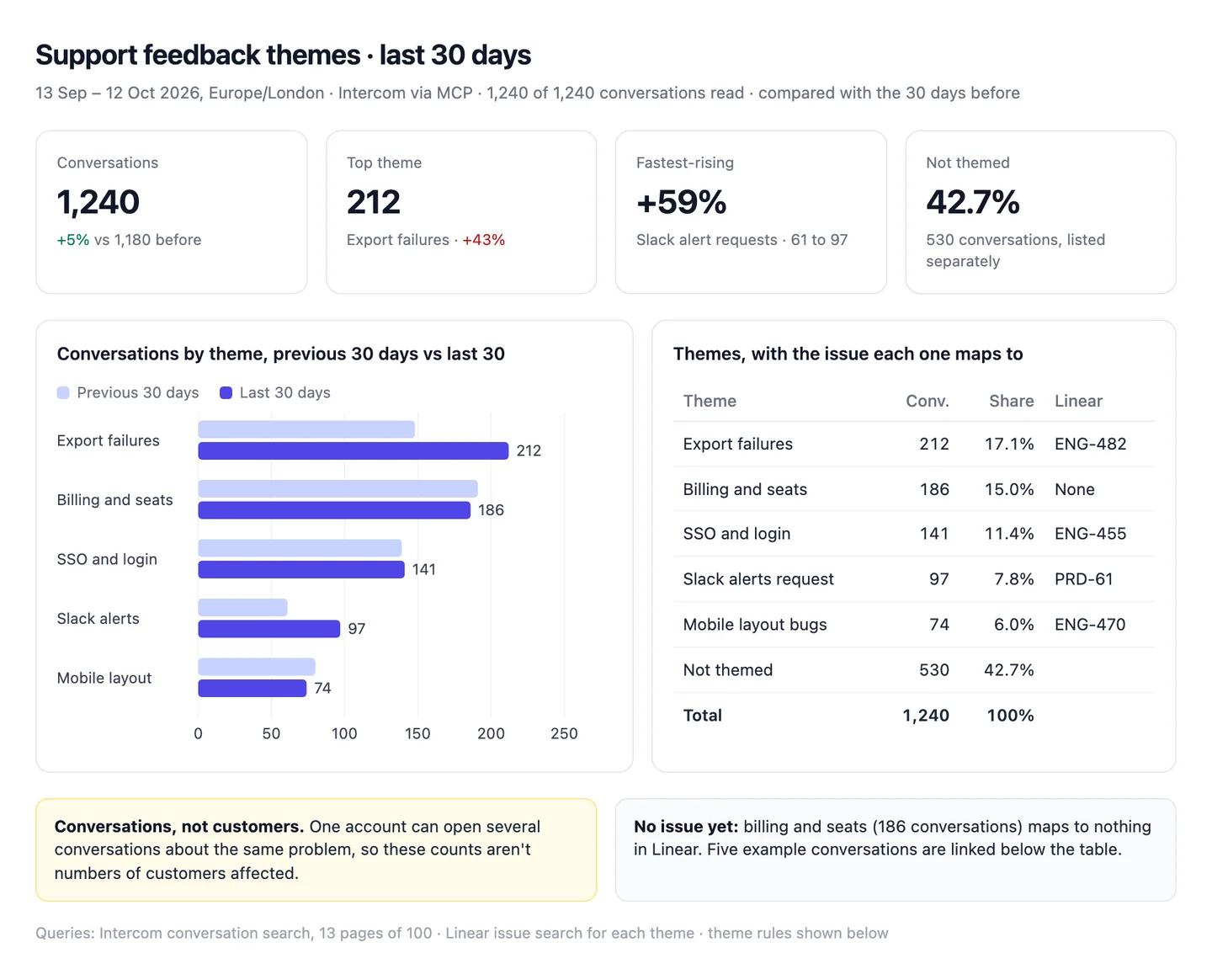
The numbers in this example
| Theme | Conversations | Before | Change | Share | Linear |
|---|---|---|---|---|---|
| Export failures | 212 | 148 | +43% | 17.1% | ENG-482 |
| Billing and seats | 186 | 191 | −3% | 15.0% | None |
| SSO and login | 141 | 139 | +1% | 11.4% | ENG-455 |
| Slack alerts request | 97 | 61 | +59% | 7.8% | PRD-61 |
| Mobile layout bugs | 74 | 80 | −8% | 6.0% | ENG-470 |
| Not themed | 530 | 561 | −6% | 42.7% | |
| Total | 1,240 | 1,180 | +5% | 100% |
- Conversations, not customers. One account can open several about the same problem.
- No issue yet: billing and seats, 186 conversations.
AI output auditRuns on every answerExport failures are the top issue, up 43% to 212 conversations, and affect about 17% of customers Assumption. Slack alert requests rose 59%, driven by the new Teams plan Hallucination. All 1,240 conversations in the period were retrieved Citation.
Assumption
Export failures affect 17% of customers
17.1% is the share of conversations, not customers. One account can open several conversations about the same bug, so the share of customers affected is likely far lower. Quoted to leadership, it overstates the problem.
Hallucination
The Teams plan drove Slack alert requests
No conversation, query or document in the chat mentions a Teams plan. The cause is invented.
Citation
1,240 of 1,240 conversations retrieved
Intercom returned 13 pages and no next page, so nothing is missing from the counts.
Workflow 5
AI for PRDs: a requirements doc where every requirement points to its evidence
A PRD is where a guess turns into a commitment. Claude drafts one fast, but left alone it fills gaps with plausible limits, targets and constraints that nobody measured. This workflow builds the PRD from the research and feedback you already have, cites each requirement, and leaves the numbers nobody has as open questions. It drafts the Linear or Jira issues too, without creating them.
Uses
- Notion
- Linear
- Jira
Before you run it
- The interview synthesis and feedback themes from the two workflows above, in the chat or in Notion
- Your PRD template from Notion or Confluence
- Linear or Jira connected, to find the issues that already exist
Show the full prompt (25 lines)Hide the prompt
Draft a PRD for [problem] using our PRD template from [Notion /
Confluence link].

Evidence: [interview synthesis], [feedback themes], and anything in
Linear matching [search terms].

1. Problem: describe it only with what the evidence shows. Every
   sentence with a fact gets a numbered source.
2. Requirements: for each, give the evidence behind it (participant
   IDs, conversation counts or a document) and whether an issue already
   exists in Linear. A requirement with no evidence goes under
   "Proposed, no evidence yet".
3. Don't invent limits, thresholds, volumes or performance numbers.
   If a requirement needs one and no source gives it, write
   [NUMBER NEEDED] and add it to the open questions.
4. Success measure: name the metric and today's value from the
   evidence. Leave the target as [set by the team].
5. Open questions: everything the evidence can't answer, and who could.
6. Draft the new issues (title, description, acceptance criteria) for
   Linear, but don't create them.
7. List your sources at the end: document, date, and what each was
   used for.

Draft in this chat only. Don't create or edit anything in Notion,
Confluence, Linear or Jira.
PRD: reliable exports for large reportsArtifactExample from sample data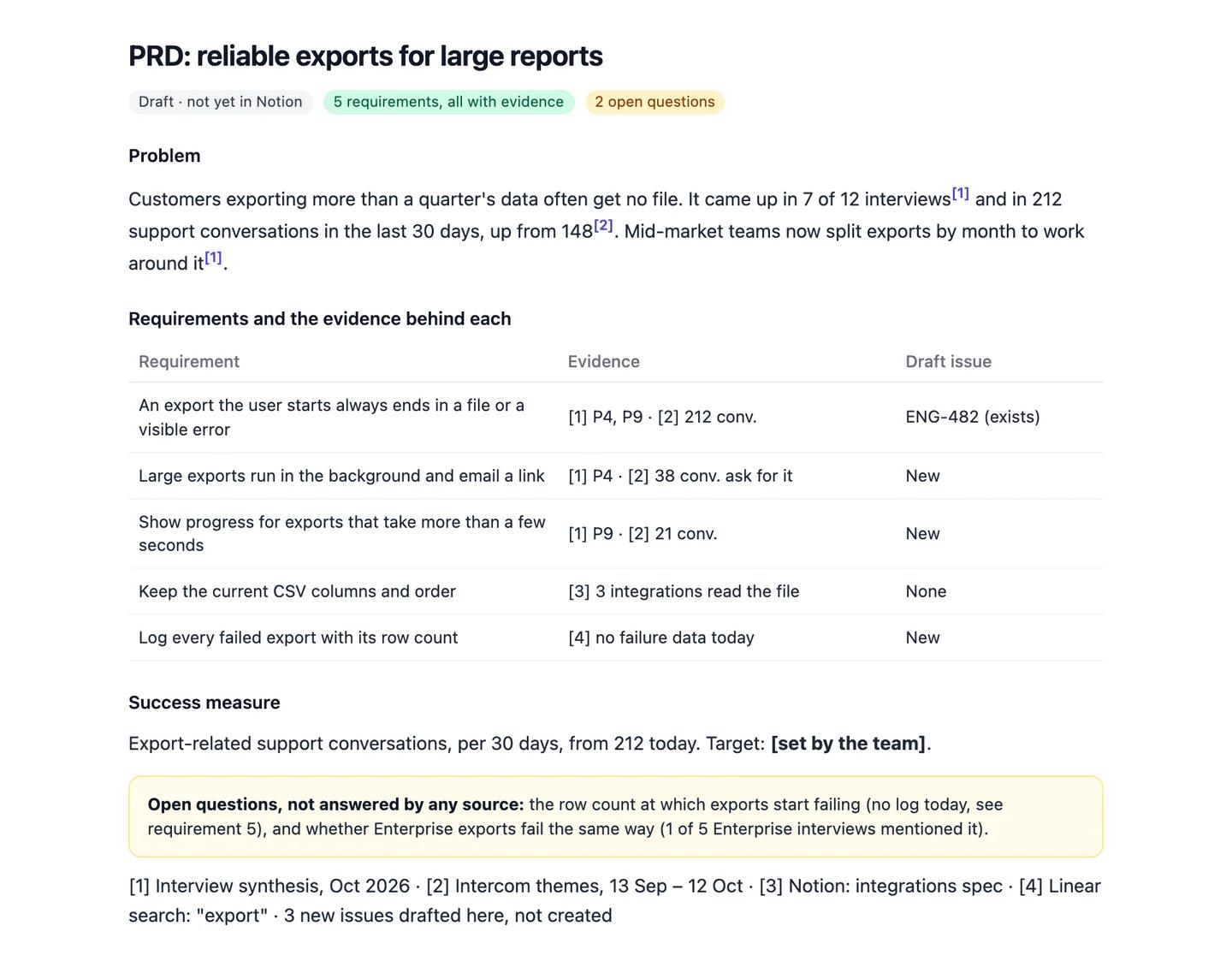
The numbers in this example
| Requirement | Evidence | Issue |
|---|---|---|
| An export always ends in a file or a visible error | 7 of 12 interviews; 212 conversations | ENG-482 (exists) |
| Large exports run in the background and email a link | P4; 38 conversations ask for it | Drafted, not created |
| Show progress on slow exports | P9; 21 conversations | Drafted, not created |
| Keep the current CSV columns and order | 3 integrations read the file | None |
| Log every failed export with its row count | No failure data today | Drafted, not created |
- Target: left for the team. Today's value is 212 export conversations in 30 days.
- Open question: the row count where exports start failing. No source has it.
AI output auditRuns on every answerExports fail on reports over 50,000 rows Hallucination. Success means export-related conversations fall by half within a quarter of launch Assumption. The problem came up in 7 of 12 interviews and 212 support conversations Citation.
Hallucination
Exports fail above 50,000 rows
No interview, conversation or Linear issue gives a row limit; there's no failure log yet. If engineering scopes the fix to it, they may fix the wrong limit.
Assumption
Target: halve export conversations in a quarter
Claude picked this target; nobody agreed it. In a PRD it reads like a commitment the team made.
Citation
7 of 12 interviews, 212 conversations
Both figures come from the synthesis and the Intercom themes in this chat. Safe to share.
Common pitfalls, team rules and the check before anything ships
Prompts reduce errors; they don't remove them. In a 2026 study of 14 models, the best produced working links more than 94% of the time, yet only 39 to 77% of their claims were accurate (Onweller et al., Cited but Not Verified, May 2026). A query that runs is the easy part.
Common pitfalls
- Comparing two tools' "active users". Amplitude, Mixpanel and PostHog each decide what counts as active and who counts as one user. A WAU from one doesn't line up with another's.
- Reading a relative lift as points. A move from 35.0% to 39.0% is +4.0 points and +11.4% relative. Mixed up, a forecast nearly triples.
- Calling a test early. Checking results daily and stopping on the first significant day finds winners that aren't there, unless the test was set up for it.
- Counting conversations as customers. One account can open five conversations about the same bug.
- A theme with no quote under it. "Users want X" that nobody in the transcripts said goes straight into a roadmap.
- Trusting a capped result. Intercom returns up to 150 conversations a page (Intercom Developers). A theme count that looks low may be one page.
Rules for the team
- No theme ships without a quote. The transcript and timestamp, not a summary of it.
- Definitions live in the project and the glossary. Change them there, once, not in individual chats.
- Experiments are called by the plan. The metric, the run length and the threshold are written before the test starts.
- Read-only by default. Write access is switched on for a named job, then off again.
- Customer data stays in the Team workspace, never a personal account.
One check before anything leaves product
Count audits every answer automatically, inside the chat, and it checks more than the numbers. For each claim it asks: did this come from a source, and does the source really say it? Does the reasoning hold, or does a conclusion go further than the data? Was a definition or a formula assumed without saying so? Is a statement from the model's memory rather than anything in the chat? It replies with a canvas where each claim is labelled a citation, an assumption, model knowledge or a hallucination, with the reasoning chain under it. A retention figure on the wrong definition, a benchmark remembered rather than sourced and a theme no customer mentioned all show up for what they are. Each workflow above shows an example; the method behind it is in how to check AI answers.
Questions people ask
How do I use AI for product management?
Start with one shared assistant connected to the tools you already use, not a new platform. Write your metric definitions into a Claude project, connect your analytics tool, Linear or Jira and Intercom read-only, then run the same few workflows: the weekly metrics review, experiment readouts, interview synthesis, feedback themes and evidence-backed PRDs.
How much does it cost to set up AI for a product team?
The Claude side is a subscription: Claude Pro is $20 a month ($17 billed annually), and a Team standard seat is $25 a month or $20 billed annually (claude.com/pricing). The official connectors for Amplitude, Mixpanel, PostHog, Linear, Jira, Notion, Intercom and Slack aren't sold separately; you need an account with each tool. Atlassian's server uses Rovo credits, and some PostHog tools are billed as PostHog AI usage.
What is the best AI for product managers?
For most teams, one general assistant connected to the tools you already use beats a specialist platform. We'd pick Claude with a shared project and a metric glossary. The options by job are compared in best AI tools for product managers.
Can Claude connect to Amplitude, Mixpanel or PostHog?
Yes. All three run official hosted MCP servers that you sign in to from Claude's connector settings. All three can also write, creating charts, cohorts, flags or experiments, so approve each change. Mixpanel usually needs an organisation admin to switch MCP on first.
Why does AI give a different retention number from my dashboard?
Usually a different retention mode, time window or set of users. Mixpanel defaults to "On or After" retention and PostHog to "On", Amplitude counts days as rolling 24-hour windows, and anonymous or internal users may be in one count and not the other.
Sources
- Anthropic Help Centre: What are projects? (checked 22 October 2026)
- Anthropic Help Centre: How to create custom skills (checked 22 October 2026)
- Anthropic Help Centre: Getting started with custom connectors using remote MCP (checked 22 October 2026)
- Anthropic Help Centre: Use connectors to extend Claude's capabilities (checked 22 October 2026)
- Anthropic: Claude pricing (checked 22 October 2026)
- Amplitude Docs: Amplitude MCP (checked 22 October 2026)
- Mixpanel Docs: MCP server (checked 22 October 2026)
- PostHog Docs: Model Context Protocol (checked 22 October 2026)
- Linear Docs: MCP server (checked 22 October 2026)
- Atlassian Support: Getting started with the Atlassian Rovo MCP Server (checked 22 October 2026)
- Atlassian Developer: Rovo MCP supported tools (checked 22 October 2026)
- Notion Developers: Notion MCP (checked 22 October 2026)
- Intercom Developers: MCP server (checked 22 October 2026)
- Slack Developer Docs: Connect the Slack MCP server to Claude (checked 22 October 2026)
- Zendesk Newsroom: Relate 2026 announcements (MCP server in early access) (checked 22 October 2026)
- Zendesk Help: Exporting a view of tickets to a CSV file (checked 22 October 2026)
- Amplitude Docs: Helpful definitions (active user) (checked 22 October 2026)
- Amplitude Docs: Change an event's activity status (checked 22 October 2026)
- Amplitude Docs: Track unique users (checked 22 October 2026)
- Amplitude Docs: Retention analysis, how time is calculated (checked 22 October 2026)
- Amplitude Docs: Manage organisations and projects (time zone) (checked 22 October 2026)
- Amplitude Docs: Block and filter internal users (checked 22 October 2026)
- Amplitude Docs: Missing data (checked 22 October 2026)
- Amplitude Docs: Optimise query performance (sampling) (checked 22 October 2026)
- Amplitude Docs: Feature Experiment overview (checked 22 October 2026)
- Mixpanel Docs: Insights (checked 22 October 2026)
- Mixpanel Docs: Identifying users (simplified ID merge) (checked 22 October 2026)
- Mixpanel Docs: Retention (checked 22 October 2026)
- Mixpanel Docs: Managing projects (time zone) (checked 22 October 2026)
- Mixpanel Docs: Reports overview (sampling) (checked 22 October 2026)
- Mixpanel Docs: Debugging (late-arriving data) (checked 22 October 2026)
- Mixpanel Docs: Experiments (checked 22 October 2026)
- PostHog Docs: Trends aggregations (checked 22 October 2026)
- PostHog Docs: Anonymous vs identified events (checked 22 October 2026)
- PostHog Docs: Retention (checked 22 October 2026)
- PostHog Docs: Filtering internal and test users (checked 22 October 2026)
- PostHog Docs: Experiments, start here (checked 22 October 2026)
- PostHog Docs: Frequentist statistics (peeking) (checked 22 October 2026)
- Intercom Help: Merging conversations and tickets (checked 22 October 2026)
- Zendesk Help: Reporting on merged tickets (checked 22 October 2026)
- Liu and Sun: From Voices to Validity, LLMs for textual analysis of stakeholder interviews (December 2023) (checked 22 October 2026)
- Onweller et al.: Cited but Not Verified (May 2026) (checked 22 October 2026)
- OpenAI Developers: Connect a custom MCP server to ChatGPT (checked 22 October 2026)
- OpenAI: ChatGPT pricing (learn.chatgpt.com) (checked 22 October 2026)