
Claude for finance teams
AI for your role · Facts checked 22 October 2026
AI is good at finance's legwork: pulling the month's numbers, matching payouts, drafting variance notes and chasing invoices. It misleads wherever a figure reaches the board, because every system counts revenue, dates and currency its own way. Give Claude that context in a shared project, connect Xero or QuickBooks and Stripe, and check each answer before it ships.
Context first: what Claude has to know about your finance numbers
Most bad AI finance numbers aren't invented from nothing. They're a real figure answering a different question: cash basis when the pack is accrual, a payout counted in the wrong month, MRR quoted as revenue. An assistant that doesn't know your conventions picks one and doesn't say so. Write the conventions down once, in the project, and Claude can say which one each figure uses.
| What differs | Why it changes the answer | What to write in the project |
|---|---|---|
| Cash or accrual | QuickBooks records income on a cash basis "at the time you actually receive a payment", and on accrual "when you send the invoice". The company has a default, and any single report can override it (QuickBooks Help). Xero lets you run most reports either way from the report's options (Xero Central) | "Our management accounts are on an [accrual] basis. State the basis at the top of every table." |
| Financial year | QuickBooks asks you to confirm your fiscal year start before you build a budget, because the budget's months follow it (QuickBooks Help). "Q3" and "year to date" mean different months for a company whose year starts in April | "Our financial year starts on [1 April]. Quarters and year to date follow it." |
| Closed periods | A Xero lock date stops edits to transactions dated before it, and only administrators set one (Xero Central). QuickBooks' closing date can be set to a warning only, so a closed month can still change (QuickBooks Help) | "Our books are locked to [date]. Say if any figure for a closed period differs from the pack we sent." |
| Stripe payouts against the bank | Stripe groups a payout by its estimated arrival date, not the date your bank posts it, and its reports run in UTC unless you ask for a time zone. Each payout is the net of the charges, refunds, disputes and fees in its batch (Stripe Docs) | "Match payouts by arrival date and list any in transit at month end. Never net fees off revenue." |
| MRR against revenue | Stripe Billing counts the monthly-normalised value of active subscriptions, so "an annual subscription for $1,200 only counts $100" (Stripe Support). Chargebee leaves out setup fees, ad hoc charges and tax, and one-time charges unless Flexible MRR is on (Chargebee Docs). Neither is revenue in your ledger | "MRR comes from [Stripe/Chargebee], with its settings named. Revenue comes from the ledger. Never put the two in one column." |
| Foreign currency | Xero calculates unrealised gains or losses on a foreign-currency invoice or bill until it's paid (Xero Developer). In QuickBooks, once multicurrency is on you can't change your home currency (QuickBooks Help) | "We report in [GBP]. Say which rate a converted figure used. Unrealised FX isn't an operating cost." |
| Departments | Xero allows two active tracking categories, four in total (Xero Developer). A "Sales and marketing" line in your pack may be a tracking option, an account range or a spreadsheet mapping | "Department lines come from tracking category [Department]. Map: [list]." |
| Ageing | Xero's aged receivables can age by due date, and the report says which basis it used (Xero Central). An invoice 30 days past due can be 60 days past its invoice date | "Age receivables by [due date]." |
| Numbers with no source | Anthropic says Claude for Excel isn't recommended for "audit-critical calculations without verification" or final deliverables without human review (Claude Docs). With no ledger connected, a model fills a gap with a typical figure | "If a figure isn't in a connected tool or an attached file, write [NO DATA]." |
The definitions themselves are on monthly recurring revenue, days sales outstanding and budget variance analysis. The project instructions in the setup below turn this table into rules Claude follows.
The stack: Claude and Count in the middle, your tools around it
Most finance teams don't need a new platform. Claude sits in the middle: a project holds the context above, a skill holds your definitions, and each vendor's own connector links it to the ledger, billing and CRM that already hold the numbers. Count sits beside it and checks the answers. On NetSuite, Oracle's AI Connector Service connects Claude through a non-administrator role; Sage has no official connector yet, so its reports go in as CSV.
What Anthropic offers finance teams
Open an inherited three-statement model, click the Claude add-in, and type "Walk me through how the revenue number in cell C42 is calculated." Claude answers with cell-level citations you can click to jump to each input (Anthropic, Use Claude for Excel). That add-in is the centre of what Anthropic offers finance teams in October 2026.
| Piece | What it does | Who gets it |
|---|---|---|
| Claude apps | Chat, file analysis with code, Projects, Research, connectors | Free (limited); Pro $20 a month ($17 billed annually); Max from $100; Team $20 per standard seat billed annually ($25 monthly); Enterprise |
| Claude for Excel | Answers with cell citations; flexes assumptions "while keeping formula relationships intact"; debugs errors; builds or populates models | Pro, Max, Team, Enterprise; generally available |
| Claude for Microsoft 365 | Excel, PowerPoint, Word and Outlook add-ins that share context across open files | Pro, Max, Team, Enterprise |
| Financial-data connectors | LSEG, FactSet, S&P Global (Capital IQ), Morningstar, PitchBook, Moody's, Dun & Bradstreet, Daloopa, Box, Databricks, Snowflake | Claude for Financial Services; several need your own data subscription |
| Agent templates | Ten, including a general ledger reconciler, a month-end closer ("runs the close checklist, prepares journal entries, and produces close reports") and a statement auditor | Plugins in Claude Cowork or Claude Code on all paid plans |
Prices from claude.com/pricing; the rest from Anthropic's docs and launch posts, checked 22 October 2026.
Most of the marketing is aimed at banks and asset managers: pitch books, credit memos, KYC screening. For a corporate finance or FP&A team the useful parts are narrower. The Excel add-in, a project holding your definitions, and read-only connectors to your own ledger, billing and warehouse cover most of the work, and a Team plan gets you all three.
If your company runs ChatGPT instead.
Xero, QuickBooks and Stripe each offer a ChatGPT plugin too (Xero Blog; Intuit; Stripe Docs), and ChatGPT Business costs the same as a Claude Team seat ($25 a user monthly, $20 annually). The project instructions below work as a ChatGPT project's instructions. For workbooks, OpenAI has its own ChatGPT for Excel add-in. The full ChatGPT setup is in ChatGPT for finance.
Your tools
 Xero
XeroHow Claude reaches it
Sign in from Claude's connector settings and pick the organisation
Good to know
Read-only, one organisation at a time. Answers on profit, cash, invoices and customers; free with a Xero subscription
 QuickBooks
How Claude reaches it
Sign in from Claude's connector settings and choose the company and permissions
Good to know
US customers only for now. Can create, send and delete invoices and send reminders, so approve each change
 Stripe
How Claude reaches it
Sign in from Claude's connector settings, after an Owner adds it for the workspace
Good to know
Reads payouts and balance transactions, and can write through the API. Stripe asks a person to confirm refunds; turn on tool approval
 Chargebee
How Claude reaches it
Add Chargebee from Claude's connector settings
Good to know
Its Data Lookup server reads customers, subscriptions, invoices and payments. Chargebee says you're responsible for any write actions
 Excel
ExcelHow Claude reaches it
Install the Claude add-in in Excel and sign in
Good to know
Answers with cell citations and can edit the workbook. Only open files you trust; Anthropic warns of hidden instructions
 HubSpot
How Claude reaches it
Sign in from Claude's connector settings, after a HubSpot admin sets it up once
Good to know
Gives account owners and last contact for collections. Can also change records, so approve each change
 Sage
SageHow Claude reaches it
Run the report in Sage Accounting, export it as CSV and upload it to the chat
Good to know
No official connector from Sage yet. Put the period and basis in the file name so Claude can label the numbers
 ClaudeFinance project
 Count
CountHow Claude reaches it
Count's MCP server, added to Claude by the Count desktop app
Good to know
Audits every answer automatically, claim by claim: what came from a source, what was assumed, what was a guess. What Count is
See which claims in the pack rest on an assumption
Count audits every answer Claude gives you, automatically. Each claim gets a label and a reasoning chain, so a variance read the wrong way, a payout called reconciled while still in transit, or a reason the ledger doesn't support shows up before the board finds it.
Set it up once: the project, the connectors, the rules
You don't need to be technical for most of this. The steps marked You happen in Claude's settings and take about half an hour between them. Xero, QuickBooks and Stripe all sign in from Claude, so IT only gets involved if you run NetSuite or want Claude for Excel deployed company-wide. Step 1 gives the project the context from the top of this page, so every workflow below starts from your conventions instead of a guess.
Technical steps for NetSuite (for your NetSuite administrator)
- Install the MCP Standard Tools SuiteApp. Create a non-administrator role with the MCP Server Connection and OAuth 2.0 Access Tokens permissions, plus REST Web Services for tools that need it (NetSuite AI Connector Service).
- Give the role view access only to the records the finance team reads. The connector can create and update records, so the role is where reading-only is enforced.
- In Claude, add a custom connector with the URL
https://<accountid>.suitetalk.api.netsuite.com/services/mcp/v1/all. Oracle notes that without/allat the end the connection appears disconnected.
Keep Claude reading, not changing, until you trust it.
Xero's connector can only read. QuickBooks' can create, send and delete invoices, Stripe's can write through the API (Stripe asks a person to confirm refunds), and Chargebee, HubSpot and Claude for Excel can change data too. When Claude asks to change something, approve it one at a time and never choose "Allow always". Claude's Research mode can act without asking, so turn off those tools' editing options in the chat's tools menu before you start a Research run.
Setup walkthrough
About 20 minutes
- 1
Create a shared project and give it the context
You10 minIn Claude, open Projects and create one called "Finance", then share it with the team (how projects work; more in Claude projects). Download the file below: it's the context table from the top of this page plus the rules that go with it. Fill in the parts in brackets and paste it into the project's instructions. Then upload your chart of accounts, the current budget and your last three month-end packs to the project.
Finance project: context and rulesShow the full prompt (66 lines)Hide the prompt
You work with [Company]'s finance team. This file is the context and the
rules for every answer in this project. When you apply a rule, say so.

## Context: how our systems count
Every system counts revenue, dates and currency its own way. Use this to
label figures, not to "correct" them.
- Basis. Our management accounts are on an [accrual] basis. QuickBooks and
  Xero reports can each be run on cash or accrual; read which one a report
  used and print it.
- Financial year. Ours starts on [1 April]. Quarters and year to date
  follow it, not the calendar.
- Closed periods. Our books are locked to [date] ([Xero lock date /
  QuickBooks closing date]). A QuickBooks closing date set to "warning
  only" still allows changes.
- Stripe payouts. Stripe groups a payout by its estimated arrival date,
  not the bank's posting date, and reports in UTC unless a time zone is
  given. A payout is net of charges, refunds, disputes and fees.
- MRR. Our MRR comes from [Stripe Billing / Chargebee] with these settings:
  [discounts, trials, one-time charges]. MRR is not revenue.
- Currency. We report in [GBP]. Xero calculates unrealised gains and losses
  on foreign-currency invoices and bills until they're paid.
- Departments. Department lines come from tracking category [Department]
  (Xero allows two active). Mapping: [department: accounts or options].
- Ageing. We age receivables by [due date].

## Definitions
- Revenue = [accounts] in the ledger, on our basis, for the period.
- Gross margin = (revenue - cost of sales) / revenue. Cost of sales =
  [accounts].
- Variance = actual - budget. For revenue and profit lines a negative
  variance is unfavourable; for cost lines a positive variance is
  unfavourable. Always label favourable or unfavourable in words.
- DSO = receivables at period end / revenue for the period x days in the
  period.
- Budget = [file and tab], version [v], approved [date].

## Numbers
- Use connected tools or attached files only. If a figure isn't available,
  write [NO DATA]. Never estimate a balance, a rate or a benchmark.
- Do calculations in code and show the code.
- Show the report or query you ran under every table: the Xero or
  QuickBooks report and its settings, the Stripe API call, the file and
  tab.
- State the period, basis and currency at the top of every table.
- If two sources disagree (Stripe and the ledger, the pack and the
  ledger), show both figures and the difference. Never net it away.

## Explanations
- Explain a variance only with a driver that is in the data: an account,
  a supplier, a customer, a date. Otherwise write "Cause not in the data".
- Don't describe customers, contracts or deals that aren't in a connected
  tool or an attached file.

## Tools
- Read only. Don't create, send, void or delete anything in QuickBooks,
  Stripe, Chargebee or HubSpot, and don't edit a workbook, unless my
  message asks for that exact change.
- Journals, provisions and write-offs are for a person to book. Draft
  them; don't post them.
- If a tool returns a capped or paged result, say how many rows you got
  and whether there were more.

## When you're unsure
- Ask one clarifying question rather than choosing a definition yourself.
- Count audits every answer automatically. Keep the reports and files you
  used visible in the chat so it can check each claim against them.
- 2
Let Claude write your finance definitions from your own packs
You10 minA skill is a short file Claude reads whenever it's relevant, and Claude can write this one for you. In a new chat, switch on code execution, attach your last three packs, the chart of accounts and the budget, and paste the prompt below. You get back a skill that says how your team calculates each metric, with the page it came from. Check every formula, fix anything wrong, then upload it under Customize > Skills (how to add a skill). On a Team plan, an Owner can switch it on for everyone.
Finance-definitions skill from your packsShow the full prompt (29 lines)Hide the prompt
Read the files I've attached (our last three month-end packs, our chart of accounts and our budget workbook) and turn how we report into a finance-definitions skill I can upload to Claude. 1. List every file you read and the tabs or pages you used. 2. From those files only, write down how we report: - Every metric in the packs (revenue, gross margin, EBITDA, MRR, DSO and anything else), with the formula as the pack calculates it and the page or cell it came from. - The accounting basis, the financial year and the reporting currency, quoted from where the pack states them. If a pack doesn't state one, write [NOT STATED]. - How each department line maps to accounts or tracking categories. - Words we use for the same thing in different places (for example "ARR" and "run rate") and which one wins. - Rounding and sign conventions: thousands or units, brackets or minus signs, favourable variance shown as positive or negative. 3. Where two packs calculate a metric differently, show both and flag it. Don't pick one. 4. Write it as a skill: a file called SKILL.md that starts with --- name: finance-definitions description: [Company]'s finance definitions and reporting conventions. Use whenever calculating, labelling or describing a financial figure. --- then the definitions above, each with its source file and page. 5. Keep it under 300 lines. Package it as finance-definitions.zip (a finance-definitions folder containing SKILL.md) so I can download it and upload it under Customize > Skills. - 3
Connect the tools that sign in from Claude
You2 min eachThese connect like any other app: open Customize > Connectors, pick the tool and sign in (connectors guide). On a Team plan, an Owner adds each one for the company first. Xero connects one organisation at a time, and the QuickBooks connector is for US customers only for now. HubSpot needs one extra step from a HubSpot admin, who creates the connection in HubSpot's settings and gives you two codes to paste in. Tap a tool on the map above for its own guide.
- 4
Add Claude for Excel
You, or IT for the whole team5 minInstall the Claude add-in from Microsoft's marketplace, open Excel and sign in with your Claude account (Claude for Excel). It answers with links to the cells it used, so the model and the pack stay checkable. Only open workbooks you trust: Anthropic warns that files from outside can carry hidden instructions. A Microsoft 365 admin can deploy it to everyone instead. More in Claude for Excel.
- 5
Connect Count
You2 minDownload the Count desktop app and follow its walkthrough; it adds Count to Claude for you. After that, Count audits every answer automatically, without leaving the chat. What Count is.
- 6
If you run NetSuite
NetSuite administratorAbout 30 minOracle's NetSuite AI Connector Service is free, but it refuses Administrator roles. Your NetSuite administrator installs the MCP Standard Tools SuiteApp and creates a role for Claude with the permissions in the technical steps below. Until then, export the saved searches you need as CSV and upload them to the chat. On Sage, CSV is the route for now: run the report, export it and attach it.
- 7
Try it on a month you've already closed
You10 minRun the first workflow on last month and compare it with the pack you actually sent. If a number differs, the difference is usually a convention to add to the project instructions: a basis, a mapping or a date.
Workflow 1
AI for financial reporting: a month-end report you can trace to the ledger
The report most teams rebuild by hand every close. Claude pulls the profit and loss and balance sheet from Xero or QuickBooks, lays the month against the last one with the basis printed at the top, and checks that last month's figures still match the pack you sent. What you get is a report you could send, plus the report settings behind every number. For the analysis that follows, see prompts for financial analysis.
Uses
- Xero
- QuickBooks
- Excel
Before you run it
- Xero or QuickBooks connected (setup step 3)
- Last month's sent pack attached, so Claude can match its layout and check for changes
- The lock or closing date for last month, written in the project instructions
Show the full prompt (26 lines)Hide the prompt
Build last month's management report.

Period: [1 Month YYYY] to [last day]. Basis: as in the project
instructions. Currency: [GBP].

1. From [Xero / QuickBooks], run the Profit and Loss for the month and
   the month before, on our basis. Print the basis the report returned.
2. Run the Balance Sheet as at the last day of the month. Take cash at
   bank, receivables and payables from it.
3. Build one table: revenue, cost of sales, gross profit, gross margin,
   operating expenses, operating profit, for both months, with the
   change as a percentage. Use the account mapping in the skill.
4. Compare last month's figures with the attached pack. If any differ,
   list each difference with the account and amount, and check whether
   anything was posted before our lock date.
5. Under the table, list the three biggest changes on last month with
   both figures and the account behind each one.
6. For each change, say what moved: the account, the supplier or the
   customer if the report shows it. If the data doesn't show why, write
   "Cause not in the data".
7. Draft two paragraphs of commentary in the pack's style, using only
   the figures in the table.
8. Show every report you ran with its settings, and the code you used
   for the calculations.

Don't round until the final table. Show amounts to the pound.
Profit and loss, September (accrual, GBP)ArtifactExample from sample data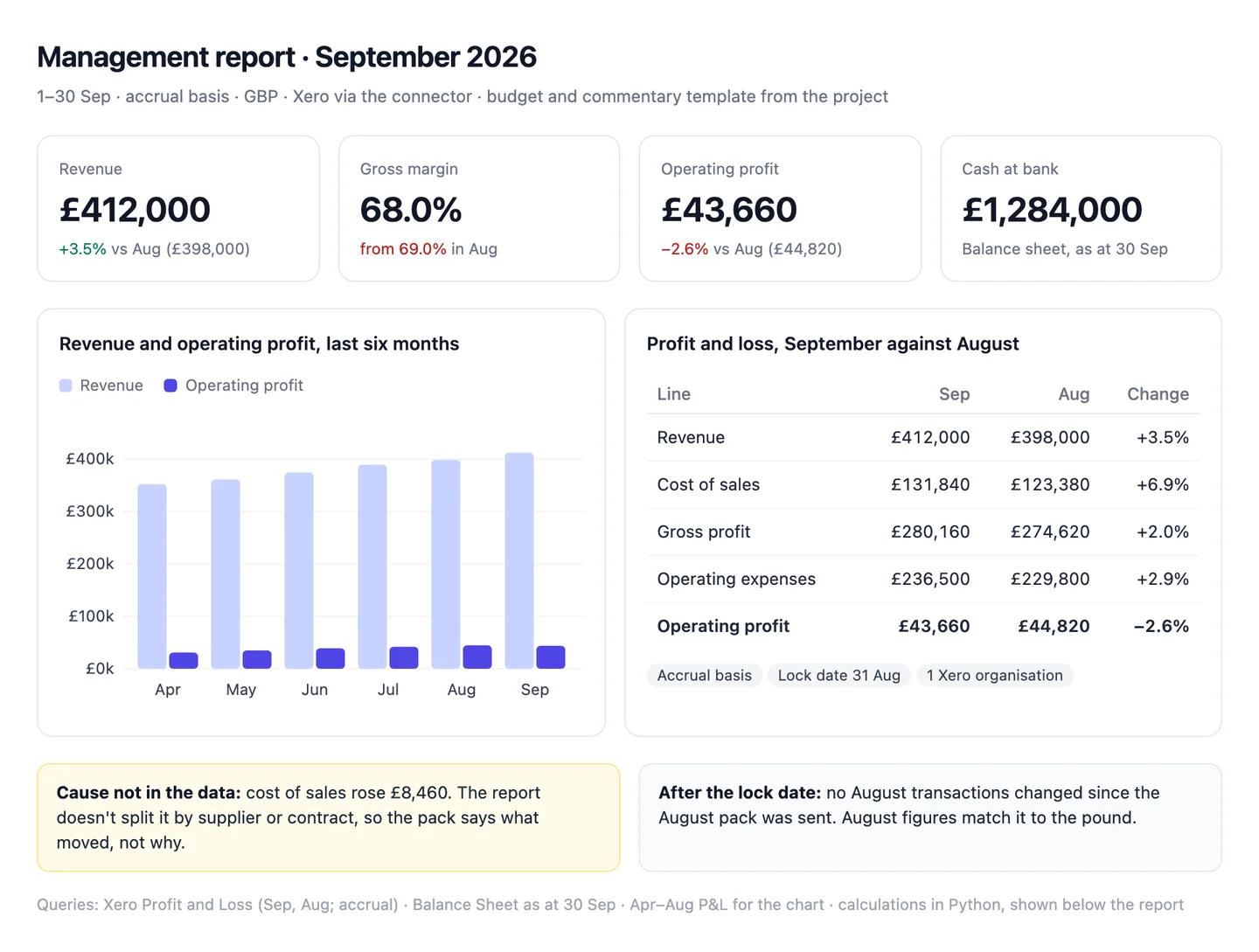
The numbers in this example
| Line | Sep | Aug | Change |
|---|---|---|---|
| Revenue | £412,000 | £398,000 | +3.5% |
| Cost of sales | £131,840 | £123,380 | +6.9% |
| Gross profit | £280,160 | £274,620 | +2.0% |
| Operating expenses | £236,500 | £229,800 | +2.9% |
| Operating profit | £43,660 | £44,820 | −2.6% |
- Gross margin: 68.0%, down from 69.0%. Cost of sales rose £8,460; cause not in the data.
- Cash at bank: £1,284,000 at 30 September, from the balance sheet.
- August unchanged: no transactions posted before the 31 August lock date since the pack was sent.
AI output auditRuns on every answerSeptember revenue was £412,000 on an accrual basis Assumption, up 3.5% on August. Gross margin slipped to 68.0% because hosting costs rose ahead of the new contracts Model knowledge. Cash at bank closed the month at £1,284,000 Citation.
Model knowledge
Margin fell because hosting costs rose ahead of new contracts
A common story for a software company, not something in your ledger. Cost of sales rose £8,460, but no report the model ran split it by supplier, and no contracts were read. Put in the board pack, it becomes the official reason.
Assumption
The report is on an accrual basis
Taken from the project instructions, not from the report Xero returned. If the connector ran it on a cash basis, unpaid invoices are missing from revenue and September doesn't compare with the pack.
Citation
Cash at bank £1,284,000 at 30 September
Read from Xero's balance sheet as at 30 September. Safe to share.
Workflow 2
AI for budgeting: budget against actuals, with variance notes from the drivers
Variance commentary is where AI saves finance the most time and where it does the most quiet damage, because an invented reason reads exactly like a real one. This workflow reads actuals by department from the ledger, reads the approved budget from your workbook, and keeps every explanation tied to an account, supplier or customer it can point to. QuickBooks keeps budgets on its Plus and Advanced plans (QuickBooks Help); most teams keep theirs in a workbook either way. FP&A teams building the forecast itself should see AI for FP&A.
Uses
- Xero
- QuickBooks
- Excel
Before you run it
- Xero or QuickBooks connected, with departments set up as tracking categories or classes
- The approved budget workbook attached, with the version and tab named in the prompt
- The finance-definitions skill installed (setup step 2), so variances use your sign convention
Show the full prompt (25 lines)Hide the prompt
Compare [month] actuals with the approved budget.

Budget: [file], tab [tab], version [v]. Basis and currency as in the
project instructions.

1. From [Xero / QuickBooks], run the Profit and Loss for the month by
   [tracking category / class]. Print the basis and the category used.
2. Read the budget for the same month from the attached workbook. Print
   the tab and the cells you read.
3. Build one table: line, budget, actual, variance (actual - budget),
   variance as a percentage of budget, and "Favourable" or
   "Unfavourable" in words. Revenue and profit lines are unfavourable
   when below budget; cost lines are unfavourable when above it.
4. Add operating expenses by department in the same format, and check
   that the departments add up to the total. Show the check.
5. For every variance over [£5,000 or 5%], pull the transactions behind
   it and name the accounts, suppliers or customers that make up most of
   it, with amounts.
6. Draft one line of commentary per material variance, using only what
   step 5 found. Where it found nothing that explains the variance,
   write "Cause not in the data" and say who would know.
7. Show every report you ran and the code you used for the variances.

Don't describe renewals, deals, campaigns or hires unless they appear in
the ledger or an attached file.
Budget against actuals, SeptemberArtifactExample from sample data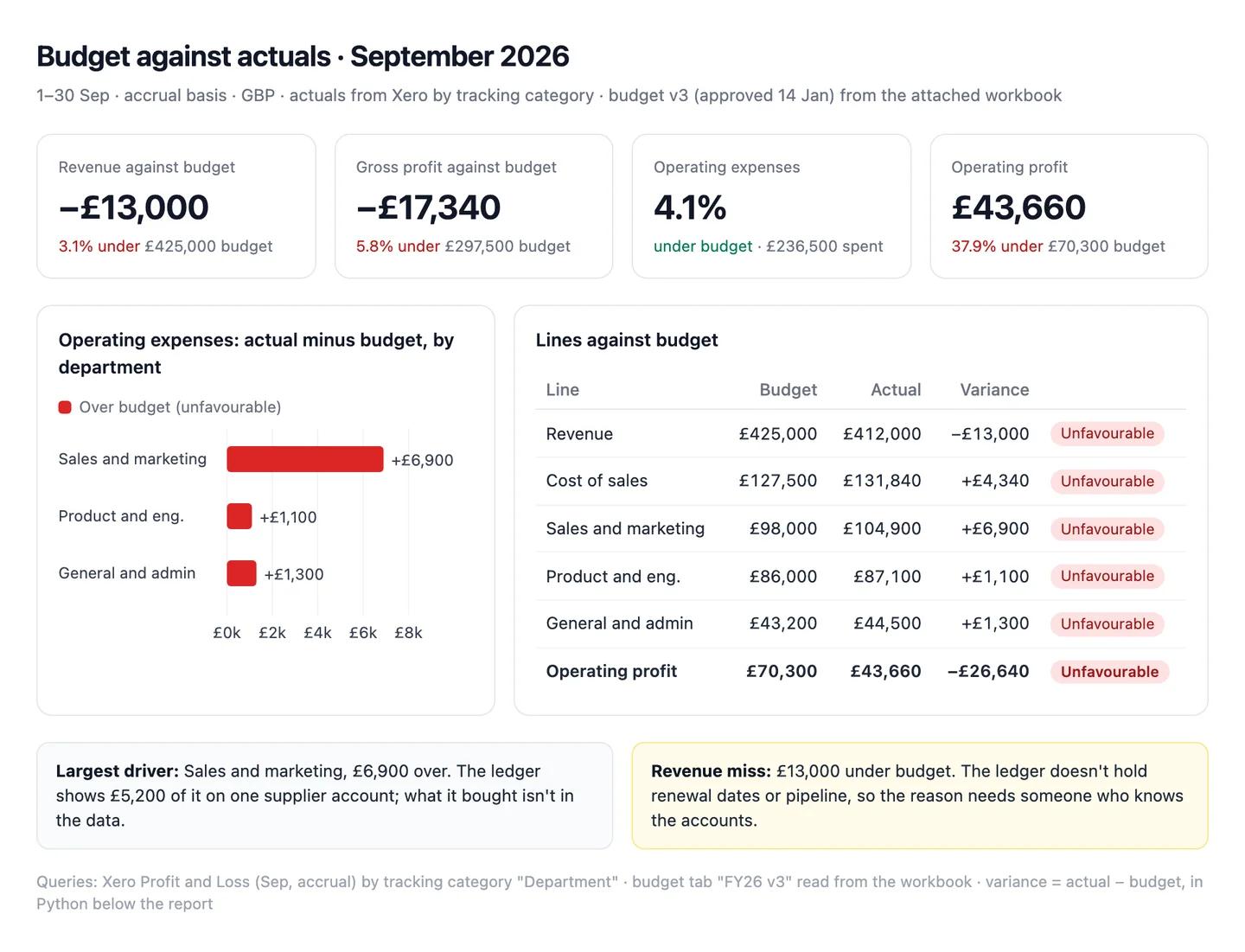
The numbers in this example
| Line | Budget | Actual | Variance | |
|---|---|---|---|---|
| Revenue | £425,000 | £412,000 | −£13,000 (−3.1%) | Unfavourable |
| Cost of sales | £127,500 | £131,840 | +£4,340 (+3.4%) | Unfavourable |
| Operating expenses | £227,200 | £236,500 | +£9,300 (+4.1%) | Unfavourable |
| Operating profit | £70,300 | £43,660 | −£26,640 (−37.9%) | Unfavourable |
- Largest cost driver: sales and marketing, £6,900 over its £98,000 budget; £5,200 of it on one supplier account.
- Revenue miss: cause not in the data. The ledger holds no renewal dates or pipeline.
AI output auditRuns on every answerOperating expenses came in 4.1% under budget Assumption at £236,500. Revenue missed budget by £13,000, mostly because two renewals slipped into October Hallucination. Sales and marketing ran £6,900 over its budget Citation.
Assumption
Operating expenses 4.1% under budget
Worked out as budget minus actual and read as a saving. £236,500 against a £227,200 budget is £9,300, or 4.1%, over, as the table says. The dashboard tile repeats it, so the board would hear costs were under control in the month they overran.
Hallucination
Two renewals slipped into October
Nothing the model read mentions renewals: the ledger has no renewal dates and no CRM was connected. It's the kind of reason a revenue miss usually gets. Someone who knows the accounts has to supply the real one.
Citation
Sales and marketing £6,900 over budget
£104,900 actual from Xero's tracking category against £98,000 in the budget tab. Safe to share.
Workflow 3
AI for reconciliation: Stripe payouts matched to the bank and the ledger
Matching Stripe payouts to the bank is slow because a payout isn't a sale: it's a batch of charges, refunds, disputes and fees, dated by when Stripe expects it to arrive. Claude reads each payout's balance transactions from Stripe, matches the payouts to your bank statement export, and checks the fees against your ledger's Stripe clearing account. Anything it can't match stays on its own line.
Uses
- Stripe
- Xero
- QuickBooks
Before you run it
- Stripe connected (setup step 3), with tool approval on
- The month's bank statement for the payout account, exported as CSV
- The ledger's Stripe clearing and fees accounts for the month, exported from Xero or QuickBooks as CSV
Show the full prompt (24 lines)Hide the prompt
Reconcile [month]'s Stripe payouts to the bank and the ledger.

Use Stripe's estimated arrival date for each payout, in [Europe/London].
Read only: don't create, update or refund anything in Stripe.

1. From Stripe, list every automatic payout with an arrival date in the
   month. For each, list its balance transactions and total them by
   reporting category: charges, refunds, disputes, fees, other.
2. Check that each payout's categories add up to its net amount. Show
   the check.
3. Match each payout to a credit in the attached bank statement on
   amount, within [3] days of the arrival date. Mark each one Matched,
   In transit (not yet in the statement) or Unmatched.
4. Compare the month's Stripe fees, refunds and disputes with the
   attached ledger export, account by account. List every difference
   with the payout and balance transaction behind it.
5. Build one table: payout arrival date, Stripe net, bank amount,
   status. Total each column separately.
6. List every reconciling item at month end on its own line, with the
   amount. Don't offset one item against another.
7. Show the Stripe calls you made, the bank and ledger rows you
   matched, and the code you used.

If the totals agree only because two differences cancel, say so.
Stripe payouts, September (by arrival date)ArtifactExample from sample data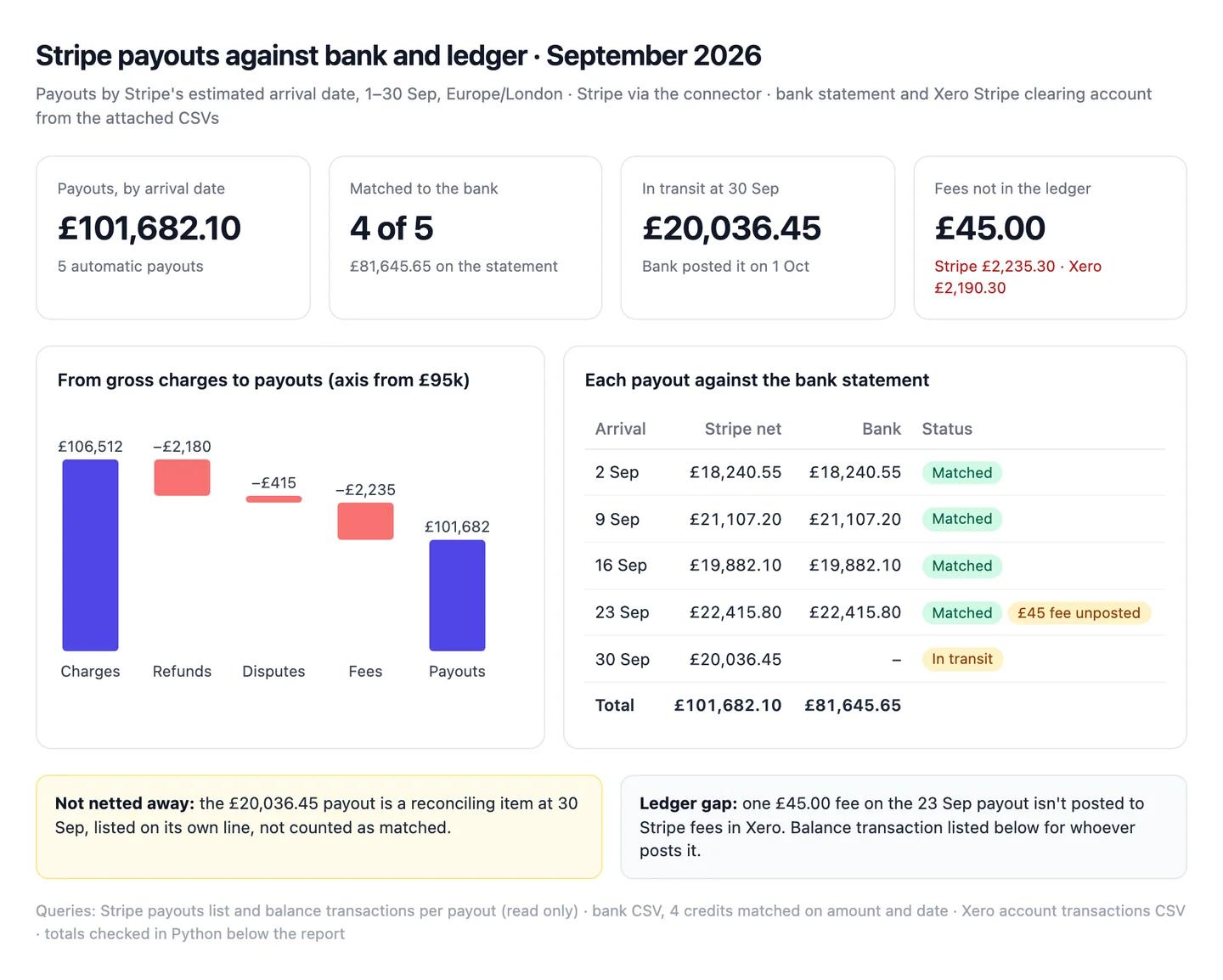
The numbers in this example
| Arrival | Stripe net | Bank | Status |
|---|---|---|---|
| 2 Sep | £18,240.55 | £18,240.55 | Matched |
| 9 Sep | £21,107.20 | £21,107.20 | Matched |
| 16 Sep | £19,882.10 | £19,882.10 | Matched |
| 23 Sep | £22,415.80 | £22,415.80 | Matched |
| 30 Sep | £20,036.45 | none | In transit |
| Total | £101,682.10 | £81,645.65 |
- Breakdown: charges £106,512.40, refunds −£2,180.00, disputes −£415.00, fees −£2,235.30.
- Ledger gap: fees in Xero £2,190.30, so one £45.00 fee on the 23 Sep payout isn't posted.
AI output auditRuns on every answerAll five September payouts reconcile to the bank Assumption. Fees of £2,235.30 match Stripe's balance transactions Citation. The £45.00 gap in the ledger is a timing difference that will clear in October Model knowledge.
Assumption
All five payouts are in the bank
Only four are on the statement. The fifth, £20,036.45, has a 30 September arrival date in Stripe and reached the bank on 1 October. Signing off the month as reconciled hides £20,036.45 that is still in transit.
Model knowledge
The £45.00 gap will clear in October
The usual explanation for a small gap, not something in the data. The fee belongs to a September payout and isn't posted at all, so it won't clear unless someone posts it.
Citation
Stripe fees £2,235.30
The sum of the fee lines in the five payouts' balance transactions. Safe to use.
Workflow 4
AI for cash flow forecasting: a 13-week forecast built from your receivables and bills
A 13-week cash forecast is mostly bookkeeping: what's owed to you and when it will really arrive, what you owe and when it's due, plus payroll and tax. Claude builds it from Xero's or QuickBooks' open invoices and bills, times receipts from how each customer has paid before, and adds the fixed payments from your calendar. You get a weekly table and a chart, with every input listed.
Uses
- Xero
- Stripe
- Excel
Before you run it
- Xero or QuickBooks connected, plus Stripe if card payments are a large share of receipts
- A workbook with payroll dates and amounts, rent, loan repayments and your tax calendar
- Six months of paid invoices, so payment timing comes from your customers rather than terms
Show the full prompt (23 lines)Hide the prompt
Build a 13-week cash forecast starting [Monday's date].

Opening balance: bank accounts in [Xero / QuickBooks] as of [date].

1. Pull open receivables with invoice date, due date and amount, and
   open bills with due dates.
2. From invoices paid since [date], work out how many days after the
   due date each customer usually pays. Use each customer's own figure;
   where a customer has fewer than [3] paid invoices, use the due date.
3. From Stripe, take the payout schedule and expected payouts for the
   period.
4. From the attached workbook, take payroll, rent, loan repayments and
   tax payments with their dates.
5. Build a weekly table: opening cash, receipts, payments, closing cash.
   Show receipts by source (invoices, Stripe) and payments by type.
6. Mark the lowest closing balance and the week it falls in, and the
   largest single payment.
7. Show how the week 4 balance changes if the three largest customers
   pay [one week] later than their usual timing.
8. Include committed items only. No new sales, hires or price changes
   unless I list them here: [none].
9. Show every report and file you used and the code that builds the
   forecast.
13-week cash forecast from 26 OctoberArtifactExample from sample data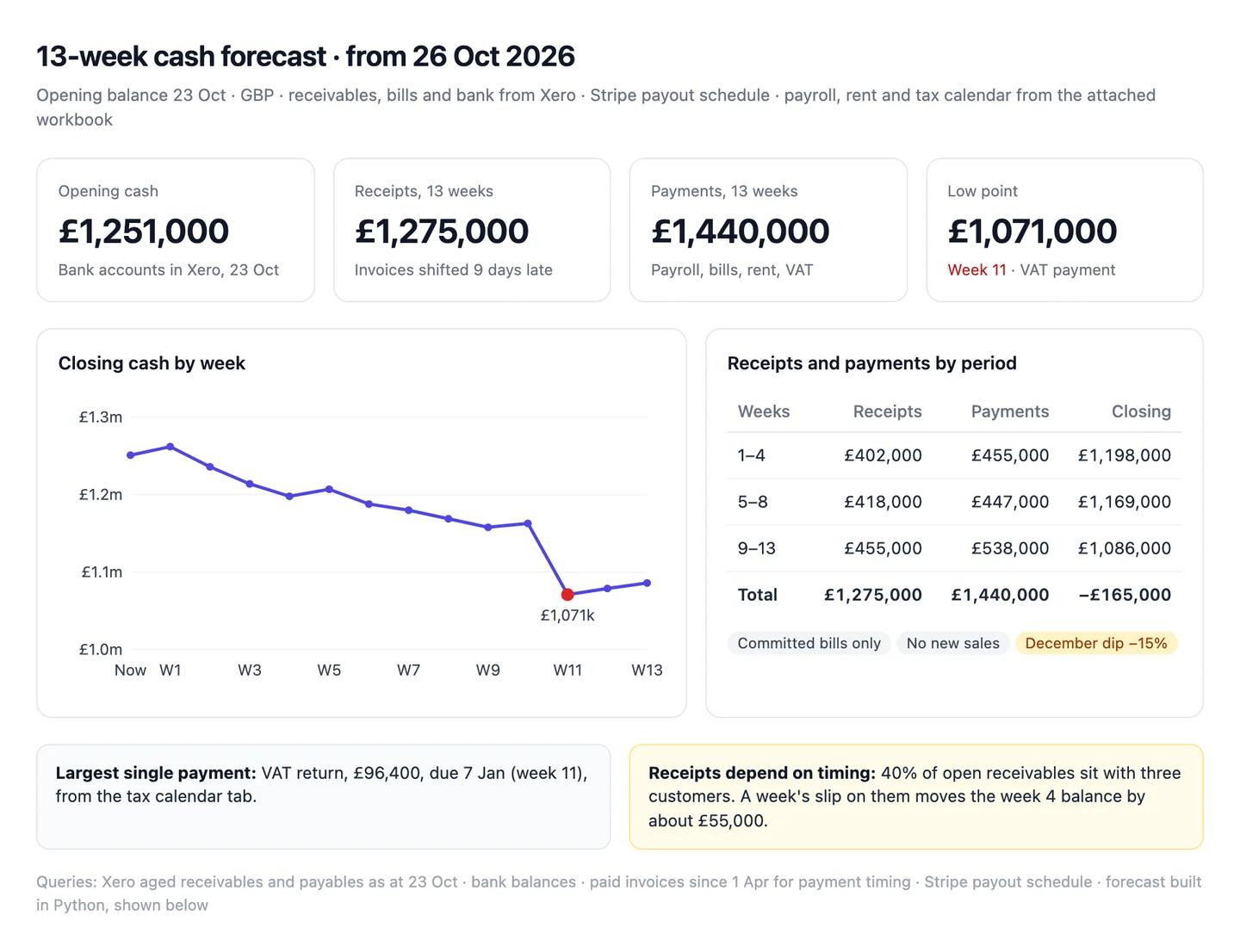
The numbers in this example
| Weeks | Receipts | Payments | Closing cash |
|---|---|---|---|
| 1–4 | £402,000 | £455,000 | £1,198,000 |
| 5–8 | £418,000 | £447,000 | £1,169,000 |
| 9–13 | £455,000 | £538,000 | £1,086,000 |
| Total | £1,275,000 | £1,440,000 | −£165,000 |
- Opening cash: £1,251,000 on 23 October.
- Low point: £1,071,000 in week 11, when the £96,400 VAT payment falls due on 7 January.
- Concentration: 40% of open receivables sit with three customers.
AI output auditRuns on every answerCash stays above £1,070,000 for all 13 weeks Citation. Customers pay on average 9 days after the due date Assumption, so every receipt is moved 9 days later. December card payments should drop by about 15% Hallucination.
Hallucination
December card payments drop by about 15%
No figure behind it: Claude didn't read last December's Stripe payouts or any history from that month. The forecast now rests on a number nobody can trace, in the weeks with the lowest balance.
Assumption
Receipts moved 9 days late, from an average across customers
The prompt asked for each customer's own timing; Claude used one average. Three customers hold 40% of what's owed and pay later than the rest, so weeks 1 to 4 show cash arriving before it will.
Citation
Lowest balance above £1,070,000
Follows from the forecast table: the lowest closing balance is £1,071,000 in week 11. Safe to share alongside the inputs.
Workflow 5
AI for accounts receivable: an overdue list with who to chase and what to say
Collections go faster when finance knows what sales knows: who owns the account, whether there's a renewal open, whether the customer has disputed the invoice. Claude reads the aged receivables from Xero or QuickBooks, looks up each overdue customer's owner and last contact in HubSpot, and drafts the reminders. Nothing gets sent: QuickBooks' connector can send reminders itself, so keep that tool switched off for this one.
Uses
- Xero
- QuickBooks
- HubSpot
Before you run it
- Xero or QuickBooks connected, and HubSpot connected (setup step 3)
- Your collections policy: when to remind, when to call, when the owner steps in
- Your provisioning policy, if you want Claude to flag invoices for review
Show the full prompt (22 lines)Hide the prompt
Build this week's collections list as at [date].

1. From [Xero / QuickBooks], run aged receivables as at [date], aged by
   [due date]. Print the ageing basis and the bucket totals.
2. Work out DSO for [month] as receivables at month end / revenue for
   the month x days in the month. Show the figures you used.
3. For every customer with an overdue balance, list invoices, amounts
   and days past due.
4. From HubSpot, find each customer's company record and read the
   owner, open deals and the last logged activity with its date and
   text. If a customer isn't in HubSpot, write [NOT IN CRM].
5. Rank customers by overdue amount, then days past due.
6. For each of the top [10], suggest a next step under our collections
   policy (attached), quoting the policy line you used. If the customer
   has an open deal or a disputed invoice, the next step goes to the
   account owner, not the customer.
7. Draft a reminder for each top customer in our tone, naming the
   invoice numbers and amounts. Draft in this chat only.
8. List invoices past [90] days for the controller to review under our
   provisioning policy. Don't recommend a provision.
9. Show the reports and HubSpot searches you ran. Don't send, create or
   update anything in [Xero / QuickBooks] or HubSpot.
Receivables as at 30 September (aged by due date)ArtifactExample from sample data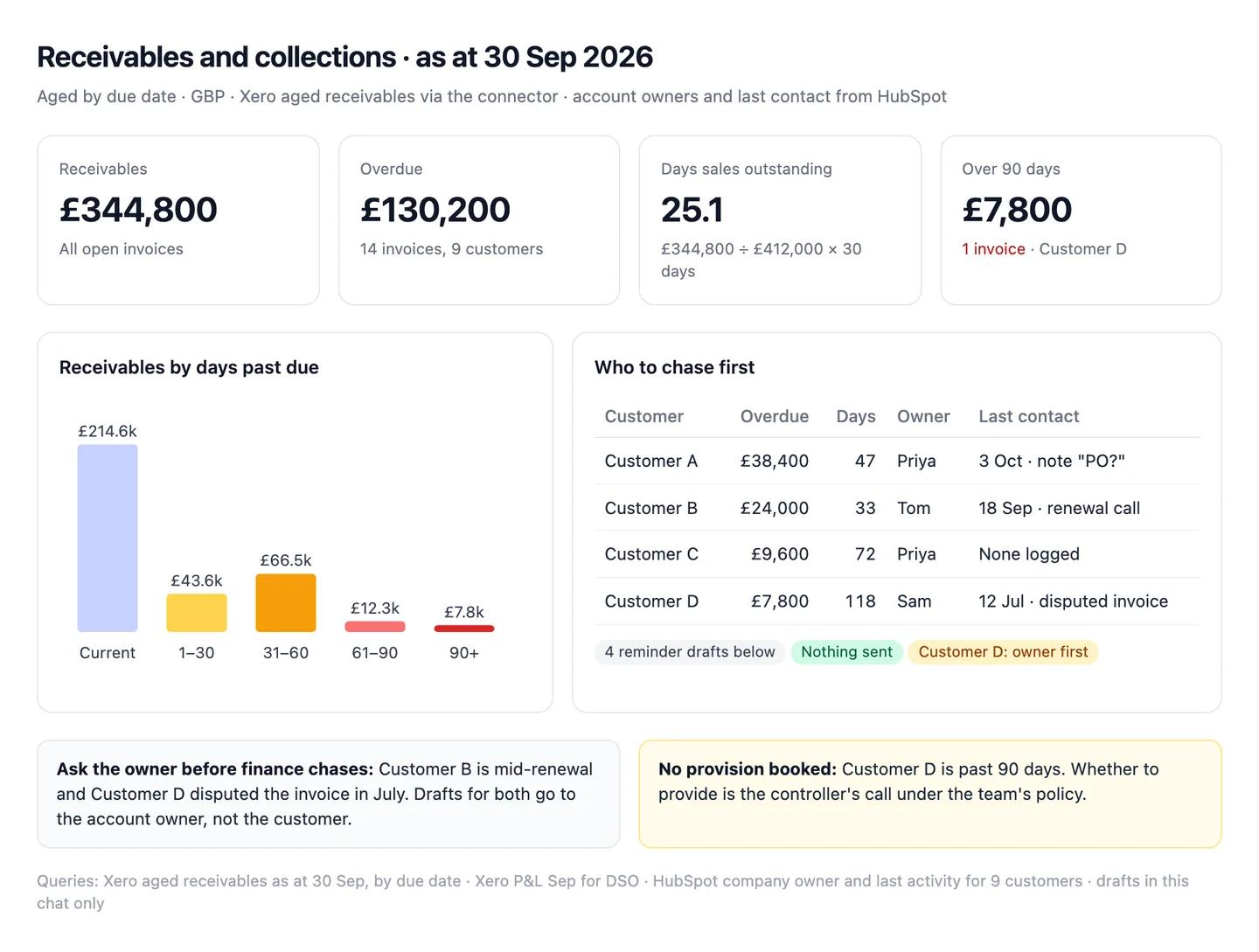
The numbers in this example
| Customer | Overdue | Days past due | Owner | Last contact |
|---|---|---|---|---|
| Customer A | £38,400 | 47 | Priya | 3 Oct, note "PO?" |
| Customer B | £24,000 | 33 | Tom | 18 Sep, renewal call |
| Customer C | £9,600 | 72 | Priya | None logged |
| Customer D | £7,800 | 118 | Sam | 12 Jul, disputed invoice |
- Totals: receivables £344,800, of which £130,200 overdue across 14 invoices. DSO 25.1 days (£344,800 ÷ £412,000 × 30).
- To the owner first: Customer B (renewal open) and Customer D (disputed).
- For the controller: Customer D, past 90 days. No provision suggested.
AI output auditRuns on every answerCustomer D's £7,800 is 118 days overdue and should be provided for as a bad debt Model knowledge. Customer A is waiting on a purchase order Assumption, so expect payment in October. Overdue receivables total £130,200 across 14 invoices Citation.
Model knowledge
Customer D should be provided for
A rule of thumb Claude brought, not your provisioning policy, and the prompt said not to recommend one. Booking it changes the P&L, and Customer D's invoice is disputed, which may call for a credit note instead.
Assumption
Customer A is waiting on a purchase order
Read from a HubSpot note that says only "PO?". The note is a question. Holding off on £38,400 because of it could cost a month.
Citation
£130,200 overdue across 14 invoices
The sum of the overdue buckets in Xero's aged receivables. Safe to share.
Common pitfalls, team rules and the check before anything ships
Prompts reduce errors; they don't remove them. In a 2026 study of 14 models, the best produced working links more than 94% of the time, yet only 39 to 77% of their claims were accurate (Onweller et al., Cited but Not Verified, May 2026). In finance, the citation that opens is the ledger, and the claim that fails is usually the reason given for a number.
Common pitfalls
- Netting a difference away. A payout in transit, a missing fee and a duplicated receipt can cancel out. "Reconciled" needs every line matched, not a zero total.
- Reading a variance sign the wrong way. Spending £9,300 more than budget is a positive number and an unfavourable variance. Ask for the words, not just the sign.
- MRR in the revenue line. Billing tools normalise annual plans and leave out one-time charges. Recognised revenue comes from the ledger.
- Mixing bases. A cash-basis report for one month and accrual for the next makes a trend out of a setting.
- A tidy reason with nothing under it. "Delayed renewals" and "seasonal slowdown" are what commentary usually says. If the data doesn't show it, it's a guess.
- One entity read as the group. Xero's connector reads one organisation at a time, so a total from it is one company, not the consolidation.
Rules for the team
- No figure leaves finance until a person has traced it to the ledger. The report, not Claude's summary of it.
- Definitions live in the project. Change them there, once, not in individual chats.
- Read-only by default. Write access is switched on for a named job, then off again.
- Journals and provisions have a human owner. Claude drafts; the controller books.
- Financial data stays in the Team workspace, never a personal account.
One check before anything leaves finance
Count audits every answer automatically, inside the chat, and it checks more than the numbers. For each claim it asks: did this come from a source, and does the source really say it? Does the reasoning hold, or does a conclusion go further than the data? Was a definition, a basis or a sign convention assumed without saying so? Is a statement from the model's memory rather than anything in the chat? It replies with a canvas where each claim is labelled a citation, an assumption, model knowledge or a hallucination, with the reasoning chain under it. A variance read the wrong way, a payout called reconciled while still in transit and a cause no ledger shows all show up for what they are. Each workflow above shows an example.
Questions people ask
How do I use AI for finance?
Start with one shared assistant connected to the systems you already use, not a new platform. Write your conventions into a Claude project (basis, financial year, lock dates, how MRR differs from revenue), connect Xero or QuickBooks and Stripe, then run the same few workflows each month: the month-end report, budget against actuals, Stripe reconciliation, a 13-week cash forecast and the collections list.
How much does it cost to set up AI for a finance team?
The Claude side is a subscription: Claude Pro is $20 a month ($17 billed annually), and a Team standard seat is $25 a month or $20 billed annually (claude.com/pricing). Xero's connector is free with a Xero subscription, and NetSuite's AI Connector Service isn't a paid feature. QuickBooks and Stripe need an account with each; Claude for Excel comes with Pro, Max, Team and Enterprise plans.
Is Claude good for finance?
It's the strongest performer on the most realistic public finance benchmark: Claude Opus 4.7 scored 64.37% on Vals AI's Finance Agent test (June 2026). That still means about one analyst task in three wrong, so use it to draft, trace and flex, and check every figure that leaves the team.
Is Claude for Excel free?
No. Anthropic lists Claude for Excel as generally available on the Pro, Max, Team and Enterprise plans. Pro costs $20 a month, or $17 a month billed annually. It shares your Claude account's usage limits.
Can Claude connect to NetSuite?
Yes. Oracle's NetSuite AI Connector Service is free and works with Claude as a custom connector. It won't run on administrator roles, its SuiteQL tools are read-only, and queries respect the role's permissions, so give that role view-only access.
Can Claude connect to Xero and QuickBooks?
Yes, through each vendor's own connector, signed in from Claude's connector settings. Xero's is read-only and connects one organisation at a time. QuickBooks' is for US customers for now and can create, send and delete invoices, so keep approval on. Sage has no official connector yet; export reports as CSV.
Is it safe to put financial data into Claude?
Xero says data shared through its connector is used only for that session and isn't used to train Claude's models, and Intuit says the same of QuickBooks data. The bigger risk is write access and untrusted files: keep connectors read-only where you can, approve each change, and only open workbooks you trust in Claude for Excel.
Will AI replace accountants?
Not on the vendors' own advice. Anthropic says Claude for Excel isn't recommended for audit-critical calculations without verification or for final deliverables without human review. What AI does well is the legwork around the close; judgement on provisions, journals and the reason a number moved stays with the team.
Should finance teams use Claude or ChatGPT?
For model work in Excel we'd lean Claude, because its add-in cites the cells behind each answer. ChatGPT is a fine choice if your company already uses it; OpenAI lists its ChatGPT for Excel add-in on every plan. See ChatGPT for finance.
Sources
- Anthropic Help Centre: What are projects? (checked 22 October 2026)
- Anthropic Help Centre: How to create custom skills (checked 22 October 2026)
- Anthropic Help Centre: Getting started with custom connectors using remote MCP (checked 22 October 2026)
- Anthropic: Claude pricing (checked 22 October 2026)
- Claude Docs: Use Claude for Excel (checked 22 October 2026)
- Xero: Get clear answers on your Xero finances from Claude (checked 22 October 2026)
- Xero Central: Connect Xero using the Xero connector in Claude (checked 22 October 2026)
- Xero Blog: Claude for Small Business and ChatGPT integrations (16 September 2026) (checked 22 October 2026)
- QuickBooks Help: Use Claude to enter transactions and get insights in QuickBooks (checked 22 October 2026)
- Intuit: QuickBooks expands into Claude and ChatGPT (checked 22 October 2026)
- Stripe Docs: Model Context Protocol (checked 22 October 2026)
- Stripe Docs: Payout reconciliation report (checked 22 October 2026)
- Stripe Support: Calculating monthly recurring revenue (MRR) in Billing (checked 22 October 2026)
- Chargebee Docs: Chargebee MCP servers (checked 22 October 2026)
- Chargebee Docs: What is included or excluded in the MRR calculation (checked 22 October 2026)
- HubSpot Developers: Integrate with the remote HubSpot MCP server (checked 22 October 2026)
- Oracle NetSuite: NetSuite AI Connector Service (checked 22 October 2026)
- Sage Help: Run the trial balance (checked 22 October 2026)
- QuickBooks Help: Choose between cash and accrual accounting methods (checked 22 October 2026)
- QuickBooks Help: Create budgets in QuickBooks Online (checked 22 October 2026)
- QuickBooks Help: Lock your books in QuickBooks Online (checked 22 October 2026)
- QuickBooks Help: Set up and use multicurrency (checked 22 October 2026)
- Xero Central: Profit and Loss report (cash or accrual) (checked 22 October 2026)
- Xero Central: Set up or remove lock dates (checked 22 October 2026)
- Xero Central: Aged Receivables Summary report (checked 22 October 2026)
- Xero Developer: Tracking categories (checked 22 October 2026)
- Xero Developer: Multicurrency (checked 22 October 2026)
- OpenAI: ChatGPT pricing (learn.chatgpt.com) (checked 22 October 2026)
- Onweller et al.: Cited but Not Verified (May 2026) (checked 22 October 2026)
- Anthropic: Claude for financial services (checked 22 October 2026)
- Anthropic: Agents for financial services (5 May 2026)
- Anthropic: Claude for Financial Services (15 July 2025, updated 10 April 2026)
- Vals AI: Finance Agent benchmark v1.1 (updated 4 June 2026)