
AI for RevOps teams
AI for your role · Facts checked 22 October 2026
AI is good at RevOps legwork: rolling up the forecast, checking pipeline coverage, finding stale CRM records and sizing territories. It misleads where definitions hide: which date puts a deal in a quarter, whether Commit already includes Closed, which currency an amount is in. Write those into a shared Claude project, connect your CRM read-only, and check each answer before the forecast call.
Context first: what Claude has to know about your pipeline numbers
Most bad AI pipeline numbers aren't hallucinations. They're real records, correctly fetched, answering a slightly different question: the wrong date field, the wrong rollup, two currencies added together. Your CRM settles each of these one way, and an assistant that doesn't know which way picks one silently. Write the differences down once, in the project, and Claude can say which one each figure uses.
| What differs | Why it changes the answer | What to write in the project |
|---|---|---|
| Which date puts a deal in a quarter | Salesforce's default forecast type measures "amount based on close date" (Salesforce Trailhead). HubSpot overwrites the close date: "When a deal moves into a closed-won or a closed-lost deal stage, the close date is set to today's date" (HubSpot Knowledge Base). A deal signed on 30 September and marked won on 2 October lands in Q4 | "A quarter's pipeline is open deals with a close date in that quarter, at [stage] or later. Name the date field under every table." |
| Forecast categories and rollups | Each stage maps to a category, and HubSpot lets a rep override the category on a single deal (HubSpot Knowledge Base). In Salesforce, a cumulative rollup's Commit already includes Closed; a single-category rollup doesn't (Salesforce Help) | "Our rollup is [cumulative / single category]. Never add Closed to a cumulative Commit." |
| Weighted pipeline | HubSpot has two weighted figures: Weighted amount is "the Amount multiplied by the Deal probability", and Forecast amount is the amount "multiplied by the forecast probability" (HubSpot Knowledge Base). They rarely agree | "Weighted pipeline means [property]. Name the property under every weighted figure." |
| Currency | HubSpot's Amount is "the total value of the deal in the deal's currency"; Amount in company currency converts it, and a closed deal keeps "the exchange rate in effect at the time of closing" (HubSpot Knowledge Base). HubSpot's query tool for Claude doesn't do currency conversion (HubSpot Developers) | "Add up Amount in company currency only. List deals in other currencies with their original amount." |
| Fiscal calendar | HubSpot's fiscal year defaults to January to December (HubSpot Knowledge Base). Salesforce supports custom fiscal years such as 4-4-5, and once enabled they can't be switched off (Salesforce Help). "Q1" can mean different weeks in each | "Our fiscal year starts in [month]; quarters are [calendar months / 4-4-5]." |
| Booked against billed | HubSpot's ARR property is calculated "based on the term length and values of the recurring line items" on the deal (HubSpot Knowledge Base). Stripe's MRR counts active and past-due subscriptions, leaves out tax, free plans and metered usage, and treats discounts however you've configured it (Stripe Docs). Stripe's downloadable reports use UTC; its charts use your account's time zone | "Booked ARR comes from the CRM; billed MRR from [Stripe / Chargebee]. Never put the two in one figure." |
| Funnel stage dates | HubSpot's automatic lifecycle updates only move a contact forward. Its Date entered properties record when a contact reached each stage, while the legacy Became a ... date properties can be cleared when a stage moves back (HubSpot Knowledge Base) | "Funnel conversion uses Date entered properties and follows one cohort of leads." |
| Capped results | HubSpot's search tool returns up to 200 records a page (HubSpot Developers). BigQuery's MCP server returns at most 3,000 rows (Google Cloud). A total that stops at a round number is probably one page | "Say how many records you read and whether there were more." |
| Numbers with no source | Ask for a "healthy" coverage ratio or a typical win rate and a model will give you one, with nothing behind it. In one study, 18% of GPT-4's citations were fabricated (Walters and Wilder, Scientific Reports, 2023) | "If a figure isn't in a connected tool or an attached file, write [NO DATA]." |
The definitions themselves are on pipeline coverage ratio, sales forecast accuracy and lead-to-opportunity conversion rate. The project instructions in the setup below turn this table into rules Claude follows.
The stack: Claude and Count in the middle, your tools around it
Most RevOps teams don't need another platform. The CRM, billing and the warehouse stay the systems of record. Claude sits in the middle: a project holds the context above and a glossary of your own stages and fields, and official connectors let it read the tools that hold the data. Count sits beside it and checks the answers.
If your company runs ChatGPT instead.
ChatGPT Business costs the same ($25 a user monthly, $20 annually) and adds custom MCP servers from its plugins page, but a server has to be reachable at a public HTTPS address or through a Secure MCP Tunnel (OpenAI Developers). Stripe publishes an official ChatGPT plugin (Stripe Docs). The Salesforce setup above is Claude's, so check Salesforce's own documentation for ChatGPT, and keep the context file in a ChatGPT project.
Your tools
 Salesforce
How Claude reaches it
Salesforce's connector, set up once by a Salesforce admin and the Claude Owner; then each person signs in
Good to know
In beta, by approval, on the latest Sales Cloud enterprise edition. It can update records, and asks before each change by default
 HubSpot
How Claude reaches it
Sign in from Claude's connector settings, after a HubSpot admin sets it up once
Good to know
Can also create and edit records, so approve each change. Searches return 200 records a page and it can't convert currencies
 Stripe
How Claude reaches it
Sign in from Claude's connector settings; a Team Owner adds it first
Good to know
Reads and writes. Refunds and payouts need your confirmation; an admin can switch MCP access off for live mode
 Chargebee
How Claude reaches it
Add Chargebee's Data Lookup server in Claude's connector settings, after an admin turns MCP access on
Good to know
Reads customers, subscriptions, invoices and MRR history. Chargebee doesn't call it read-only, so approve any action
 Slack
SlackHow Claude reaches it
Sign in from Claude's connector settings; a workspace admin may need to approve it
Good to know
Can send messages and create channels as well as read, so approve each post
 Google Sheets
How Claude reaches it
Claude's Google Drive connector reads Sheets; sign in from connector settings. Excel files can be uploaded to the chat
Good to know
Reads text only. Drive can also share, move and delete files; a Team Owner decides whether those need approval
 Snowflake
How Claude reaches it
Snowflake's own MCP server, created by an admin and added as a custom connector
Good to know
Its SQL tool is read-only unless an admin changes it
 BigQuery
How Claude reaches it
Google's remote BigQuery server, set up by whoever runs Google Cloud
Good to know
Results stop at 3,000 rows. Block execute_sql so it can only read
 ClaudeRevOps project
 Count
CountHow Claude reaches it
Count's MCP server, added to Claude by the Count desktop app
Good to know
Audits every answer automatically, claim by claim: what came from a source, what was assumed, what was a guess. What Count is
See which claims rest on an assumption
Count audits every answer Claude gives you, automatically. Each claim gets a label and a reasoning chain, so a rollup nobody stated, two currencies added as one, or a reason for a slipped deal that no record supports shows up before the forecast call does.
Set it up once: the project, the connectors, the rules
You don't need to be technical for most of this. The steps marked You happen in Claude's settings and take about half an hour between them. Salesforce and the warehouse need an admin, and CSV exports cover the gap until that's done. Step 1 gives the project the context from the top of this page, so every workflow below starts from your definitions instead of a guess.
Technical steps for Salesforce, Snowflake and BigQuery (for admins)
- Salesforce: request beta access through AgentExchange; the organisation needs the latest Sales Cloud enterprise edition. Turn on the Salesforce MCP server and give the Claude Owner the External Client App's consumer key and secret, which go in Organization settings > Connectors > Salesforce (Beta) (Claude setup guide).
- Snowflake: create the MCP server (needs the CREATE MCP SERVER privilege) and an OAuth security integration with
OAUTH_CLIENT_TYPE = 'PUBLIC'and the redirect URIhttps://claude.ai/api/mcp/auth_callback, then add the server URL in Claude as a custom connector. Leave the SQL tool'sread_onlyat its default oftrue(Snowflake docs). - BigQuery: the remote server is at
https://bigquery.googleapis.com/mcp. Grant MCP Tool User, BigQuery Job User and BigQuery Data Viewer, and blockexecute_sqlwith an IAM deny policy so onlyexecute_sql_readonlyruns (BigQuery MCP docs).
Keep Claude reading, not changing, until you trust it.
Salesforce, HubSpot, Stripe, Chargebee and Slack can all make changes. Salesforce asks before each write by default, and Stripe asks for confirmation before refunds and payouts; for the rest, approve each change one at a time and never choose "Allow always". Snowflake's SQL tool is read-only by default. Claude's Research mode can act without asking, so turn off those tools' editing options in the chat's tools menu before you start a Research run.
Setup walkthrough
About 20 minutes
- 1
Create a shared project and give it the context
You10 minIn Claude, open Projects and create one called "RevOps", then share it with your team (how projects work; more in Claude projects). Download the file below: it's the context table from the top of this page plus the rules that go with it. Fill in the parts in brackets and paste it into the project's instructions. Then upload last quarter's approved board figures and the quota sheet to the project.
RevOps project: context and rulesShow the full prompt (67 lines)Hide the prompt
You work with [Company]'s revenue operations team. This file is the context
and the rules for every answer in this project. When you apply a rule, say so.

## Context: how our systems count
Our CRM and billing tools each settle these questions one way. Use this to
label figures, not to "correct" them.
- Dates. A quarter's pipeline is open deals with a close date in that
  quarter. [HubSpot sets the close date to the day a deal is marked won or
  lost.] Salesforce forecasts on close date by default.
- Forecast categories. Stages map to categories ([mapping in glossary.md]);
  reps [can / can't] override a deal's category. Our rollup is
  [cumulative / single category]. In a cumulative rollup Commit already
  includes Closed.
- Weighted pipeline. Weighted amount = amount x deal probability. Forecast
  amount = amount x forecast probability. Ours means [property].
- Currency. Company currency is [currency]. Amount is in the deal's own
  currency; add up [Amount in company currency] only. Closed deals keep
  the exchange rate from the day they closed.
- Fiscal calendar. Our fiscal year starts in [month]; quarters are
  [calendar months / 4-4-5]. Reporting time zone: [zone].
- Booked vs billed. Booked ARR comes from the CRM's [property]. Billed MRR
  comes from [Stripe / Chargebee], whose MRR includes past-due
  subscriptions and [includes / excludes] discounts. Stripe's downloaded
  reports use UTC.
- Funnel dates. Use the Date entered [stage] properties, not the legacy
  Became a ... date properties, and follow one cohort of leads.
- Capped results. HubSpot returns up to 200 records a page; BigQuery up to
  3,000 rows. Page through, and say how many you read.

## Definitions
- Pipeline = open deals at [stage] or later, by close date.
- Coverage = open pipeline closing in the period / [remaining target after
  closed-won / full target]. Written as a ratio (2.7x).
- Commit, Best case = the forecast categories in glossary.md, rolled up
  [cumulatively / by single category].
- Forecast accuracy = 1 - |actual - forecast| / actual, using the
  [week-4 / final] commit snapshot.
- Quota attainment = closed-won amount / quota for the period, per rep.
- MQL, SQL = the lifecycle stages in glossary.md. Conversion = contacts
  from one cohort who reached the next stage.

## Numbers
- Use connected tools or attached files only. If a figure isn't
  available, write [NO DATA]. Never supply a benchmark, a typical rate
  or a "healthy" ratio from memory.
- Do calculations in code and show the code.
- Show the query you ran (the SOQL, the HubSpot search filters, the SQL)
  under every table, and the date field and currency it uses.
- Return record IDs with every list of deals, companies or contacts.
- Approved board figures in this project are final. Don't recalculate
  them.

## Explanations
- Don't give a reason a deal moved unless a field, note, activity or
  message in this chat says so. Write "Reason not in the data" instead.

## Tools
- Read only. Don't create, update, merge or delete anything in
  Salesforce, HubSpot, Stripe, Chargebee or Slack unless my message asks
  for that exact change.
- If a tool returns a capped or paged result, say how many rows you got
  and whether there were more.

## When you're unsure
- Ask one clarifying question rather than choosing a definition yourself.
- Count audits every answer automatically. Keep the queries and files you
  used visible in the chat so it can check each claim against them.
- 2
Connect the tools that sign in from Claude
You2 min eachThese connect like any other app: open Customize > Connectors, pick the tool and sign in (connectors guide). On a Team plan, an Owner switches each one on for the company first. HubSpot needs one extra step from a HubSpot admin, who creates the connection in HubSpot's settings and gives you two codes to paste in. Chargebee needs an admin to turn MCP access on in Chargebee's settings first. Tap a tool on the map above for its own guide.
- 3
Connect Salesforce and the warehouse
Salesforce admin or data teamAbout an hourSalesforce in Claude is in beta. A Salesforce admin requests access, turns on Salesforce's MCP server and sends the Claude Owner two codes to enter in Claude's organisation settings; after that, each person signs in with their own Salesforce account (setup guide). Snowflake and BigQuery are added by whoever runs the warehouse. The technical steps are below. Until then, export the reports you need as CSV and upload them to the chat.
- 4
Let Claude write your glossary from your CRM's settings
You10 minYour stages, probabilities, currencies and fiscal year are already in the CRM, and Claude can read them back to you. Paste the prompt below in a new chat, check the file it returns against your CRM's settings screens, fix anything it marked [NOT READABLE], then upload it to the project as glossary.md. When someone changes a stage or a probability, rerun it.
RevOps glossary from your CRM's settingsShow the full prompt (23 lines)Hide the prompt
Read our CRM's settings and write a RevOps glossary I can add to
this project.

1. From [HubSpot / Salesforce], list every deal pipeline. For each, list
   its stages in order with the probability and the forecast category
   each stage maps to. Say whether forecast categories update
   automatically when a stage changes.
2. List the properties we use for amount, close date, create date,
   currency and owner on deals, with their internal names. Say which
   ones are calculated (weighted amount, forecast amount, ARR, MRR,
   amount in company currency) and how.
3. List our currencies, the company currency and whether exchange
   rates update automatically.
4. Read our fiscal year setting and our forecast period (monthly or
   quarterly).
5. List the lifecycle stages and lead statuses in use, and the date
   properties that record when a contact entered each one.
6. Write it as one file, glossary.md, with a section per heading above.
   Use the exact labels and internal names the tools return.
7. Where a setting isn't readable through the connector, write
   [NOT READABLE] and leave it for me to fill in. Don't fill gaps with
   what CRMs usually do.
8. Under the file, show every tool call you made to build it.
- 5
Connect Count
You2 minDownload the Count desktop app and follow its walkthrough; it adds Count to Claude for you. After that, Count audits every answer automatically, without leaving the chat. What Count is.
- 6
Try it on a quarter you already know
You10 minRun the first workflow on last quarter and compare it with the pipeline report you actually presented. If the numbers differ, the difference is usually a definition to add to the project instructions.
Workflow 1
AI for pipeline analysis: coverage by segment for the quarter
The question every pipeline review starts with: is there enough to hit the number? Claude reads open deals from the CRM and the targets from your quota sheet, and works out coverage by segment against what's left to close. Deals with a close date already gone are listed apart, so they don't pad the ratio.
Uses
- Salesforce
- HubSpot
- Google Sheets
Before you run it
- Salesforce or HubSpot connected (setup steps 2 and 3), or a pipeline report exported as CSV
- This quarter's targets by segment, from the quota sheet in Google Sheets or Excel
- glossary.md in the project, so Claude knows which stage counts as pipeline
Show the full prompt (25 lines)Hide the prompt
Build this quarter's pipeline coverage review.

Quarter: [Q4 FY26], [1 October] to [31 December], fiscal calendar as in
the project.

1. From [Salesforce / HubSpot], pull open deals at [stage] or later with
   a close date in the quarter. Use Amount in company currency. Page
   through every result and say how many deals you read.
2. Pull deals closed won in the quarter so far, same currency field.
3. From the attached quota sheet, take the quarter's target for each
   segment: [Enterprise, Mid-market, SMB].
4. For each segment: target, closed won, remaining (target minus closed
   won), open pipeline, coverage (open pipeline / remaining) as a ratio
   to two decimals. Add a total row.
5. List open deals whose close date is already in the past separately,
   with record IDs, amounts and owners. Keep them out of coverage.
6. List deals in other currencies with their original amount, and say
   which exchange rate the company-currency figure used.
7. Under the table, name the segment furthest below the coverage the
   project says we plan to, with the numbers.
8. Show the SOQL or HubSpot search filters, and the code you used for
   the calculations.

Don't compare our coverage with any benchmark that isn't in this
project. Write "No benchmark in the project" instead.
Pipeline coverage, Q4 to 22 October (GBP)ArtifactExample from sample data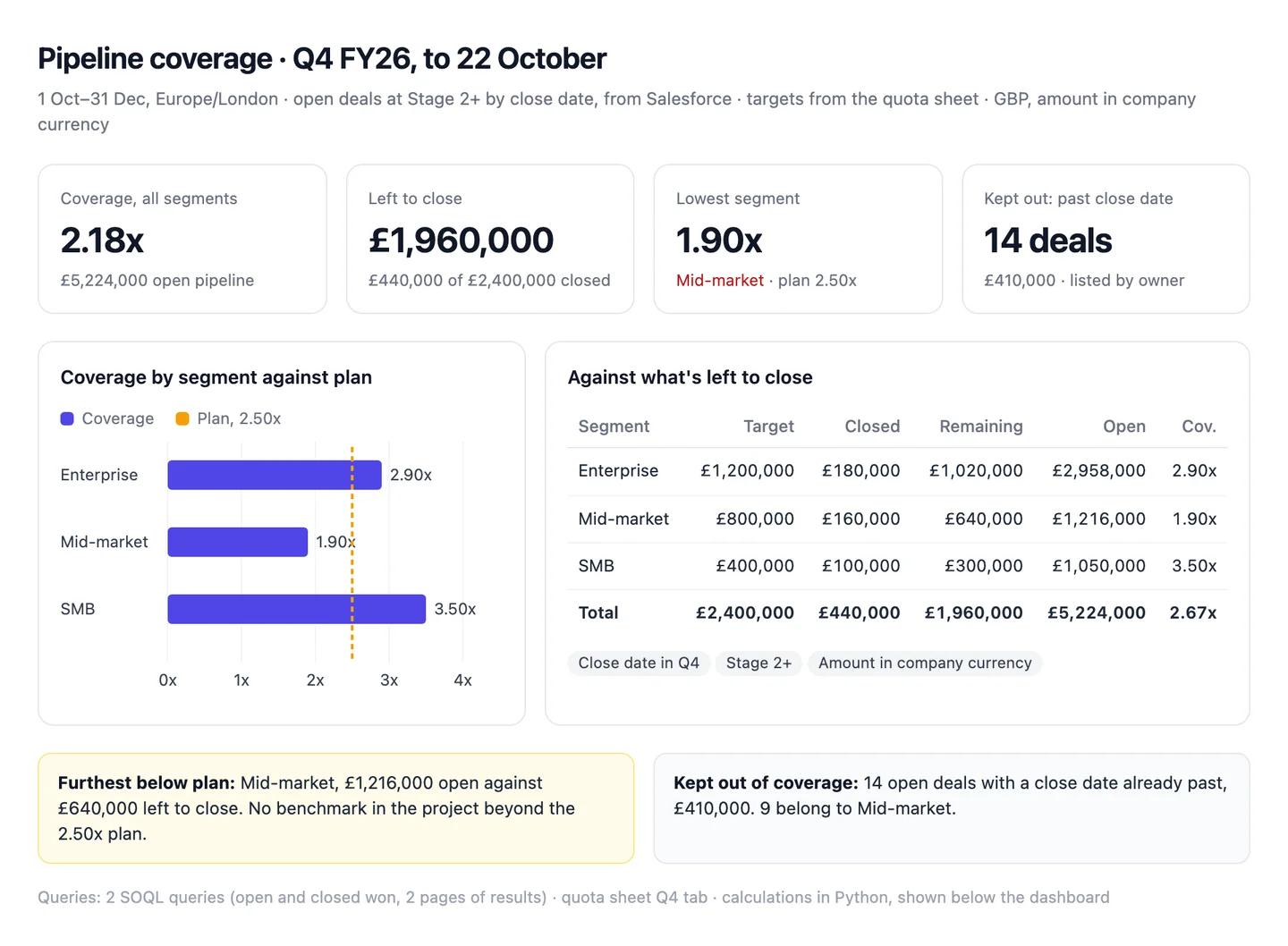
The numbers in this example
| Segment | Target | Closed won | Remaining | Open pipeline | Coverage |
|---|---|---|---|---|---|
| Enterprise | £1,200,000 | £180,000 | £1,020,000 | £2,958,000 | 2.90x |
| Mid-market | £800,000 | £160,000 | £640,000 | £1,216,000 | 1.90x |
| SMB | £400,000 | £100,000 | £300,000 | £1,050,000 | 3.50x |
| Total | £2,400,000 | £440,000 | £1,960,000 | £5,224,000 | 2.67x |
- Kept out: 14 open deals worth £410,000 with a close date already past, listed by owner.
- Furthest below plan: Mid-market at 1.90x, against the 2.50x the project plans to.
AI output auditRuns on every answerTotal coverage is 2.18x Assumption with £5,224,000 of open pipeline. Enterprise has £2,958,000 open against £1,020,000 left to close, so 2.90x Citation. A healthy pipeline needs 3x coverage Model knowledge, so every segment except SMB is short.
Assumption
Total coverage 2.18x
Divided by the full £2,400,000 target, while the segment rows divide by what's left to close. On the same basis the total is £5,224,000 ÷ £1,960,000 = 2.67x, as the table says. Two definitions on one dashboard, and the headline is the gloomier one.
Model knowledge
Healthy coverage is 3x
A rule of thumb from memory. Your project plans to 2.50x, which Enterprise clears, so the review would chase a shortfall that isn't there.
Citation
Enterprise coverage 2.90x
Both figures come from Salesforce, in company currency, with past-dated deals excluded. Safe to share.
Workflow 2
AI for sales forecasting: a weekly commit you can explain
Most forecast calls spend their first ten minutes on what changed since last week. Claude compares this week's forecast categories with last week's snapshot, lists every deal that moved in or out of Commit, and checks last quarter's week-4 call against what actually closed. It doesn't replace your forecasting tool; it explains it.
Uses
- Salesforce
- HubSpot
- Slack
Before you run it
- Salesforce or HubSpot connected, with forecast categories mapped to stages
- Last week's forecast snapshot attached as CSV (export it each Monday)
- Slack connected if reps post deal updates in a forecast channel; Claude only reads it
Show the full prompt (22 lines)Hide the prompt
Build this week's forecast roll-up for [Q4 FY26], week [4].

1. From [Salesforce / HubSpot], pull open and closed-won deals with a
   close date in the quarter: amount in company currency, stage,
   forecast category, close date, owner, record ID.
2. Our rollup is [cumulative / single category], as the project says.
   Build one table: category, this week, last week (from the attached
   snapshot), change. Don't add Closed to Commit if the rollup already
   includes it; say which rollup you used above the table.
3. List every deal that moved into or out of Commit since last week,
   with amount, old and new category, and old and new close date.
4. List deals whose close date moved out of the quarter, with record IDs.
5. For each moved deal, give the reason only if a field, a note, an
   activity or a message in [#forecast channel] says so, and quote it.
   Otherwise write "Reason not in the data".
6. From the attached Q3 week-4 snapshot and Q3 closed won, work out last
   quarter's forecast accuracy: 1 - |actual - commit| / actual.
7. Show the queries, the Slack search you ran and the code for the
   calculations.

Don't predict where the quarter will land. Report the categories as they
stand and what changed.
Forecast roll-up, Q4 week 4 (cumulative rollup, GBP)ArtifactExample from sample data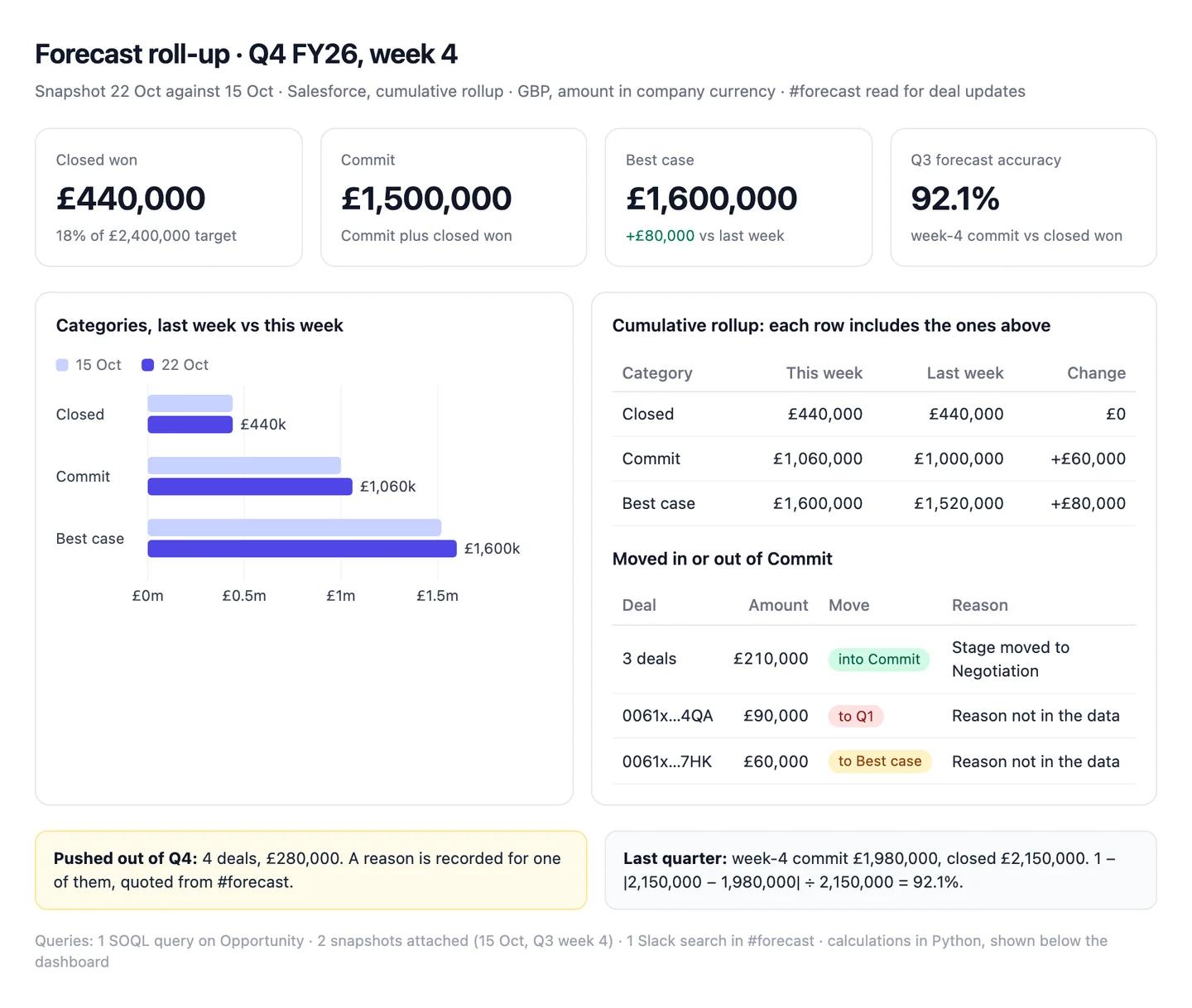
The numbers in this example
| Category | This week | Last week | Change |
|---|---|---|---|
| Closed | £440,000 | £440,000 | £0 |
| Commit (includes Closed) | £1,060,000 | £1,000,000 | +£60,000 |
| Best case (includes Commit) | £1,600,000 | £1,520,000 | +£80,000 |
- Into Commit: 3 deals, £210,000. Out of Commit: 2 deals, £150,000 (one pushed to Q1, one back to Best case).
- Pushed out of Q4: 4 deals, £280,000. Reason not in the data for 3 of them.
- Last quarter: week-4 commit £1,980,000 against £2,150,000 closed, so 92.1% accurate.
AI output auditRuns on every answerCommit stands at £1,500,000 Assumption once the £440,000 already closed is added. Two Enterprise deals left Commit because their legal review ran long Hallucination. Last quarter's week-4 commit landed within 8% of what closed Citation.
Assumption
Commit £1,500,000
Treats the rollup as single-category. It's cumulative, so the £1,060,000 Commit already includes the £440,000 closed, and adding it again counts it twice. Read out on the call, the team plans around £440,000 that doesn't exist.
Hallucination
Two deals slipped because of legal review
No field, note, activity or Slack message mentions legal review. Claude supplied a plausible cause, and a manager may chase the wrong blocker.
Citation
Q3 week-4 commit within 8% of actual
|£2,150,000 − £1,980,000| ÷ £2,150,000 = 7.9%, from the attached snapshot and Q3 closed won. Safe to share.
Workflow 3
AI for CRM hygiene: a weekly data-quality report with record IDs
Stale close dates, missing amounts and duplicate companies quietly bend every number on this page. Claude runs the same checks every Monday and returns each problem as a list of record IDs with an owner, so the fix is a person's job, not the assistant's. It also matches closed-won deals against Stripe, so a deal that never turned into a subscription shows up. The CRM-specific traps are in AI for CRM data.
Uses
- HubSpot
- Salesforce
- Stripe
Before you run it
- HubSpot or Salesforce connected; write tools switched off for this chat
- Stripe (or Chargebee) connected, for the booked-against-billed check
- The list of checks your team cares about, if it differs from the prompt
Show the full prompt (21 lines)Hide the prompt
Run this week's CRM hygiene checks on open deals and companies in
[HubSpot / Salesforce]. Read only: don't change any record.

1. Read every open deal. Page through all results and report how many
   deals you read and how many pages it took.
2. For each check, give the number of records, the value at stake
   (Amount in company currency) and the owner with the most:
   a. Open deals with a close date in the past.
   b. Deals at [stage] or later with no amount.
   c. Deals at [stage] or later with no logged activity in 30 days.
   d. Deals whose forecast category differs from their stage's mapping.
   e. Companies sharing a website domain with another company.
3. From Stripe, list deals closed won in the last 90 days with no
   active subscription for the same customer, matched by [field].
4. Put each check's records in a list under the table: record ID,
   name, owner, amount, the field that failed.
5. Don't add the checks together: one deal can fail more than one.
6. List deals in other currencies with their original amount.
7. Show the search filters, the Stripe calls and the code you used.

Don't say why a record is stale or duplicated unless a field shows it.
CRM hygiene, week of 19 October (312 open deals, 2 pages)ArtifactExample from sample data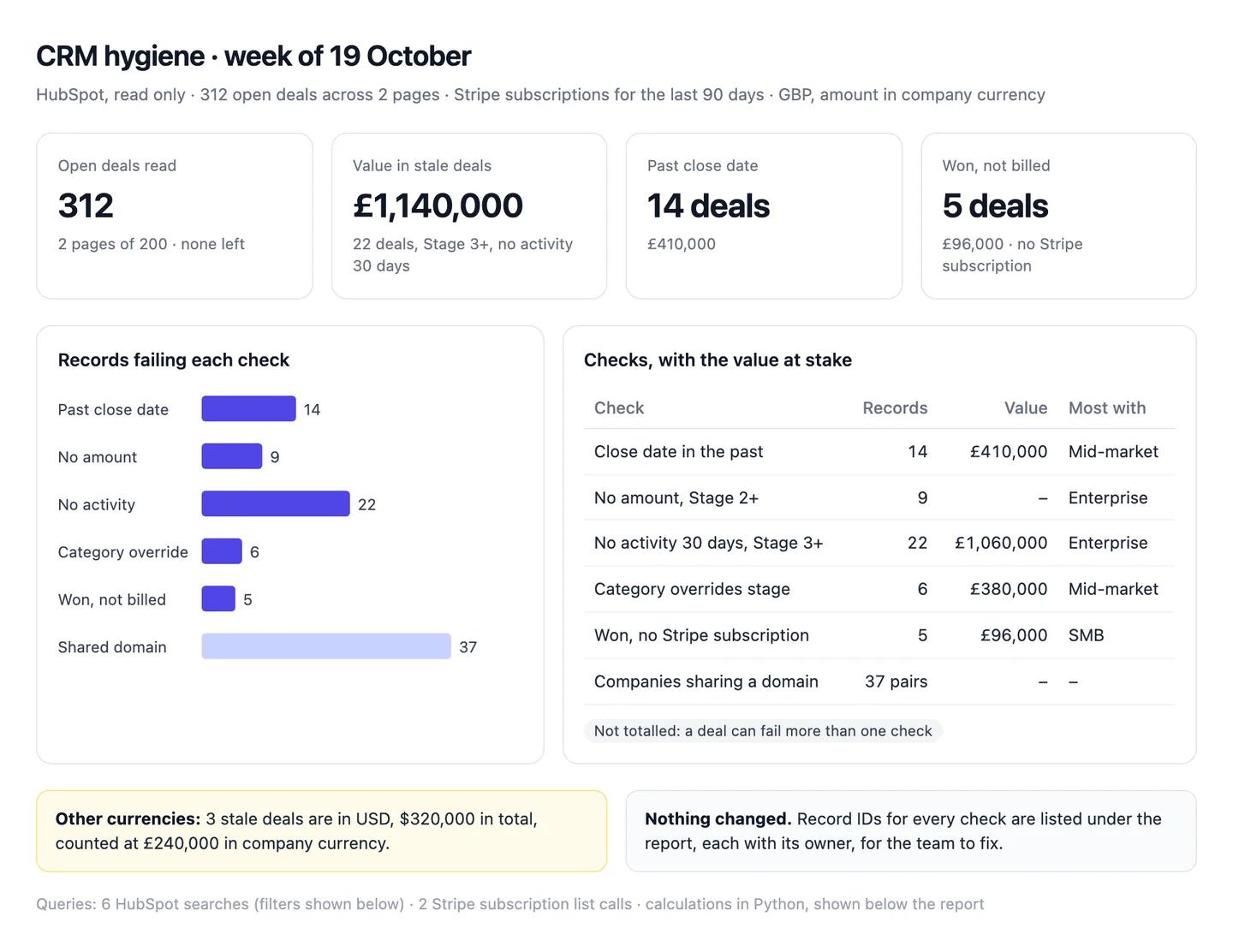
The numbers in this example
| Check | Records | Value at stake | Most with |
|---|---|---|---|
| Close date in the past | 14 deals | £410,000 | Mid-market team |
| No amount at Stage 2+ | 9 deals | none | Enterprise team |
| No activity in 30 days, Stage 3+ | 22 deals | £1,060,000 | Enterprise team |
| Category overrides the stage mapping | 6 deals | £380,000 | Mid-market team |
| Closed won, no Stripe subscription | 5 deals | £96,000 | SMB team |
| Companies sharing a domain | 37 pairs | n/a | n/a |
- Not totalled: a deal can fail more than one check.
- Other currencies: 3 of the stale deals are in USD ($320,000), counted at £240,000 in company currency.
AI output auditRuns on every answerStale deals at Stage 3 or later hold £1,140,000 Assumption. Deals with no activity for a month rarely close Model knowledge, so most of that can come out of the forecast. All 312 open deals were read, across two pages Citation.
Assumption
Stale deals hold £1,140,000
Adds up the Amount property, which is in each deal's own currency, so three USD deals worth $320,000 were counted as pounds. In company currency it's £1,060,000, as the table says. The tile overstates stale pipeline by £80,000.
Model knowledge
Inactive deals rarely close
A common belief, not something in your data. Pulling £1,060,000 out of the forecast on that basis is a decision for the team, not a finding.
Citation
312 of 312 open deals read
HubSpot returns 200 a page; Claude read both pages and the count matches the pipeline view. Nothing is missing from the checks.
Workflow 4
AI for territory and quota planning: capacity against next year's target
Planning season starts with one sum: will the team you'll have carry the number finance wants? Claude takes accounts by territory from the CRM, the rep roster from a spreadsheet and last year's attainment from the warehouse, and lays capacity against target territory by territory. The ramp for new hires is the input that moves the answer most, so the prompt makes you state it. Quota attainment is defined on sales rep quota attainment.
Uses
- Salesforce
- Snowflake
- Google Sheets
Before you run it
- Salesforce or HubSpot connected, for accounts by territory
- The rep roster as a Google Sheet or Excel file: name, territory, start date, quota
- Snowflake or BigQuery connected for last year's bookings and quotas, or a CSV
Show the full prompt (25 lines)Hide the prompt
Size next year's sales capacity against the target, by territory.

Target: [£9,000,000] bookings for [FY27]. Full quota per ramped AE:
[£600,000]. Ramp for new hires: [50% of quota for two quarters, then
100%].

1. From the attached roster, list AEs by territory, marking each as
   ramped or new, with start date.
2. From [Salesforce / HubSpot], count accounts by territory using
   [territory field]. Say how many accounts have no territory.
3. Work out quota capacity by territory: ramped AEs at full quota, new
   hires at the ramp above. Show the arithmetic for one new hire.
4. From [Snowflake / BigQuery], take last year's closed-won bookings and
   quota by rep, and work out average quota attainment. Say how many
   reps it covers and which ones you left out (for example, people who
   joined mid-year).
5. Build one table: territory, accounts, ramped AEs, new AEs, accounts
   per AE, quota capacity, share of capacity.
6. Under it: total capacity against target, expected bookings at last
   year's attainment, the gap, and how many ramped AEs at that
   attainment would close it.
7. Show the SQL, the CRM query and the code for the calculations.

Use only the ramp, quota and target written above. If one is missing,
ask before you assume it.
FY27 capacity by territory (GBP)ArtifactExample from sample data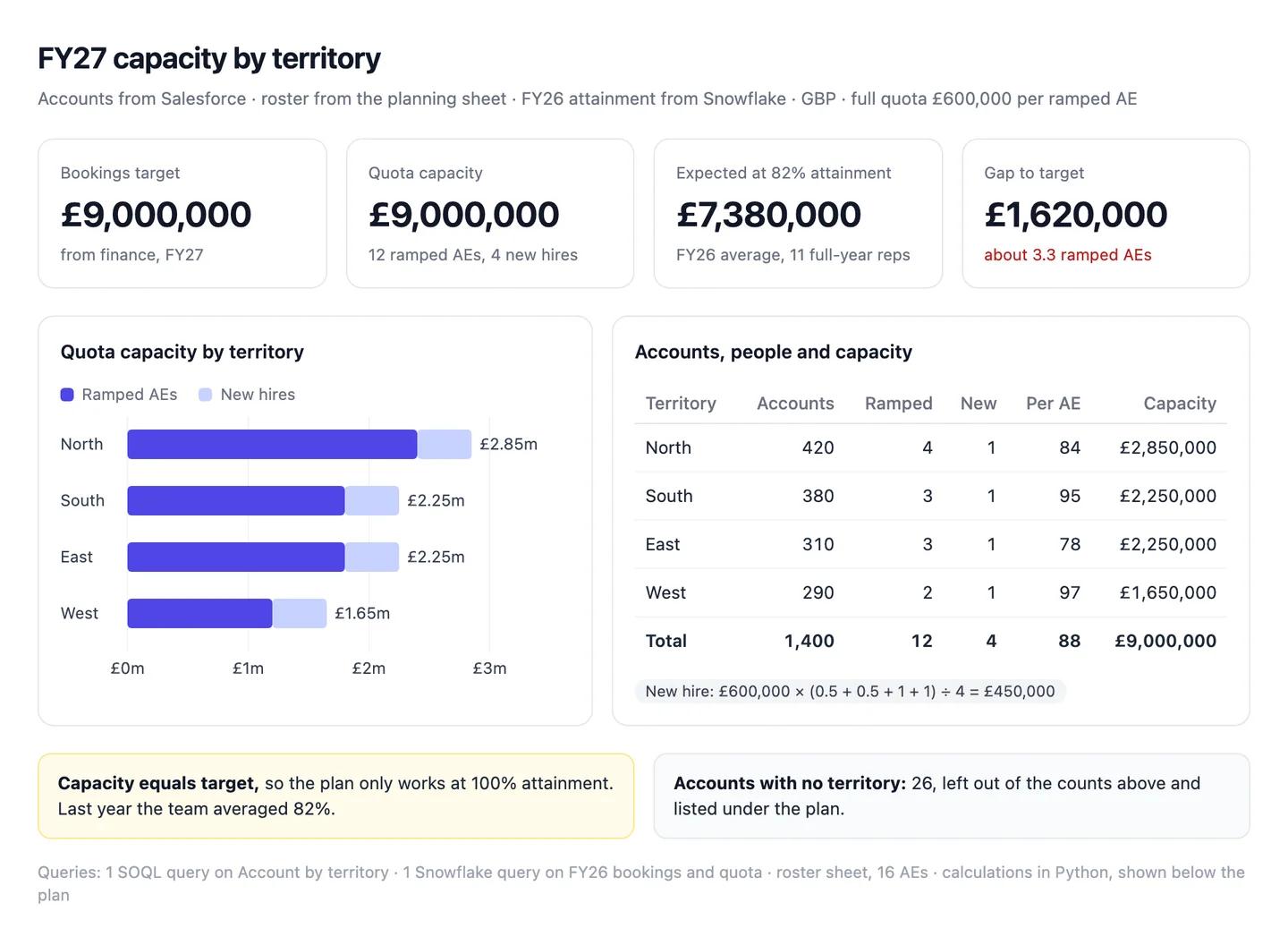
The numbers in this example
| Territory | Accounts | Ramped AEs | New AEs | Accounts per AE | Quota capacity |
|---|---|---|---|---|---|
| North | 420 | 4 | 1 | 84 | £2,850,000 |
| South | 380 | 3 | 1 | 95 | £2,250,000 |
| East | 310 | 3 | 1 | 78 | £2,250,000 |
| West | 290 | 2 | 1 | 97 | £1,650,000 |
| Total | 1,400 | 12 | 4 | 88 | £9,000,000 |
- Capacity equals the target. At last year's 82% average attainment that's £7,380,000 of bookings, £1,620,000 short.
- To close the gap: about 3.3 more ramped AEs at £492,000 each (£600,000 at 82%).
AI output auditRuns on every answerThe four Q1 hires add £1,800,000 of capacity, because new AEs reach full productivity after six months Assumption. Q1 is usually the slowest quarter Model knowledge, so set Q1 quotas lower. At last year's 82% average attainment Citation, the plan delivers £7,380,000.
Assumption
New AEs ramp to full quota in six months
The roster has no ramp data; this is the example ramp from the prompt's brackets, left unchanged. If your new AEs sit at 50% for three quarters instead of two, the four hires add £1,500,000, not £1,800,000.
Model knowledge
Q1 is the slowest quarter
Seasonality from memory, not your bookings history in Snowflake. Check last year's quarterly split before you shape quotas around it.
Citation
Average attainment 82%
Closed-won bookings over quota for the 11 reps who worked the full year, from Snowflake. Safe to use.
Workflow 5
AI for sales and marketing alignment: one funnel both teams agree on
Marketing and sales argue about the handoff because they count it differently. This workflow follows one cohort of leads through the lifecycle stages by source, using the dates HubSpot records when a contact enters each stage, so both teams look at the same people. Revenue by ad campaign is a different question, covered in Claude for marketing.
Uses
- HubSpot
- Salesforce
Before you run it
- HubSpot connected (or Salesforce, with lead conversion dates)
- Your MQL and SQL definitions from glossary.md
- A cohort old enough to have closed deals: a quarter that ended at least one sales cycle ago
Show the full prompt (23 lines)Hide the prompt
Build a funnel for the [Q2 FY26] cohort of MQLs, by original source.

1. From HubSpot, find contacts whose Date entered Marketing Qualified
   Lead stage falls in [1 April] to [30 June]. Page through every result
   and say how many contacts you read.
2. For each, read Original Traffic Source and the Date entered
   properties for Sales Qualified Lead and Opportunity. Use Date
   entered, not the legacy Became a ... date properties.
3. Follow the cohort to [30 September]: how many reached SQL, how many
   reached Opportunity, and how many have an associated deal closed won,
   with the amount in company currency.
4. Build one table by source: MQLs, SQLs, MQL to SQL %, opportunities,
   SQL to opportunity %, won, won value. Add a total row. Rates are
   from this cohort only.
5. List contacts with no Original Traffic Source separately, with the
   count.
6. Say how many contacts skipped a stage, and how you counted them.
7. Under the table, name the source with the lowest MQL to SQL rate and
   the source with the lowest SQL to opportunity rate, with numbers.
8. Show the search filters and the code for the calculations.

Don't explain why a source converts worse unless a property shows it.
Write "Reason not in the data" instead.
Q2 MQL cohort, followed to 30 SeptemberArtifactExample from sample data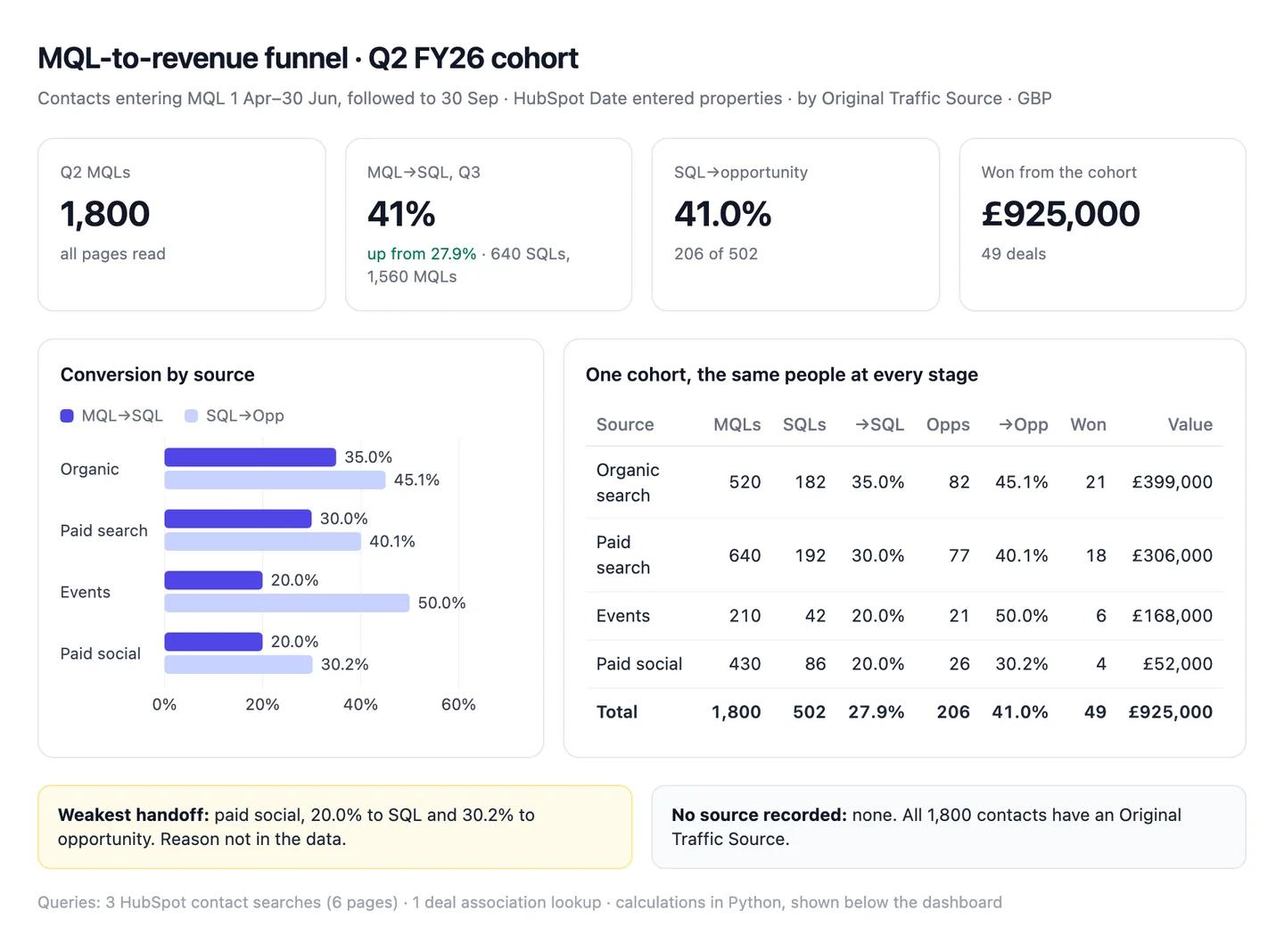
The numbers in this example
| Source | MQLs | SQLs | MQL→SQL | Opps | SQL→Opp | Won | Won value |
|---|---|---|---|---|---|---|---|
| Organic search | 520 | 182 | 35.0% | 82 | 45.1% | 21 | £399,000 |
| Paid search | 640 | 192 | 30.0% | 77 | 40.1% | 18 | £306,000 |
| Events | 210 | 42 | 20.0% | 21 | 50.0% | 6 | £168,000 |
| Paid social | 430 | 86 | 20.0% | 26 | 30.2% | 4 | £52,000 |
| Total | 1,800 | 502 | 27.9% | 206 | 41.0% | 49 | £925,000 |
- Weakest handoff: paid social, 20.0% to SQL and 30.2% to opportunity. Reason not in the data.
- Dates: Date entered properties throughout, one cohort, so every rate compares the same people.
AI output auditRuns on every answerIn Q3, 41% of MQLs became SQLs Assumption, up from 27.9% for the Q2 cohort. Paid social leads convert worse because they're earlier in their research Model knowledge. Of the 1,800 Q2 MQLs, 502 reached SQL Citation.
Assumption
Q3 MQL to SQL rate 41%
Divides SQLs created in Q3 by MQLs created in Q3, which aren't the same people: many Q3 SQLs were Q2 MQLs. Shared as it is, marketing reads a 13-point improvement that nothing in the cohort shows.
Model knowledge
Paid social leads are earlier in their research
A common explanation, not anything a property shows. It may be true, but it's a question to test with sales, not a finding for the review.
Citation
502 of 1,800 Q2 MQLs reached SQL
Counted from Date entered properties in HubSpot, one cohort, every page read. Safe to share.
Common pitfalls, team rules and the check before anything ships
Prompts reduce errors; they don't remove them. In a 2026 study of 14 models, the best produced working links more than 94% of the time, yet only 39 to 77% of their claims were accurate (Onweller et al., Cited but Not Verified, May 2026). A query that runs is the easy part.
Common pitfalls
- Created date for close date. "Q4 pipeline" built on create date counts deals that won't close for a year.
- Adding currencies together. Amount is in each deal's own currency. Summed as one, a dollar deal counts as pounds.
- Adding Closed to Commit twice. In a cumulative rollup Commit already includes it.
- Period rates instead of cohorts. SQLs this quarter divided by MQLs this quarter aren't the same people.
- Trusting a capped result. HubSpot returns 200 records a page (HubSpot Developers). A count of exactly 200 is one page.
- Mixing booked and billed. CRM ARR and Stripe MRR answer different questions, and both are right.
Rules for the team
- Definitions live in the project. Change them there, once, not in individual chats.
- Read-only by default. Claude lists record IDs; a person merges, closes or reassigns them.
- Board figures come from the approved snapshot. Claude can explain them, not restate them.
- Every reason gets a record. "Slipped because of legal" needs the note or the message that says so.
- Customer data stays in the Team workspace, never a personal account.
One check before anything leaves RevOps
Count audits every answer automatically, inside the chat, and it checks more than the numbers. For each claim it asks: did this come from a source, and does the source really say it? Does the reasoning hold, or does a conclusion go further than the data? Was a definition or a formula assumed without saying so? Is a statement from the model's memory rather than anything in the chat? It replies with a canvas where each claim is labelled a citation, an assumption, model knowledge or a hallucination, with the reasoning chain under it. A Commit figure that counts closed deals twice, a currency summed as another and a slipped deal explained by a reason nobody recorded all show up for what they are. Each workflow above shows an example.
Questions people ask
How do I use AI for RevOps?
Start with one shared assistant connected to the systems you already run, not a new platform. Write your stage, date and currency definitions into a Claude project, connect Salesforce or HubSpot read-only, then run the same few workflows each week: pipeline coverage, the forecast roll-up and CRM hygiene, with territory planning and funnel reviews each quarter.
How much does it cost to set up AI for a RevOps team?
The Claude side is a subscription: Claude Pro is $20 a month ($17 billed annually), and a Team standard seat is $25 a month or $20 billed annually (claude.com/pricing). The connectors for HubSpot, Stripe, Chargebee, Slack, Snowflake and BigQuery aren't sold separately; you need an account with each tool. Salesforce in Claude is in beta on all paid plans, for organisations Salesforce approves.
Can Claude connect to Salesforce?
Yes, in beta. A Salesforce admin requests access and turns on Salesforce's MCP server, a Claude Owner enters the connection details, and each person signs in with their own Salesforce account, so Claude sees only what they can. It can update records too, and asks before each change by default.
Why does AI give a different pipeline number from my CRM report?
Usually a different date field, rollup or currency, or a result that stopped at one page. HubSpot resets the close date when a deal is marked won, a cumulative Commit already includes Closed, Amount is in each deal's own currency, and HubSpot's search returns 200 records a page.
Can AI do sales forecasting?
It can roll the forecast up, explain what changed since last week and measure last quarter's accuracy against what closed. Predicting the landing number is a different job: keep that in your CRM's forecasting tool or with the people on the call, and ask Claude to show the deals behind every figure.
Sources
- Anthropic Help Centre: What are projects? (checked 22 October 2026)
- Anthropic Help Centre: Getting started with custom connectors using remote MCP (checked 22 October 2026)
- Anthropic Help Centre: Set up Salesforce in Claude for your organization (checked 22 October 2026)
- Anthropic: Bringing Salesforce into Claude (15 September 2026) (checked 22 October 2026)
- Anthropic Help Centre: Use Google Workspace connectors (checked 22 October 2026)
- Anthropic Help Centre: Upload files to Claude (checked 22 October 2026)
- Anthropic: Claude pricing (checked 22 October 2026)
- HubSpot Developers: Integrate with the remote HubSpot MCP server (checked 22 October 2026)
- HubSpot Knowledge Base: Default deal properties (checked 22 October 2026)
- HubSpot Knowledge Base: Add and edit your account currencies (checked 22 October 2026)
- HubSpot Knowledge Base: Use lifecycle stages (checked 22 October 2026)
- HubSpot Knowledge Base: Set up the forecast tool (checked 22 October 2026)
- HubSpot Knowledge Base: Track the accuracy of forecasts (checked 22 October 2026)
- HubSpot Knowledge Base: Set an account's fiscal year (checked 22 October 2026)
- Salesforce Trailhead: Configure sales forecasting in Salesforce (checked 22 October 2026)
- Salesforce Help: Rollup methods for pipeline forecasts (checked 22 October 2026)
- Salesforce Help: Define your fiscal year (checked 22 October 2026)
- Stripe Docs: Model Context Protocol (MCP) (checked 22 October 2026)
- Stripe Docs: Billing analytics (MRR and churn definitions) (checked 22 October 2026)
- Chargebee Docs: Chargebee MCP servers (checked 22 October 2026)
- Chargebee Docs: Data Lookup MCP server (checked 22 October 2026)
- Slack: MCP server (checked 22 October 2026)
- Snowflake: Snowflake-managed MCP server (checked 22 October 2026)
- Google Cloud: Use the BigQuery MCP server (checked 22 October 2026)
- OpenAI Developers: Connect a custom MCP server to ChatGPT (checked 22 October 2026)
- Walters and Wilder: Fabrication and errors in the bibliographic citations generated by ChatGPT, Scientific Reports (September 2023) (checked 22 October 2026)
- Onweller et al.: Cited but Not Verified (May 2026) (checked 22 October 2026)