
Claude for marketing teams
AI for your role · Facts checked 22 October 2026
AI is good at marketing's legwork: pulling campaign numbers, grouping keywords, drafting posts and reading competitors. It misleads wherever a figure goes public, because every ad platform counts conversions its own way. Give Claude that context in a shared project, connect GA4, Google Ads and HubSpot read-only, and check each answer before it ships.
Context first: what Claude has to know about your numbers
Most bad AI marketing numbers aren't hallucinations. They're a real figure answering a different question from the one you asked. Every platform counts a conversion its own way, and an assistant that doesn't know which way picks one silently. Write the differences down once, in the project, and Claude can say which one each figure uses.
| What differs | Why it changes the answer | What to write in the project |
|---|---|---|
| Attribution windows | Google Ads counts conversions within 30 days of a click by default for Search and Display, adjustable from 1 to 90 days (Google Ads Help). GA4's default lookback for most key events is 90 days (Analytics Help). Meta offers a 1- or 7-day click window plus 1-day view-through (Meta Business Help); LinkedIn's Campaign Manager defaults to 90-day click and 90-day view (LinkedIn Help) | "Label every platform figure with its attribution setting. Never add conversions across platforms as if they were deduplicated." |
| Which date a conversion lands on | Google Ads "reports conversions from the date and time of the click"; other tools, GA4 included, attribute them to the conversion date (Google Ads Help). The same month can hold different conversions in each | "When Google Ads and GA4 disagree, say which date each one uses before explaining the gap." |
| Time zones | Google Ads reports in the account's time zone; GA4 in the property's, and a visit is recorded on the property's date, not the visitor's (Google Ads Help; Analytics Help) | "State the date range and time zone at the top of every table." |
| Modelled conversions | Meta says it "may use statistical modelling where conversion data may be missing or partial" (Meta Business Help). Google Ads models cross-device conversions. Some reported conversions are estimates | "Say when a platform's figures include modelled conversions." |
| ROAS format | Google Ads shows ROAS as a percentage, "total conversion value divided by total spend" (Google Ads Help glossary), so 500% and 5x are the same campaign. Averaging daily ROAS gives a different answer from dividing the totals | "ROAS is a ratio (4.2x), computed from totals for the period. Never average daily ratios." |
| Platform revenue against CRM revenue | Conversion value is what the platform was told a conversion was worth, and value rules can multiply it by audience, device or location (Google Ads Help, Target ROAS). Closed-won revenue in HubSpot is a different number | "Platform ROAS and CRM ROAS are reported side by side, never merged." |
| Bounce rate | Universal Analytics counted single-page sessions as bounces. GA4 counts sessions that weren't engaged, so a visitor who reads one page for five minutes was a bounce in UA and isn't in GA4 (Analytics Help) | "Bounce rate means GA4's definition. Don't compare it with UA benchmarks." |
| Email opens | Apple's Mail Privacy Protection loads emails without a person opening them, so "opens and open-related metrics are inflated" (Mailchimp Help). HubSpot filters these out by default, so its open rates run lower than tools that don't | "Judge email on clicks and replies, not opens." |
| Numbers with no source | Ahrefs says search volume in any SEO tool "is always an estimation" (Ahrefs Help), and with no SEO tool connected a model will invent one. In copy, it will add a statistic: 18% of GPT-4's citations in one study were fabricated (Walters and Wilder, Scientific Reports, 2023) | "If a figure isn't in a connected tool or an attached file, write [NO DATA]." |
The definitions themselves are on return on ad spend, attribution modelling and bounce rate. The project instructions in the setup below turn this table into rules Claude follows.
The stack: Claude and Count in the middle, your tools around it
Most marketing teams don't need a new platform. Claude sits in the middle: a project holds the context above, a skill holds your house style, and official MCP servers connect it to the tools that already hold your data. Count sits beside it and checks the answers.
If your company runs ChatGPT instead.
ChatGPT Business costs the same ($25 a user monthly, $20 annually) and adds custom MCP servers from its plugins page, but a server has to be reachable at a public HTTPS address or through a Secure MCP Tunnel (OpenAI Developers). The two Google servers run on your laptop, so in ChatGPT an export is usually simpler. More in ChatGPT for marketing.
Your tools
 Google Analytics
How Claude reaches it
Google's connector, installed on a computer by IT
Good to know
Reads your reports; can't change anything. Google labels it experimental
 Google Ads
How Claude reaches it
Google's connector, installed on a computer by IT
Good to know
Reads campaigns and results; can't change bids, pause campaigns or create ads
 HubSpot
How Claude reaches it
Sign in from Claude's connector settings, after a HubSpot admin sets it up once
Good to know
Can also publish blog posts and landing pages and draft emails, so approve each change. It can't convert currencies
 Ahrefs
How Claude reaches it
Sign in from Claude's connector settings
Good to know
Needs an Ahrefs Lite plan or above; each lookup uses some of your Ahrefs API allowance
 Notion
How Claude reaches it
Sign in from Claude's connector settings
Good to know
Can read and edit pages, so approve each change
 Meta
MetaHow Claude reaches it
Sign in from Claude's connector settings
Good to know
New: in open beta since April 2026. Check what it can do for your account and approve any change
 LinkedIn
How Claude reaches it
Export a report from Campaign Manager and upload it to the chat
Good to know
No official connector yet. Put the conversion window in the file name so Claude can label the numbers
 ClaudeMarketing project
 Count
CountHow Claude reaches it
Count's MCP server, added to Claude by the Count desktop app
Good to know
Audits every answer automatically, claim by claim: what came from a source, what was assumed, what was a guess. What Count is
See which claims rest on an assumption
Count audits every answer Claude gives you, automatically. Each claim gets a label and a reasoning chain, so an unstated attribution window, a citation that doesn't say what Claude says it does, or a conclusion the data doesn't support shows up before your audience finds it.
Set it up once: the project, the connectors, the rules
You don't need to be technical for most of this. The steps marked You happen in Claude's settings and take about half an hour between them. One step needs someone with access to your company's Google Cloud, and CSV exports cover the gap until it's done. Step 1 gives the project the context from the top of this page, so every workflow below starts from your definitions instead of a guess.
Technical steps for Google Analytics and Google Ads (for IT)
- Both servers need a Google Cloud project and Application Default Credentials. Google Analytics needs the
analytics.readonlyscope (GA MCP README; Google Ads MCP). - In Claude Desktop, open Settings > Developer > Edit Config, add both servers, then quit and restart (connect local servers).
- Leave off the Google Analytics
--allow-writeflag; the Google Ads server is read-only already.
Keep Claude reading, not changing, until you trust it.
Google Analytics and Google Ads can only read. HubSpot, Meta and Notion can make changes, so when Claude asks to edit something there, approve it one at a time and never choose "Allow always". Claude's Research mode can act without asking, so turn off those tools' editing options in the chat's tools menu before you start a Research run.
Setup walkthrough
About 20 minutes
- 1
Create a shared project and give it the context
You10 minIn Claude, open Projects and create one called "Marketing", then share it with your team (how projects work; more in Claude projects). Download the file below: it's the context table from the top of this page plus the rules that go with it. Fill in the parts in brackets and paste it into the project's instructions. Then upload your brand guide and your last three monthly reports to the project.
Marketing project: context and rulesShow the full prompt (77 lines)Hide the prompt
You work with [Company]'s marketing team. This file is the context and the
rules for every answer in this project. When you apply a rule, say so.

## Context: how our platforms count
Every platform counts a conversion its own way. Use this to label figures,
not to "correct" them.
- Attribution windows. Google Ads: 30 days after a click by default
  (ours: [setting]). GA4: 90-day lookback for most key events, 30 days for
  first_visit and first_open; data-driven model. Meta: 1- or 7-day click,
  plus 1-day view-through (ours: [setting]). LinkedIn Campaign Manager:
  90-day click and 90-day view by default (ours: [setting]).
- Dates. Google Ads puts a conversion on the date of the click. GA4 and
  most other tools put it on the date of the conversion.
- Time zones. Google Ads reports in the account's time zone ([zone]);
  GA4 in the property's ([zone]).
- Modelled conversions. Meta and Google Ads may include statistically
  modelled conversions where data is missing. Say when a figure does.
- ROAS. Google Ads shows it as a percentage; we write it as a ratio.
- Platform revenue vs CRM revenue. Conversion value is what a platform
  was told a conversion was worth (value rules can change it). Closed-won
  revenue in HubSpot is a different number.
- Bounce rate. GA4 counts sessions that weren't engaged; Universal
  Analytics counted single-page sessions. Never compare the two.
- Email opens. Apple Mail Privacy Protection inflates opens. Judge email
  on clicks and replies.
- Search volume. Any SEO tool's volume is an estimate; only use the
  volumes Ahrefs returns in this chat.

## Definitions
- ROAS = total conversion value / total spend for the period, written as a
  ratio (4.2x). Compute from totals. Never average daily ROAS.
- CAC = [our formula, e.g. total sales and marketing spend / new customers].
- Bounce rate = GA4's definition (sessions that were not engaged).
- "Pipeline" = HubSpot deals at or past [stage]. "Revenue" = closed-won
  deal amount in HubSpot, in [currency].
- Our fiscal month runs [calendar month / 4-4-5]. Our reporting time zone
  is [time zone].

## Attribution
- Label every platform figure with its source and attribution setting:
  Google Ads conversion window, GA4 lookback and model, Meta and LinkedIn
  attribution setting. If you can't read the setting, write
  [WINDOW UNKNOWN] next to the figure.
- Never add conversions across platforms as one total without saying it
  is not deduplicated.
- Google Ads reports conversions on the click date; GA4 on the conversion
  date. When they disagree, say which date each uses before explaining
  the gap.
- Report platform ROAS and CRM ROAS side by side. Never merge them.

## Numbers
- Use connected tools or attached files only. If a figure isn't available,
  write [NO DATA]. Never estimate a search volume, a conversion rate or a
  benchmark.
- Do calculations in code and show the code.
- Show the query you ran (GAQL for Google Ads, the GA4 report definition,
  the HubSpot search) under every table.
- State the date range and time zone at the top of every table.

## Claims and copy
- Every statistic in copy needs the original source URL and the sentence
  containing the number, or it is marked [SOURCE NEEDED] and kept out of
  the draft.
- Competitor claims come from their current pages, with URL and date.
  Anything from memory goes under "Unconfirmed".
- Write in our brand voice (see the brand-voice skill). British spelling.

## Tools
- Read only. Don't create, edit or publish anything in HubSpot, Notion or
  the CMS unless my message asks for that exact change.
- If a tool returns a capped or paged result, say how many rows you got
  and whether there were more.

## When you're unsure
- Ask one clarifying question rather than choosing a definition yourself.
- Count audits every answer automatically. Keep the queries and files you
  used visible in the chat so it can check each claim against them.
- 2
Let Claude write your brand voice from your website
You10 minA skill is a short file that tells Claude how you write, and Claude can write it for you. In a new chat, switch on web search and code execution, paste the prompt below with your website's address, and Claude reads your site and gives you back the skill as a file. Read it, fix anything that sounds off, then upload it under Customize > Skills (how to add a skill). On a Team plan, an Owner can switch it on for everyone. There's a worked example in Claude skills for marketing.
Brand-voice skill from your websiteShow the full prompt (28 lines)Hide the prompt
Read our website, [yourcompany.com], and turn how we write into a brand-voice skill I can upload to Claude. 1. Use web search to open: the homepage, two product or service pages, the pricing page, the about page and our three most recent blog posts. List every URL you read. 2. From those pages only, work out how we write: - Our voice in three words, each with one sentence quoted from the site that shows it, and its URL. - Words and phrases we use often, and ones we never use. Only list what the pages show; mark anything you're inferring. - Sentence habits: typical length, how headlines are written, whether we use questions, exclamation marks or emoji. - Spelling and formatting: British or American spelling, how we write numbers, dates and our product names, heading capitalisation. - What we don't say: claims we avoid, tones we don't use. 3. Write it as a skill: a file called SKILL.md that starts with --- name: brand-voice description: [Company]'s house style. Use whenever writing or editing marketing copy: blog posts, emails, landing pages, ads, social posts. --- then the guide above, plus three short before-and-after rewrites that turn generic copy into our voice. 4. Quote real sentences from the site. Don't invent examples of our copy. Keep the whole file under 300 lines. 5. Package it as brand-voice.zip (a brand-voice folder containing SKILL.md) so I can download it and upload it under Customize > Skills. - 3
Connect the tools that sign in from Claude
You2 min eachThese connect like any other app: open Customize > Connectors, pick the tool and sign in (connectors guide). On a Team plan, an Owner switches each one on for the company first. HubSpot needs one extra step from a HubSpot admin, who creates the connection in HubSpot's settings and gives you two codes to paste in. Tap a tool on the map above for its own guide.
- 4
Connect Count
You2 minDownload the Count desktop app and follow its walkthrough; it adds Count to Claude for you. After that, Count audits every answer automatically, without leaving the chat. What Count is.
- 5
Connect Google Analytics and Google Ads
IT or data teamAbout 30 minGoogle's connectors don't sign in from Claude. They're installed on a computer and use a Google Cloud project, so they work in the Claude desktop app rather than the browser. Send whoever looks after Google Cloud the technical steps below. Until then, export the reports you need as CSV and upload them to the chat.
- 6
Try it on a month you already know
You10 minRun the first workflow on last month and compare it with the report you actually sent. If the numbers differ, the difference is usually a definition to add to the project instructions.
Workflow 1
AI for campaign reporting: a monthly channel report you can defend
The report most teams rebuild by hand every month. Claude pulls spend and conversions from Google Ads, GA4 and Meta, reads the LinkedIn export, and lays them side by side with each platform's attribution setting printed next to its numbers. What you get is a table you could send, plus the queries behind it.
Uses
- Google Ads
- Google Analytics
- Meta
- LinkedIn
Before you run it
- Google Ads, Google Analytics and Meta connected (setup steps 3 and 5), or their CSV exports
- The LinkedIn Campaign Manager export for the month, as CSV, with the conversion window in the file name
- Last month's sent report attached, so Claude can match its layout
Show the full prompt (26 lines)Hide the prompt
Build last month's paid channel report.

Date range: [1 Month YYYY] to [last day], in our reporting time zone.

1. From Google Ads, pull spend, clicks, conversions and conversion value
   by campaign type (Search, Performance Max, Display, YouTube). Read the
   conversion window for the primary conversion action and print it.
2. From GA4, pull sessions, engaged sessions and key events by session
   default channel group, using the property's reporting attribution
   model and lookback. Print both.
3. From Meta, pull spend, results and result value by campaign, and
   print the attribution setting each campaign uses. Say whether the
   results include modelled conversions.
4. From the attached LinkedIn export, take spend, conversions and
   conversion value. The conversion window is in the file name; print
   it. If it isn't there, write [WINDOW UNKNOWN].
5. Build one table: channel, spend, conversions, conversion value, ROAS
   (ratio, from totals), attribution setting. Add a total row for spend
   only. Don't total conversions across platforms.
6. Under the table, list the three biggest month-on-month changes against
   the attached report, with the numbers both months.
7. Show the GAQL, the GA4 report definition, the Meta call and the code
   you used for the calculations.

Don't explain why a number moved unless the data shows it. Write
"Cause not in the data" instead.
Paid channels, September (Europe/London)ArtifactExample from sample data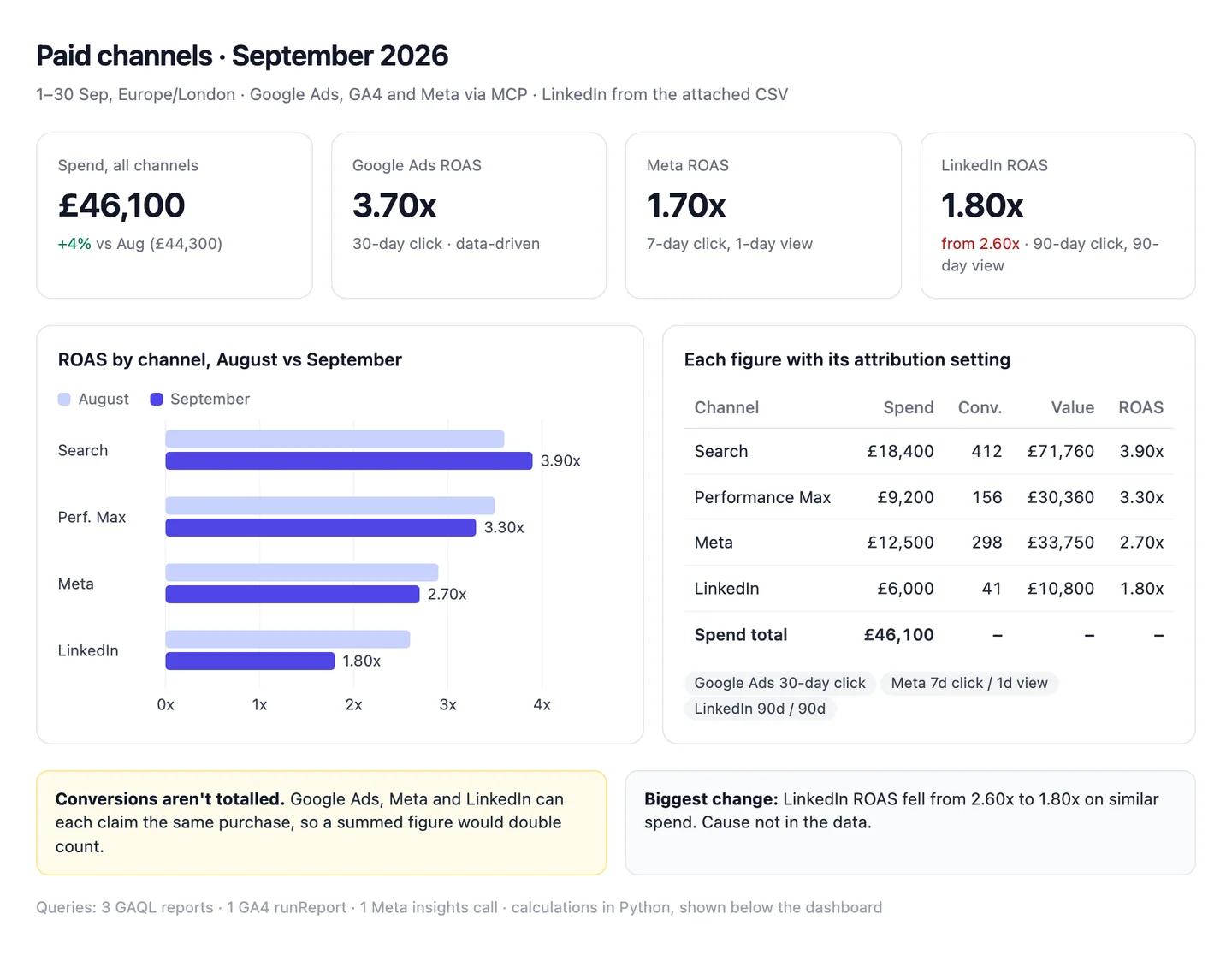
The numbers in this example
| Channel | Spend | Conv. | Conv. value | ROAS | Attribution setting |
|---|---|---|---|---|---|
| Google Ads: Search | £18,400 | 412 | £71,760 | 3.90x | 30-day click |
| Google Ads: Performance Max | £9,200 | 156 | £30,360 | 3.30x | 30-day click |
| Meta | £12,500 | 298 | £33,750 | 2.70x | 7-day click, 1-day view |
| £6,000 | 41 | £10,800 | 1.80x | 90-day click, 90-day view | |
| Spend total | £46,100 |
- Not totalled: conversions. Meta and Google Ads can both claim the same purchase.
- Biggest change: LinkedIn ROAS 1.80x, down from 2.60x in August on similar spend. Cause not in the data.
AI output auditRuns on every answerPaid spend was £46,100 in September. Search returned 3.90x ROAS Citation, Meta 1.70x Assumption and LinkedIn 1.80x. Meta is reported on a 7-day click, 1-day view setting Model knowledge, so its conversions are counted on the same basis as last month.
Assumption
Meta ROAS 1.70x
Worked out as (value − spend) ÷ spend, which is ROI, not ROAS. ROAS is value ÷ spend: £33,750 ÷ £12,500 = 2.70x, as the table says. Shared as it is, Meta looks 37% worse than it is.
Model knowledge
Meta: 7-day click, 1-day view
The model didn't read this from your Meta account; it's the setting it expected. If yours is 1-day click, Meta is counted differently from everything else in the report.
Citation
Search ROAS 3.90x
£71,760 ÷ £18,400, both straight from Google Ads. Safe to share.
Workflow 2
AI for marketing attribution: platform ROAS against CRM revenue
Ad platforms report the value they were told a conversion was worth. HubSpot knows which deals closed. Putting the two side by side by campaign is usually where the month's real finding is: the campaign that looks best in Google Ads is often not the one that closed revenue. HubSpot's own revenue attribution reports need Marketing Hub Enterprise (HubSpot Knowledge Base); this workflow gets a first answer on any tier.
Uses
- Google Ads
- HubSpot
Before you run it
- Google Ads and HubSpot connected
- The HubSpot property your team uses for a deal's original campaign (for example the contact's Original Traffic Source drill-down), named in the prompt
- A date range long enough for deals to close: a quarter is safer than a month
Show the full prompt (23 lines)Hide the prompt
Compare Google Ads ROAS with CRM revenue by campaign for [quarter].

1. From Google Ads, pull spend and conversion value by campaign for the
   period. Print the conversion window and whether conversion value rules
   are active.
2. From HubSpot, find closed-won deals created in the period whose
   associated contact has Original Traffic Source = Paid Search, and
   read [campaign property] to match each deal to a Google Ads campaign.
   Page through all results; report how many you retrieved and confirm
   none were left.
3. Build one table: campaign, spend, platform conversion value, platform
   ROAS, HubSpot closed-won amount, CRM ROAS, number of deals. ROAS as a
   ratio from totals.
4. List deals in other currencies separately with their original amount.
   Don't convert them.
5. List campaigns with spend but no matched deals, and deals with a
   campaign value that matches no Google Ads campaign.
6. Under the table, name the campaign with the largest gap between
   platform and CRM ROAS in each direction, with both numbers.
7. Show the GAQL and the HubSpot search filters you used.

Don't call either ROAS "true". They measure different things; say what
each one counts.
Google Ads against HubSpot closed-won, Q3ArtifactExample from sample data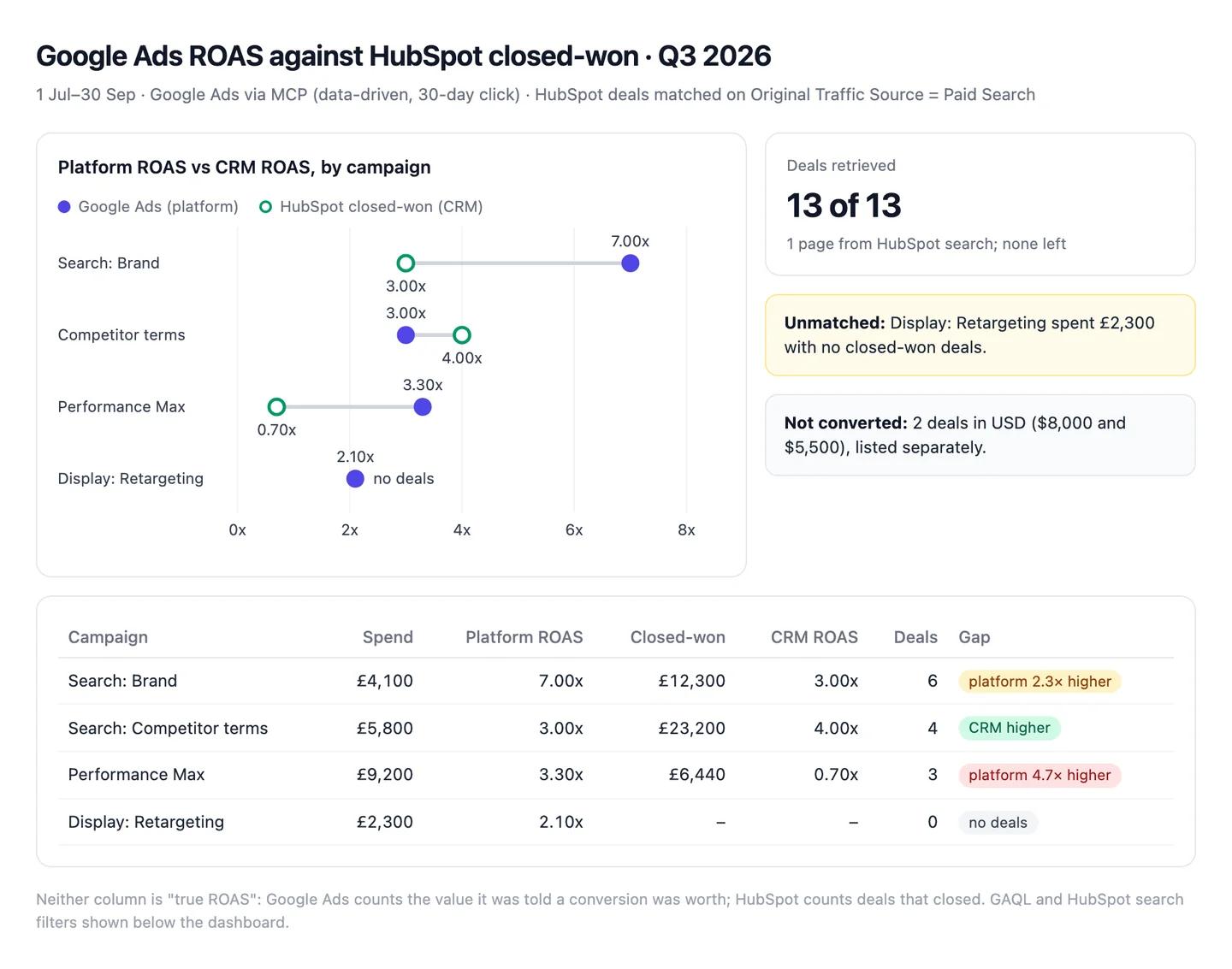
The numbers in this example
| Campaign | Spend | Platform ROAS | Closed-won | CRM ROAS | Deals |
|---|---|---|---|---|---|
| Search: Brand | £4,100 | 7.00x | £12,300 | 3.00x | 6 |
| Search: Competitor terms | £5,800 | 3.00x | £23,200 | 4.00x | 4 |
| Performance Max | £9,200 | 3.30x | £6,440 | 0.70x | 3 |
| Display: Retargeting | £2,300 | 2.10x | none | none | 0 |
- Largest gaps: Performance Max claims 3.30x and closed 0.70x. Brand claims 7.00x and closed 3.00x. Competitor terms is the one campaign that closed more than Google Ads reports.
- Not converted: 2 deals in USD ($8,000 and $5,500), listed separately.
- Unmatched: 1 campaign with spend and no deals (Display: Retargeting).
AI output auditRuns on every answerPerformance Max closed 0.70x Assumption against the 3.30x Google Ads reports, the biggest gap of any campaign. Brand's platform ROAS is inflated by people who'd have bought anyway Model knowledge. All 13 matching deals were retrieved Citation from HubSpot.
Assumption
Performance Max closed 0.70x
Deals were matched to campaigns by the contact's first traffic source. A deal that came through Performance Max but first arrived from a Brand search counts as Brand, so Performance Max may look worse than it is.
Model knowledge
Brand ROAS is inflated by people who'd have bought anyway
A common belief, not something in your data. Fine as a question to test; not a finding to put in the board pack.
Citation
13 of 13 deals retrieved
HubSpot returned every matching deal, so none are missing from the totals.
Workflow 3
AI for SEO: keyword clusters and content briefs from Ahrefs
With Ahrefs connected, Claude can pull real keyword data, group it by what the searcher wants, and match each group to a page you have or one you should write. Without a connected SEO tool it will guess volumes, so this workflow only works with the connector on.
Uses
- Ahrefs
- Notion
Before you run it
- Ahrefs connected (Lite plan or above; each pull uses API units)
- A list of your existing URLs on the topic, pasted or attached
- Your brief template in Notion, if you want the briefs written there
Show the full prompt (21 lines)Hide the prompt
Build keyword clusters for [topic] in [country] using Ahrefs data only.

1. Pull matching terms and related terms for [seed keywords]. Keep
   keywords with a volume of at least [10]. Report how many keywords you
   pulled and how many API units it used, if the tool says.
2. Group them by search intent: what the searcher wants to read or do,
   not by shared words. Name each cluster in plain words.
3. For each cluster, give: intent (informational, commercial,
   transactional), number of keywords, combined volume, the highest-
   volume keyword, and its keyword difficulty.
4. Match each cluster to one of our existing pages [URLs], or say "New
   page". Check our current position for the cluster's main keyword in
   Ahrefs and print it, or "Not ranking".
5. For the three clusters with the most volume we don't rank for, draft
   a brief: target keyword, the question the page answers, the sections
   the top three results share, and what they all miss.
6. Any keyword with no volume returned stays in a separate list. Don't
   estimate it.

Every number comes from an Ahrefs tool call in this chat. Show which
call each table came from.
Clusters for "customer onboarding", USArtifactExample from sample data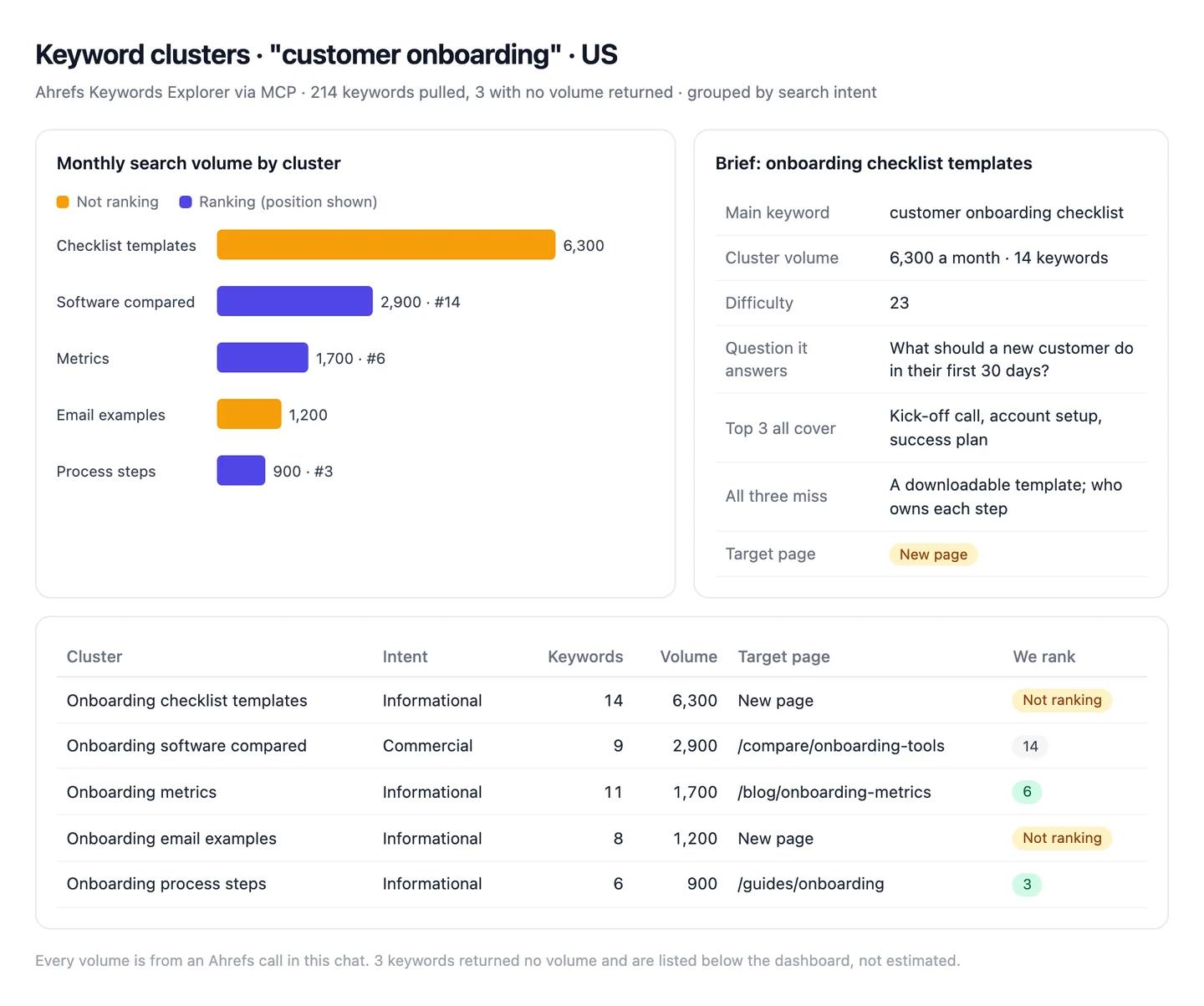
The numbers in this example
| Cluster | Intent | Keywords | Volume | Target page | We rank |
|---|---|---|---|---|---|
| Onboarding checklist templates | Informational | 14 | 6,300 | New page | Not ranking |
| Onboarding software compared | Commercial | 9 | 2,900 | /compare/onboarding-tools | 14 |
| Onboarding metrics | Informational | 11 | 1,700 | /blog/onboarding-metrics | 6 |
| Onboarding email examples | Informational | 8 | 1,200 | New page | Not ranking |
| Onboarding process steps | Informational | 6 | 900 | /guides/onboarding | 3 |
- No volume returned: 3 keywords, listed separately and not estimated.
- Brief written for: onboarding checklist templates (6,300 a month, not ranking).
AI output auditRuns on every answerOnboarding checklist templates is the biggest gap: 6,300 searches a month Citation, informational intent Assumption, and a keyword difficulty of 23 Hallucination, so it's an easy win for a new page.
Hallucination
Keyword difficulty 23
No Ahrefs lookup returned this number; the model made it up. The "easy win" it points to may not be easy at all.
Assumption
The cluster is informational
The model's judgement of what searchers want, not Ahrefs data. If they actually want to buy, a template page won't rank.
Citation
6,300 searches a month
The sum of 14 volumes Ahrefs returned. Safe to use.
Workflow 4
AI for email and content marketing: drafts where every statistic has a source
Drafting is where AI saves marketing the most time and where it does the most quiet damage, because a made-up statistic reads exactly like a real one. This workflow drafts a blog post or email in your brand voice and keeps every number on a leash: each one comes with the original source and the sentence it's in, or it stays out.
Uses
- HubSpot
- Notion
Before you run it
- The brand-voice skill installed (setup step 2)
- The brief: audience, the one thing the reader should do, and any sources you already trust
- For email: the HubSpot list or segment it goes to, so Claude can match the tone of past sends
Show the full prompt (27 lines)Hide the prompt
Draft a [blog post / email] on [topic] for [audience].

Goal: the reader should [one action] by the end.
Length: [words]. Voice: use the brand-voice skill.

Statistics:
1. Use a number only if you can give the original study or dataset (not
   an article about it), its URL, and the exact sentence containing the
   number.
2. Put every statistic you use in a table after the draft: claim as
   written, source title, URL, quoted sentence, year.
3. Any number you'd like to use but can't source that way goes in an
   "Unsourced" list with where you saw it. Keep it out of the draft.
4. Prefer numbers from the last three years. If a source is older, say so
   in the table.

Claims:
- Don't describe a customer, a result or a quote that isn't in the brief
  or an attached file.
- No claims about competitors unless they come from their current pages,
  with the URL.

For email: write three subject lines under 50 characters and a preview
line for each. Don't use urgency we can't back up ("last chance",
"ending soon") unless the brief says so.

Draft in this chat only. Don't create anything in HubSpot or Notion.
Source table under a draft post on AI accuracyArtifactExample from sample data![A draft blog post Claude wrote with one statistic marked [1], a sources table quoting the original sentence from Walters and Wilder (2023), and a box listing a statistic it left out because it found no original study.](https://cdn.sanity.io/images/8potcy1y/production/116b0c8519cec0b5cae1f3ade8b548249d68805d-1440x785.webp)
The numbers in this example
| Claim as written | Source | Quoted sentence | Status |
|---|---|---|---|
| "In one study, 18% of GPT-4's citations were fabricated" | Walters and Wilder, Scientific Reports, 2023 | "…55% of the GPT-3.5 citations but just 18% of the GPT-4 citations are fabricated." | Sourced |
| "Most buyers read three pieces of content before talking to sales" | None found | Unsourced, kept out of the draft |
AI output auditRuns on every answerWhen researchers had GPT-4 write short literature reviews Model knowledge with references, 18% of the citations it produced were fabricated Citation. Every number in this draft appears in the sources table Citation.
Model knowledge
Researchers had GPT-4 write short literature reviews
Right, but the model didn't open the paper; it's from memory. Worth one click before you publish.
Citation
18% of GPT-4's citations were fabricated
The quoted sentence is in the original study. Safe to publish.
Citation
Every number in the draft has a source
Each figure matches a row in the sources table, so nothing unsourced slipped into the copy.
Workflow 5
AI for competitor research: a positioning brief from their current pages
Claude reads pricing pages and release notes faster than anyone on the team. The risk is that it also remembers them, possibly from a year ago. This workflow uses Claude's Research mode to read each competitor's live pages and keeps anything it can't find there in a separate list.
Uses
- Claude
- Notion
Before you run it
- Research mode on, with HubSpot's and Notion's write tools switched off first
- The competitors' names and their homepage URLs
- Your own positioning statement, so the brief compares like with like
Show the full prompt (23 lines)Hide the prompt
Research [competitors] and compare them with us on pricing, packaging and
positioning. Our positioning: [one paragraph].

For each competitor:
1. Pricing: every plan name, its price, billing period and the main
   limit (seats, usage, features). From their current pricing page only,
   with the URL and today's date.
2. Positioning: the headline and subhead on their homepage, quoted
   exactly, with the URL.
3. Recent changes: anything in their changelog, release notes or blog
   from the last 90 days that changes pricing, packaging or who they sell
   to. URL and date for each.
4. Where they say they're better than us, quoted, with the URL.

Then:
- One table: competitor, cheapest paid plan, the plan most like ours,
  headline claim, last pricing change.
- Three places our positioning is clearly different, and one where it
  isn't.

Every claim needs a URL and date from this research run. Anything from
memory or that you couldn't confirm on a current page goes under
"Unconfirmed", never in the table.
Positioning brief, two competitorsArtifactExample from sample data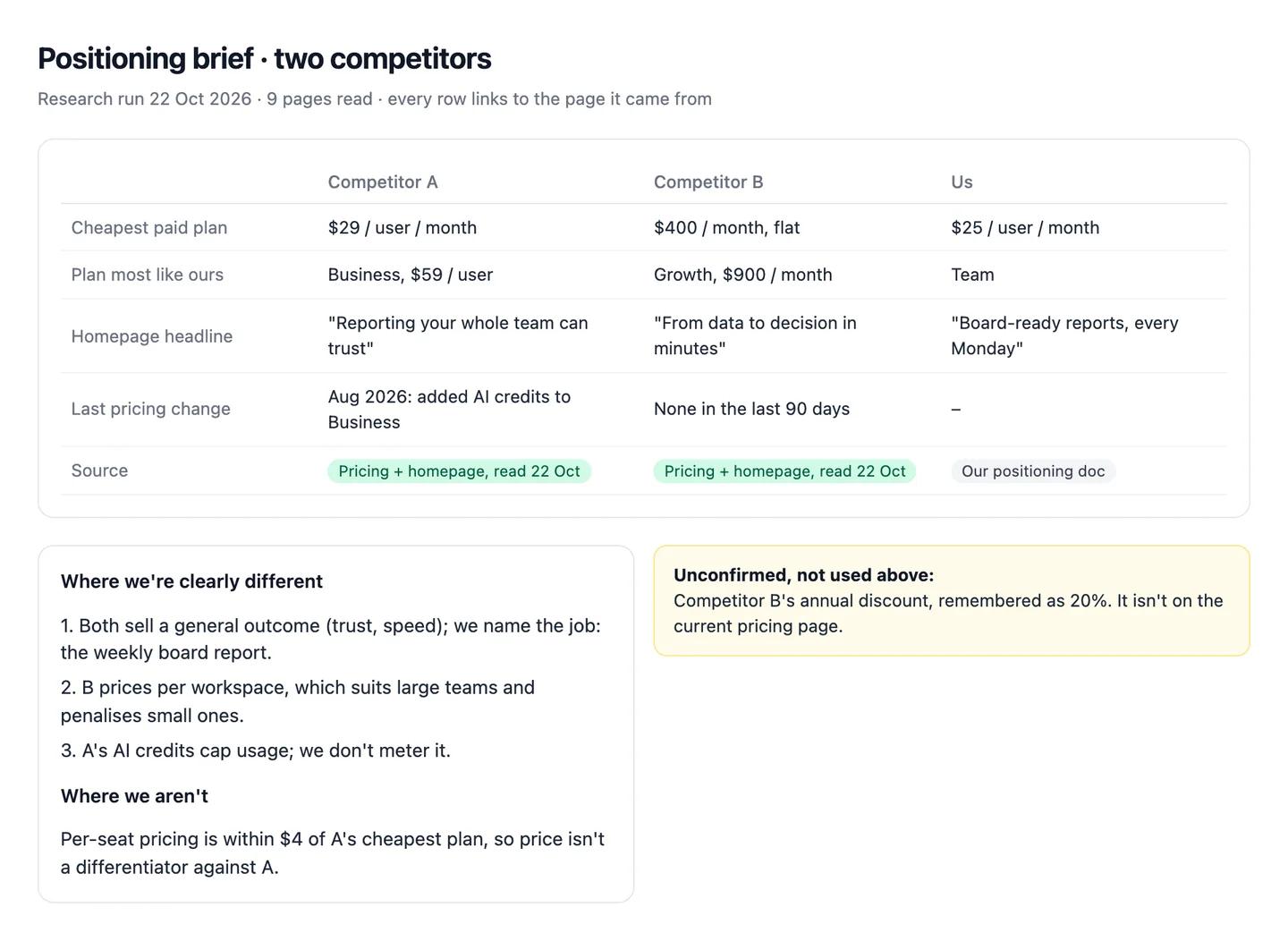
The numbers in this example
| Competitor | Cheapest paid plan | Plan like ours | Headline claim | Source |
|---|---|---|---|---|
| Competitor A | $29/user/month | Business, $59 | "Reporting your whole team can trust" | Pricing and homepage, read 22 Oct |
| Competitor B | $400/month flat | Growth, $900 | "From data to decision in minutes" | Pricing and homepage, read 22 Oct |
Unconfirmed: Competitor B's annual discount (remembered as 20%; not on the current page).
AI output auditRuns on every answerCompetitor A's cheapest plan is $29 per user per month Citation. Competitor B prices per workspace Assumption and gives 20% off annual plans Model knowledge.
Model knowledge
Competitor B gives 20% off annual plans
From memory, not their current page. If it's out of date, sales quotes the wrong price to a prospect.
Assumption
Competitor B prices per workspace
Inferred from a flat $400 price; the page doesn't say. Check before sales repeats it.
Citation
Competitor A's cheapest plan is $29 per user
Quoted from their pricing page today.
Common pitfalls, team rules and the check before anything ships
Prompts reduce errors; they don't remove them. In a 2026 study of 14 models, the best produced working links more than 94% of the time, yet only 39 to 77% of their claims were accurate (Onweller et al., Cited but Not Verified, May 2026). A link that opens is the easy part.
Common pitfalls
- Reading email opens as attention. Apple Mail opens are inflated by privacy protection. Clicks are the better signal.
- Adding platforms together. Google Ads, Meta and LinkedIn can each claim the same sale. A summed "total conversions" row double counts unless it says otherwise.
- Averaging ratios. The mean of 30 daily ROAS figures isn't the month's ROAS. Divide the totals.
- Comparing GA4 with Universal Analytics. Bounce rate and sessions changed definition; year-on-year comparisons across the switch mislead.
- Trusting a capped result. HubSpot searches return up to 200 results a page (HubSpot Developers). A deal count that looks low may be one page.
- Competitor facts from memory. A rival's price stated without a URL may be a year old.
Rules for the team
- No statistic ships until a person has opened its source. The study, not the article about it.
- Definitions live in the project. Change them there, once, not in individual chats.
- Read-only by default. Write access is switched on for a named job, then off again.
- Competitor claims get a human owner. The FTC's 2024 rule bans fake reviews and testimonials, including AI-generated ones (FTC, 14 August 2024).
- Customer data stays in the Team workspace, never a personal account.
One check before anything leaves marketing
Count audits every answer automatically, inside the chat, and it checks more than the numbers. For each claim it asks: did this come from a source, and does the source really say it? Does the reasoning hold, or does a conclusion go further than the data? Was a definition or a formula assumed without saying so? Is a statement from the model's memory rather than anything in the chat? It replies with a canvas where each claim is labelled a citation, an assumption, model knowledge or a hallucination, with the reasoning chain under it. A ROAS figure built on an unstated window, a competitor price remembered from last year and a statistic quoted from an article instead of the study all show up for what they are. Each workflow above shows an example.
Questions people ask
How do I use AI for marketing?
Start with one shared assistant connected to the tools you already use, not a new platform. Write your definitions into a Claude project, connect GA4, Google Ads and HubSpot read-only, then run the same few workflows each month: channel reporting, ROAS against CRM revenue, keyword research, drafts and competitor briefs.
How much does it cost to set up AI for a marketing team?
The Claude side is a subscription: Claude Pro is $20 a month ($17 billed annually), and a Team standard seat is $25 a month or $20 billed annually (claude.com/pricing). The official connectors for Google Analytics, Google Ads, HubSpot, Notion and Meta aren't sold separately; you need an account with each tool. Ahrefs' connector needs a Lite plan or above and uses your API units. Claude doesn't generate images, so keep whatever you use for that.
What is the best AI for marketing?
For most teams, one general assistant connected to the tools you already use beats a specialist platform. We'd pick Claude with a shared project, plus an SEO data tool such as Ahrefs. The options by job are in best AI tools for marketing.
Can Claude connect to Google Analytics and Google Ads?
Yes, through Google's own MCP servers. Both run locally, so they work in Claude Desktop or Claude Code rather than the web app. The Google Ads server is read-only; the Google Analytics one is read-only unless you add a flag that enables one annotation tool.
Why does AI give a different ROAS from my ad platform?
Usually a different attribution window, revenue source or formula. Google Ads defaults to a 30-day conversion window for Search and Display, GA4 to a 90-day lookback for most key events, and averaging daily ROAS gives a different answer from dividing totals.
Sources
- Anthropic Help Centre: What are projects? (checked 22 October 2026)
- Anthropic Help Centre: How to create custom skills (checked 22 October 2026)
- Anthropic Help Centre: Getting started with custom connectors using remote MCP (checked 22 October 2026)
- Model Context Protocol: Connect to local MCP servers (checked 22 October 2026)
- Google: Google Analytics MCP server (Experimental), GitHub (checked 22 October 2026)
- Google Ads API: MCP server (checked 22 October 2026)
- HubSpot Developers: Integrate with the remote HubSpot MCP server (checked 22 October 2026)
- Ahrefs: What is Ahrefs MCP (checked 22 October 2026)
- Notion: Notion MCP (checked 22 October 2026)
- OpenAI Developers: Connect a custom MCP server to ChatGPT
- Anthropic: Claude pricing (checked 22 October 2026)
- OpenAI: ChatGPT pricing (learn.chatgpt.com, checked 22 October 2026)
- Google Ads Help: About conversion windows
- Google Ads Help: Glossary (ROAS and ROI)
- Google Ads Help: About Target ROAS bidding
- Google Analytics Help: Attribution settings (GA4)
- Google Analytics Help: Engagement rate and bounce rate (GA4)
- Google Analytics Help: Bounce rate (Universal Analytics)
- Walters and Wilder: Fabrication and errors in the bibliographic citations generated by ChatGPT, Scientific Reports (September 2023)
- Onweller et al.: Cited but Not Verified (May 2026)
- FTC: Final rule banning fake reviews and testimonials (14 August 2024)
- Google Ads Help: Understand conversion tracking in Google Ads and Analytics (click date) (checked 22 October 2026)
- Google Ads Help: Time zones in your account (checked 22 October 2026)
- Google Analytics Help: Time zone in reports (checked 22 October 2026)
- Meta Business Help: About attribution settings (checked 22 October 2026)
- Meta Business Help: Statistical modelling in results (checked 22 October 2026)
- Meta for Business: Meta ads AI connectors in open beta (29 April 2026, updated 16 July 2026) (checked 22 October 2026)
- Meta for Developers: Ads MCP server overview (checked 22 October 2026)
- LinkedIn Help: Conversion windows in Campaign Manager (checked 22 October 2026)
- HubSpot Knowledge Base: Default contact properties (Original Traffic Source) (checked 22 October 2026)
- HubSpot Knowledge Base: Create attribution reports (checked 22 October 2026)
- HubSpot Knowledge Base: Bot filtering in marketing email analytics (checked 22 October 2026)
- Mailchimp Help: Apple Mail Privacy Protection FAQ (checked 22 October 2026)
- Ahrefs Help: How accurate is keyword search volume in Ahrefs (checked 22 October 2026)
- LinkedIn Help: Export reports in Campaign Manager (checked 22 October 2026)