
Budget variance analysis
AI for data and analytics · Facts checked 28 October 2026
Budget variance is the gap between plan and result: actual minus budget, in money, and that gap divided by budget as a percentage. Revenue of £540,200 against a £600,000 budget is a £59,800 (10%) unfavourable variance. Above budget is favourable for revenue and profit lines, and unfavourable for costs.
What is budget variance analysis?
Budget variance analysis is the monthly job of putting actuals next to the budget, line by line, and explaining the gaps that matter. Most finance teams call the report budget vs actual, or BvA.
The arithmetic takes seconds. The explaining takes days, because a variance is only useful once you know whether it's real. Revenue £60,000 under budget might mean fewer deals, lower prices, a deal booked a month late, or a budget that was phased evenly across a seasonal year. Each one calls for a different response, and only one of them is a business problem.
So a good variance analysis answers three questions for each material line:
- How big is it? In money and as a percentage of budget.
- Is it good or bad? Favourable or unfavourable, which depends on the type of line.
- What caused it? Price, volume, timing, a reclass, exchange rates, or a budget that doesn't match the ledger.
The first two are formulas. The third is where most of the work, and most of the mistakes, live. If you're building the wider FP&A process around this, AI for FP&A covers the forecast and reporting cycle it sits inside.
How to calculate budget variance
Formula: Budget variance = actual − budget
Formula: Budget variance % = (actual − budget) ÷ budget × 100
Revenue of £540,200 against a budget of £600,000 is a variance of −£59,800, or −10.0%.
Divide by the absolute value of the budget when a line can be negative, such as a budgeted loss or an FX line. Otherwise a worse-than-planned loss shows a positive percentage. When the budget is zero, report the money and leave the percentage blank; a percentage of nothing tells the reader nothing.
Favourable or unfavourable
The sign of actual − budget doesn't tell you whether the result is good. That depends on the line:
| Line type | Actual above budget | Actual below budget |
|---|---|---|
| Revenue, gross profit, EBITDA | Favourable | Unfavourable |
| Costs and expenses | Unfavourable | Favourable |
Some teams flip the sign on cost lines so that a negative number always means bad news. Others keep actual − budget everywhere and add a Favourable or Unfavourable column. Either works. Mixing the two in one pack is how a board ends up praising an overspend, so pick one, write it at the top of the report, and say it in words next to every material line.
Which variances to explain
Explain a line when it crosses a threshold in money and in percentage, for example £10,000 and 5%. Money alone flags every big line for normal noise. Percentage alone flags a £300 travel line that came in 40% over. Set the thresholds once a year and keep them in the report, so nobody debates them during close.
See the ledger rows behind every variance
Connect your ledger and budget workbook, ask Count in plain English, and open the Reasoning Chain behind every variance: which budget version, which accounts, which journals.
Price and volume variance, worked through
A total variance on a revenue or cost line usually has two causes mixed together: how many you sold or bought (volume), and at what rate (price). Splitting them is the most useful thing you can do to a variance, because the two have different owners. Sales owns price. Demand, marketing and capacity own volume.
The standard split, the one managerial accounting textbooks use for materials variances, prices the volume difference at the budget rate and the rate difference at actual quantity:
Formula: Volume variance = (actual quantity − budget quantity) × budget price
Formula: Price variance = (actual price − budget price) × actual quantity
The two always add back to the total.
Example: a software subscription line
The figures are invented to show the arithmetic.
| Seats | Price per seat | Revenue | |
|---|---|---|---|
| Budget | 2,000 | £300 | £600,000 |
| Actual | 1,850 | £292 | £540,200 |
| Variance | −150 | −£8 | −£59,800 |
- Volume variance: −150 × £300 = −£45,000 (unfavourable)
- Price variance: −£8 × 1,850 = −£14,800 (unfavourable)
- Total: −£45,000 + −£14,800 = −£59,800
Three-quarters of the miss is seats. The discounting is real, but it isn't the headline, and a commentary line that says "revenue down on pricing pressure" would send the conversation the wrong way.
The order you calculate in changes the split
Price the rate difference at budget quantity instead, and the volume difference at actual price, and you get −£16,000 for price and −£43,800 for volume. Same total, different story. The £1,200 gap is the joint effect of fewer seats at a lower price, and neither variance owns it on its own. There's no right answer. Pick a convention, write it down, and use it every month so the trend means something.
With more than one product, add a mix variance: selling the same total volume but more of the cheaper product lowers revenue even when every price is on budget.
Flex budget vs static budget
A static budget is set at one level of activity and never changes. A flexible budget restates the budget for the activity that actually happened (OpenStax, Principles of Managerial Accounting). On cost lines this matters a lot, because variable costs should fall when volume falls.
Take the same month. Hosting and support cost is budgeted at £120 per seat, plus £150,000 of fixed cost.
| Static budget (2,000 seats) | Flex budget (1,850 seats) | Actual | |
|---|---|---|---|
| Variable cost | £240,000 | £222,000 | £228,000 |
| Fixed cost | £150,000 | £150,000 | £155,000 |
| Total | £390,000 | £372,000 | £383,000 |
Against the static budget, total cost is £7,000 under: a favourable variance, and a quiet month for the cost owner.
Against the flex budget, cost is £11,000 over. Variable cost ran at £123 a seat instead of £120, and fixed cost overspent by £5,000. The static budget hid both, because lower volume made the totals look thrifty.
Split it the same way as revenue:
- Volume effect (static to flex): −£18,000. Nobody earned that saving; fewer seats did.
- Flex budget variance (flex to actual): +£11,000 unfavourable. This is the number the cost owner should explain.
Report against the static budget for the board, because that's the plan they approved. Use the flex budget when you're judging whether a cost owner ran their area well. Most teams show both, side by side.
Asking Claude or ChatGPT for your budget variance
Give Claude or ChatGPT a budget export and a trial balance, and it will produce a tidy BvA table with commentary in under a minute. The table is usually right. The commentary is where the risk sits, because a model asked to explain a variance will find a plausible reason whether or not your data contains one. "Higher contractor spend in engineering" reads exactly the same when it's invented.
The fix is to make every explanation point to ledger rows. A variance you can't trace to journal lines is a guess, however confident the sentence sounds.
A prompt that ties each variance to the GL
Copy this, fill in the brackets, and run it against your own ledger and budget:
Work out budget vs actual for [month] and tie every variance to the ledger.

Budget: [file / table], version [name and approval date].
Actuals: the general ledger in [warehouse table / Xero / QuickBooks],
accrual basis, posted journals only.

1. Print the budget version you read, the GL table and date range you
   queried, and every filter (entity, currency, period, status).
2. Map GL accounts to budget lines using [mapping table or tab]. List
   any GL account with activity that maps to no budget line, with its
   total, before you build anything else.
3. For each line: budget, actual, variance (actual - budget), variance %
   of the absolute budget, and "Favourable" or "Unfavourable" in words.
   Revenue is unfavourable below budget; costs are unfavourable above it.
4. For revenue lines with seat or unit counts, split the variance into
   volume (at budget price) and price (at actual quantity).
5. For every variance over [£10,000 and 5%], list the GL rows behind
   it: date, journal ID, account, department, supplier or customer,
   amount, memo. Sort by size and stop when the rows cover 80% of it.
6. Flag rows that look like timing or reclasses: journals posted after
   [close date], reversals, accruals released, and entries that move
   cost between departments or accounts.
7. Where actuals are in another currency, show the variance at the
   budget rate and the FX effect on a separate line.
8. Show the SQL for every step. Give a reason for a variance only if a
   GL row, a memo or an attached file supports it; otherwise write
   "Cause not in the data".
Steps 1 and 2 catch the most expensive errors before any variance is calculated: the wrong budget version, and accounts that fall through the mapping. For more prompts in this style, see prompts for financial analysis.
Count's MCP server lets Claude run these queries against your warehouse or spreadsheet and show its working, so every variance traces back to a query and the rows it returned. In Count, a Reasoning Chain lays out each step from raw journals to the final figure, with the filters and mappings it used, so you can challenge the one you disagree with.
The workflow below runs the same job against Xero or QuickBooks and a budget workbook, department by department.
Workflow 1
AI for budgeting: budget against actuals, with variance notes from the drivers
Variance commentary is where AI saves finance the most time and where it does the most quiet damage, because an invented reason reads exactly like a real one. This workflow reads actuals by department from the ledger, reads the approved budget from your workbook, and keeps every explanation tied to an account, supplier or customer it can point to. QuickBooks keeps budgets on its Plus and Advanced plans (QuickBooks Help); most teams keep theirs in a workbook either way. FP&A teams building the forecast itself should see AI for FP&A.
Uses
 Xero
Xero QuickBooks
 Excel
Excel
Before you run it
- Xero or QuickBooks connected, with departments set up as tracking categories or classes
- The approved budget workbook attached, with the version and tab named in the prompt
- The finance-definitions skill installed (setup step 2), so variances use your sign convention
Show the full prompt (25 lines)Hide the prompt
Compare [month] actuals with the approved budget.

Budget: [file], tab [tab], version [v]. Basis and currency as in the
project instructions.

1. From [Xero / QuickBooks], run the Profit and Loss for the month by
   [tracking category / class]. Print the basis and the category used.
2. Read the budget for the same month from the attached workbook. Print
   the tab and the cells you read.
3. Build one table: line, budget, actual, variance (actual - budget),
   variance as a percentage of budget, and "Favourable" or
   "Unfavourable" in words. Revenue and profit lines are unfavourable
   when below budget; cost lines are unfavourable when above it.
4. Add operating expenses by department in the same format, and check
   that the departments add up to the total. Show the check.
5. For every variance over [£5,000 or 5%], pull the transactions behind
   it and name the accounts, suppliers or customers that make up most of
   it, with amounts.
6. Draft one line of commentary per material variance, using only what
   step 5 found. Where it found nothing that explains the variance,
   write "Cause not in the data" and say who would know.
7. Show every report you ran and the code you used for the variances.

Don't describe renewals, deals, campaigns or hires unless they appear in
the ledger or an attached file.
 Budget against actuals, SeptemberArtifactExample from sample data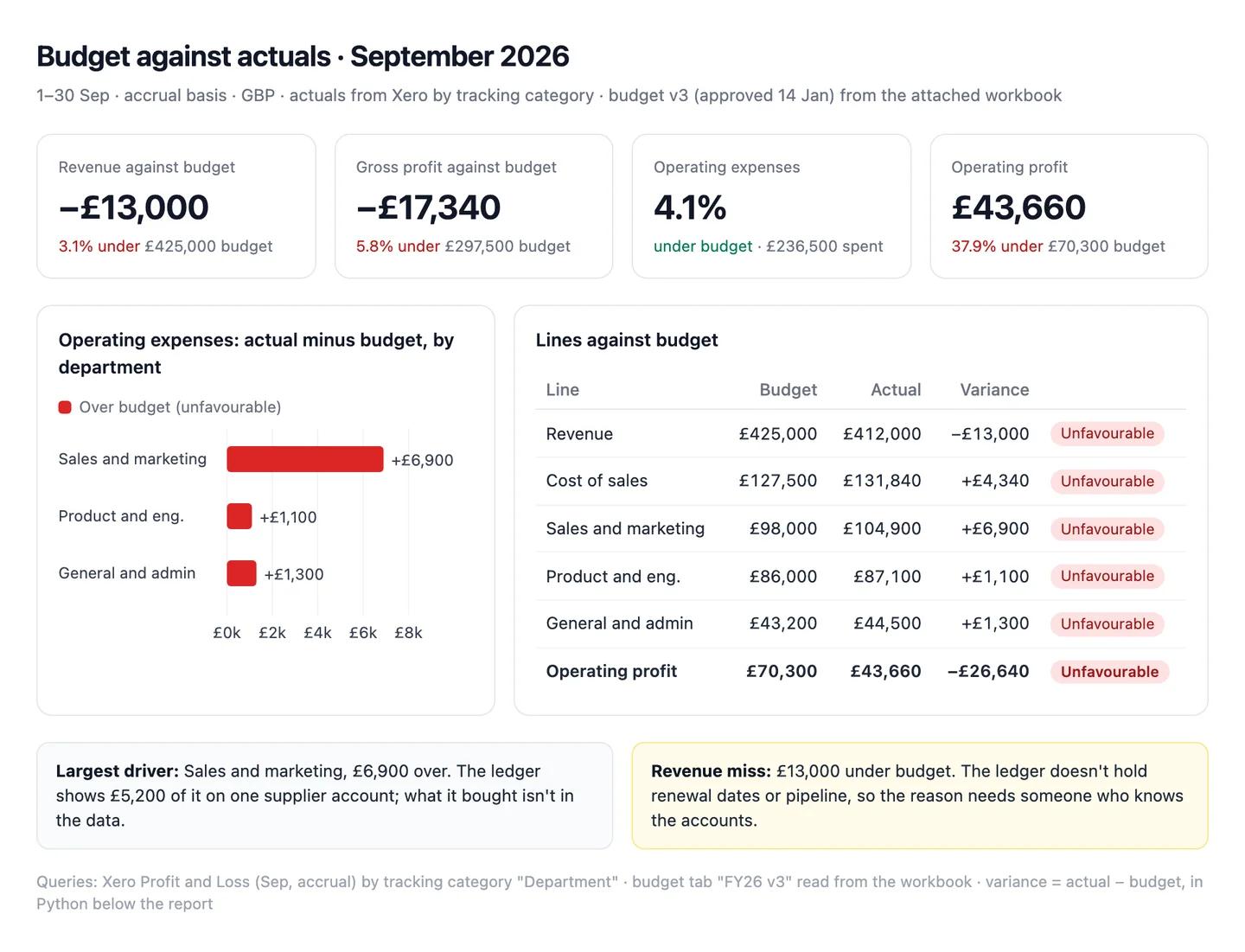
The numbers in this example
| Line | Budget | Actual | Variance | |
|---|---|---|---|---|
| Revenue | £425,000 | £412,000 | −£13,000 (−3.1%) | Unfavourable |
| Cost of sales | £127,500 | £131,840 | +£4,340 (+3.4%) | Unfavourable |
| Operating expenses | £227,200 | £236,500 | +£9,300 (+4.1%) | Unfavourable |
| Operating profit | £70,300 | £43,660 | −£26,640 (−37.9%) | Unfavourable |
- Largest cost driver: sales and marketing, £6,900 over its £98,000 budget; £5,200 of it on one supplier account.
- Revenue miss: cause not in the data. The ledger holds no renewal dates or pipeline.
 AI output auditRuns on every answer
Operating expenses came in 4.1% under budget Assumption at £236,500. Revenue missed budget by £13,000, mostly because two renewals slipped into October Hallucination. Sales and marketing ran £6,900 over its budget Citation.
Assumption
Operating expenses 4.1% under budget
Worked out as budget minus actual and read as a saving. £236,500 against a £227,200 budget is £9,300, or 4.1%, over, as the table says. The dashboard tile repeats it, so the board would hear costs were under control in the month they overran.
Hallucination
Two renewals slipped into October
Nothing the model read mentions renewals: the ledger has no renewal dates and no CRM was connected. It's the kind of reason a revenue miss usually gets. Someone who knows the accounts has to supply the real one.
Citation
Sales and marketing £6,900 over budget
£104,900 actual from Xero's tracking category against £98,000 in the budget tab. Safe to share.
Why budget vs actual goes wrong on real data
On a clean spreadsheet, the variance is whatever the formula says. On a real ledger, a large share of reported variances are artefacts of how the numbers were recorded. Rule these out before you write a word of commentary.
Timing and phasing. An annual budget divided by twelve assumes every month is the same. Most businesses aren't. If the budget wasn't phased for seasonality, renewals or annual invoices, half your monthly variances are calendar effects that reverse later. The same goes for a supplier invoice budgeted in September that landed in October: unfavourable next month, favourable this month, zero over the quarter. Check the year-to-date variance before you chase a monthly one.
Accrual vs cash. Budgets are almost always built on an accrual basis. If actuals come from bank transactions or a cash-basis report, annual payments, prepayments and late supplier bills all show up in the wrong month. Confirm the report basis on both sides. In most accounting tools it's an option on the report itself, which makes it easy to pull the wrong one.
Reclasses. A journal that moves £20,000 of cost from Marketing to Sales after the first draft of the pack creates two variances that cancel at company level. Reclasses also change last month's actuals after you've reported them. Pull journals posted after your close date separately, and compare this month's view of last month with what you published.
FX. IAS 21 has foreign-currency income and expenses translated at the rates on the transaction dates, or an average rate that approximates them. Your budget used a single planning rate. When the pound moves, every foreign-currency line picks up a variance nobody in the business caused. Restate actuals at the budget rate to isolate it, and report the FX effect on its own line.
A budget version that doesn't match. The board approved V1 in January, finance reforecast in June, and someone's workbook still points at a draft. Or the budget was built on last year's chart of accounts, and new GL accounts map to nothing, so their spend sits outside every budget line. Print the version name and approval date at the top of every BvA, and reconcile total actuals in the report to the trial balance before anyone reads the detail.
Work through them in that order. Timing and basis problems are the most common and take minutes to rule out; a version mismatch is rarer, and it invalidates everything.
Sources
- OpenStax, Principles of Managerial Accounting: 7.4 Prepare Flexible Budgets
- OpenStax, Principles of Managerial Accounting: 7.5 Explain How Budgets Are Used to Evaluate Goals
- OpenStax, Principles of Managerial Accounting: 8.2 Compute and Evaluate Materials Variances
- IFRS Foundation: IAS 21 The Effects of Changes in Foreign Exchange Rates