
Forecast accuracy
AI for data and analytics · Facts checked 28 October 2026
Forecast accuracy measures how close a forecast came to the actual result. The usual formula is 1 − |actual − forecast| ÷ actual: forecast £1.0m, close £0.9m, and accuracy is 89%. Across many rows, use weighted MAPE for the size of the miss and bias for its direction, because errors in opposite directions cancel out.
What is forecast accuracy?
Forecast accuracy tells you how close a forecast came to what actually happened. Finance uses it to judge the revenue and cost forecast; RevOps uses it to judge the sales call made in week 4 of the quarter. Either way it answers two separate questions, and one number can't answer both:
- How big was the miss? That's error: MAPE, WMAPE, or accuracy as 1 − error.
- Which way did it miss? That's bias. A team that over-forecasts every quarter by 8% has a different problem from one that's 8% out in random directions, even though both score 92%.
Most arguments about forecast accuracy come down to three choices that the headline number hides: which formula, at what level of detail, and against which version of the forecast. This page works through all three on a sales forecast, then shows how to make Claude or ChatGPT calculate it from your CRM without quietly making those choices for you.
Sales forecast accuracy is the same measure applied to a sales call: the number a team committed to at a fixed point in the quarter, against the closed-won revenue at the end of it.
Forecast accuracy formulas: MAPE, WMAPE and bias
Formula: Forecast accuracy = 1 − |actual − forecast| ÷ actual
Formula: MAPE = average over items of |actual − forecast| ÷ actual
Formula: WMAPE = sum of |actual − forecast| ÷ sum of actual
Formula: Bias = sum of (forecast − actual) ÷ sum of actual
Some teams divide by the forecast instead of the actual. Neither is wrong, but they give different answers, so write down which you use. Sign conventions for bias vary too; here a positive bias means you over-forecast.
One quarter, four answers
Here's a quarterly sales forecast by segment, in £000. The figures are invented to show the arithmetic.
| Segment | Forecast | Actual | Absolute error | % error |
|---|---|---|---|---|
| Enterprise | 600 | 520 | 80 | 15.4% |
| Mid-market | 300 | 330 | 30 | 9.1% |
| SMB | 90 | 105 | 15 | 14.3% |
| Partner | 10 | 4 | 6 | 150.0% |
| Total | 1,000 | 959 | 131 |
- Accuracy at total: 1 − 41 ÷ 959 = 95.7%
- WMAPE across segments: 131 ÷ 959 = 13.7%, so accuracy of 86.3%
- MAPE across segments: (15.4 + 9.1 + 14.3 + 150.0) ÷ 4 = 47.2%
- Bias: 41 ÷ 959 = +4.3%, a slight over-forecast
Same forecast, same quarter. The 95.7% is what the CRO will quote. The 47.2% is what a spreadsheet produces if someone averages the percentage column. Both are arithmetically correct.
Why each one misleads
- Accuracy at total lets errors cancel. Enterprise over-called by £80k and the other segments under-called by £45k, which nets to a £41k miss. A forecast can score well at total and be wrong in every segment.
- MAPE gives every row equal weight, so a £10k partner line moves the result more than a £600k enterprise line. It also penalises over-forecasts more heavily than under-forecasts (Hyndman and Athanasopoulos): an under-forecast can be at most 100% wrong, an over-forecast has no ceiling.
- WMAPE weights by size, which is usually what finance wants, but it can still hide a segment that's consistently wrong if it's small.
- Bias on its own can be zero while every row is badly wrong, as long as the misses cancel.
Report WMAPE (or 1 − WMAPE) for size and bias for direction, together. And note that 1 − error can go negative: the partner line above has an accuracy of −50%. Most teams floor it at zero; say so if you do.
See which deals your forecast accuracy rests on
Connect your CRM and forecast snapshots, ask Count in plain English, and open the Reasoning Chain behind every accuracy figure: which snapshot, which deals, which formula.
Why MAPE breaks near zero
Percentage errors divide by the actual. When the actual is zero the result is undefined, and when it's close to zero the result is enormous. Hyndman and Athanasopoulos list this as the first disadvantage of percentage-based measures in Forecasting: Principles and Practice: they are "infinite or undefined" when an actual is zero and have "extreme values" when it's close to zero.
In a sales forecast this happens all the time. A new segment, a rep in their first month, a product that sold nothing in a given week. One row with £1,000 forecast and £0 closed makes the MAPE for the whole team undefined. One row with £1,000 forecast and £50 closed adds 1,900% to the sum before averaging.
Three ways to deal with it:
- Use WMAPE. It divides by the total, which is rarely near zero. This is the simplest fix, and it's the one most finance teams land on.
- Use a scaled error. Hyndman and Koehler proposed the mean absolute scaled error (MASE), which compares your error with the error of a naive forecast on the same data. Below 1 means you beat the naive forecast. It's well suited to demand and volume series; it's harder to explain to a sales leader.
- Exclude small rows, openly. Set a floor, for example rows with actuals under £20,000, leave their accuracy blank, and report their combined error on one separate line. What you mustn't do is drop them silently.
Aggregation level changes the answer
The same forecast scores differently depending on where you measure it, because errors cancel when you add rows together. In the example above, accuracy is 95.7% at company level and 86.3% by segment. By rep it would be lower again, and by deal lower still.
None of these is the true accuracy. Each answers a different question:
| Level | Question it answers | Who it's for |
|---|---|---|
| Company, quarter | Did we hit the number we told the board? | CFO, board |
| Segment or region | Where is the forecast reliable enough to plan hiring on? | FP&A, CRO |
| Rep or manager | Whose calls can we trust? | Sales leadership |
| Deal | Did the deals we expected close? | RevOps, deal reviews |
Time aggregation works the same way. A forecast measured monthly will look worse than the same forecast measured quarterly, because timing slips between months net out over a quarter. Pick the level at which a decision is made, measure there, and print the level next to the number. A 96% that's really a company-level, quarterly figure shouldn't be compared with last year's 88% by rep.
Sales forecast accuracy: weighted pipeline vs commit
Most sales teams have two forecasts running at once. The weighted pipeline multiplies each deal's amount by a probability, usually set by stage; HubSpot's forecast tool calls this the weighted amount, "the Amount multiplied by the Deal probability". The commit is what the team says it will close: in Salesforce's standard categories, the deals in Commit plus those already Closed.
Here's the week-4 snapshot of a quarter, in £000. The figures are invented.
| Stage at week 4 | Pipeline | Stage probability | Weighted |
|---|---|---|---|
| Discovery | 1,200 | 10% | 120 |
| Proposal | 800 | 40% | 320 |
| Negotiation | 500 | 70% | 350 |
| Closed won to date | 150 | 100% | 150 |
| Total | 940 |
The team's commit at week 4 was £820k. At quarter end, closed won was £910k.
| Forecast at week 4 | Forecast | Actual | Accuracy | Bias |
|---|---|---|---|---|
| Weighted pipeline | 940 | 910 | 96.7% | +3.3% |
| Commit | 820 | 910 | 90.1% | −9.9% |
On these numbers the weighted pipeline wins, and the team sandbagged. But look at where the £910k came from:
- £150k was already closed at week 4.
- £520k came from deals open at week 4.
- £240k came from deals created after the snapshot.
The weighted forecast expected £790k from the open pipeline and got £520k. By stage, Discovery converted 3% against a 10% assumption, Proposal 25% against 40%, and Negotiation 56% against 70%. Every stage probability was too high. The total looked accurate only because new pipeline filled the gap, and that won't happen every quarter.
This is the point of measuring sales forecast accuracy at deal level as well as in total: the headline score can be right for the wrong reasons. You can only see it if you kept the week-4 snapshot.
Snapshot the forecast before you measure it
You can't measure forecast accuracy against a forecast that no longer exists. CRMs store the current state of each deal. When a rep moves a close date from September to October, or drops an amount from £90k to £60k, the old value is overwritten, and the week-4 forecast you want to score against is gone.
Some history survives. Salesforce's OpportunityHistory object records changes to an opportunity's amount, probability, stage and close date, and current versions include the forecast category, so you can rebuild a past state with some work. HubSpot keeps forecast submissions, but changing the forecast period resets the submissions for all pipelines (HubSpot Knowledge Base). Neither gives you a clean table of "the forecast as it stood on 14 July" by default.
So build one. Once a week, on the same day, append every open and closed-won deal in the period to a snapshot table:
- snapshot date
- deal ID, owner, segment
- amount in company currency
- stage, stage probability, forecast category
- close date
Append, never update. Keep the stage probabilities in the snapshot too, because if someone changes them next quarter, the weighted forecast you scored against should still be the one people saw. A scheduled export to a warehouse table or a spreadsheet tab is enough; the important part is that nobody can edit last week's rows.
Then agree which snapshot is "the forecast". Week 4 of the quarter, the first Monday of the last month, the call submitted to the board: pick one, and score the same week every quarter so the trend means something.
Asking Claude or ChatGPT for your forecast accuracy
Export a quarter of deals, paste them into Claude or ChatGPT, and ask for forecast accuracy, and it will give you a percentage. The risk is in what it had to assume. A current CRM export has no forecast in it, only the deals as they stand today, so the model will either compare today's pipeline with today's closed won, which measures nothing, or quietly pick a formula and a level you never chose.
Make it work from snapshots, and make it show the choices. Copy this, fill in the brackets, and run it against your own data:
Measure forecast accuracy for [Q3 FY26] from our forecast snapshots.

Snapshots: [table], one row per deal per snapshot_date, with deal ID,
owner, segment, amount, stage, probability, forecast category, close date.
Actuals: closed-won deals in [CRM table] with a close date in the quarter.

1. Print the snapshot table, the snapshot date you used for the
   [week 4] call, and every filter (pipeline, currency, deal type).
2. From that snapshot, build three forecasts by [segment]: commit
   (Commit + Closed), weighted (amount x the probability stored in the
   snapshot, not today's), and best case.
3. Actuals: closed-won amount by segment. Split it into deals that were
   in the snapshot and deals created after it, with a total for each.
4. For each forecast and segment: forecast, actual, error (forecast -
   actual), accuracy (1 - |error| / actual) and bias (error / actual).
   Then WMAPE across segments: sum of |error| / sum of actual. Leave
   accuracy blank where actual is under [£20,000] and say so.
5. For the weighted forecast, compare each stage's probability with the
   share of that stage's snapshot amount that closed in the quarter.
6. List the 10 largest deals in Commit at the snapshot that did not
   close in the quarter, with record IDs, amount and final stage.
7. Show the SQL for every step and the row count each query returned.
   Don't explain why a deal slipped unless a field or note says so.
Step 3 is the one most reports leave out, and it's the one that catches a lucky quarter. For more on checking an answer like this, see how to check AI answers.
Count's MCP server lets Claude run these queries against your warehouse or spreadsheet and show its working, so every accuracy figure traces back to a query and the rows behind it. In Count, a Reasoning Chain lays out each step, from the snapshot it read to the formula it applied, so you can see which deals the number rests on.
The workflow below runs the weekly version of this job: this week's forecast categories against last week's snapshot, and last quarter's week-4 call against what closed. If you own the CRM data behind it, AI for RevOps covers the rest of that stack.
Workflow 1
AI for sales forecasting: a weekly commit you can explain
Most forecast calls spend their first ten minutes on what changed since last week. Claude compares this week's forecast categories with last week's snapshot, lists every deal that moved in or out of Commit, and checks last quarter's week-4 call against what actually closed. It doesn't replace your forecasting tool; it explains it.
Uses
 Salesforce
 HubSpot
 Slack
Slack
Before you run it
- Salesforce or HubSpot connected, with forecast categories mapped to stages
- Last week's forecast snapshot attached as CSV (export it each Monday)
- Slack connected if reps post deal updates in a forecast channel; Claude only reads it
Show the full prompt (22 lines)Hide the prompt
Build this week's forecast roll-up for [Q4 FY26], week [4].

1. From [Salesforce / HubSpot], pull open and closed-won deals with a
   close date in the quarter: amount in company currency, stage,
   forecast category, close date, owner, record ID.
2. Our rollup is [cumulative / single category], as the project says.
   Build one table: category, this week, last week (from the attached
   snapshot), change. Don't add Closed to Commit if the rollup already
   includes it; say which rollup you used above the table.
3. List every deal that moved into or out of Commit since last week,
   with amount, old and new category, and old and new close date.
4. List deals whose close date moved out of the quarter, with record IDs.
5. For each moved deal, give the reason only if a field, a note, an
   activity or a message in [#forecast channel] says so, and quote it.
   Otherwise write "Reason not in the data".
6. From the attached Q3 week-4 snapshot and Q3 closed won, work out last
   quarter's forecast accuracy: 1 - |actual - commit| / actual.
7. Show the queries, the Slack search you ran and the code for the
   calculations.

Don't predict where the quarter will land. Report the categories as they
stand and what changed.
 Forecast roll-up, Q4 week 4 (cumulative rollup, GBP)ArtifactExample from sample data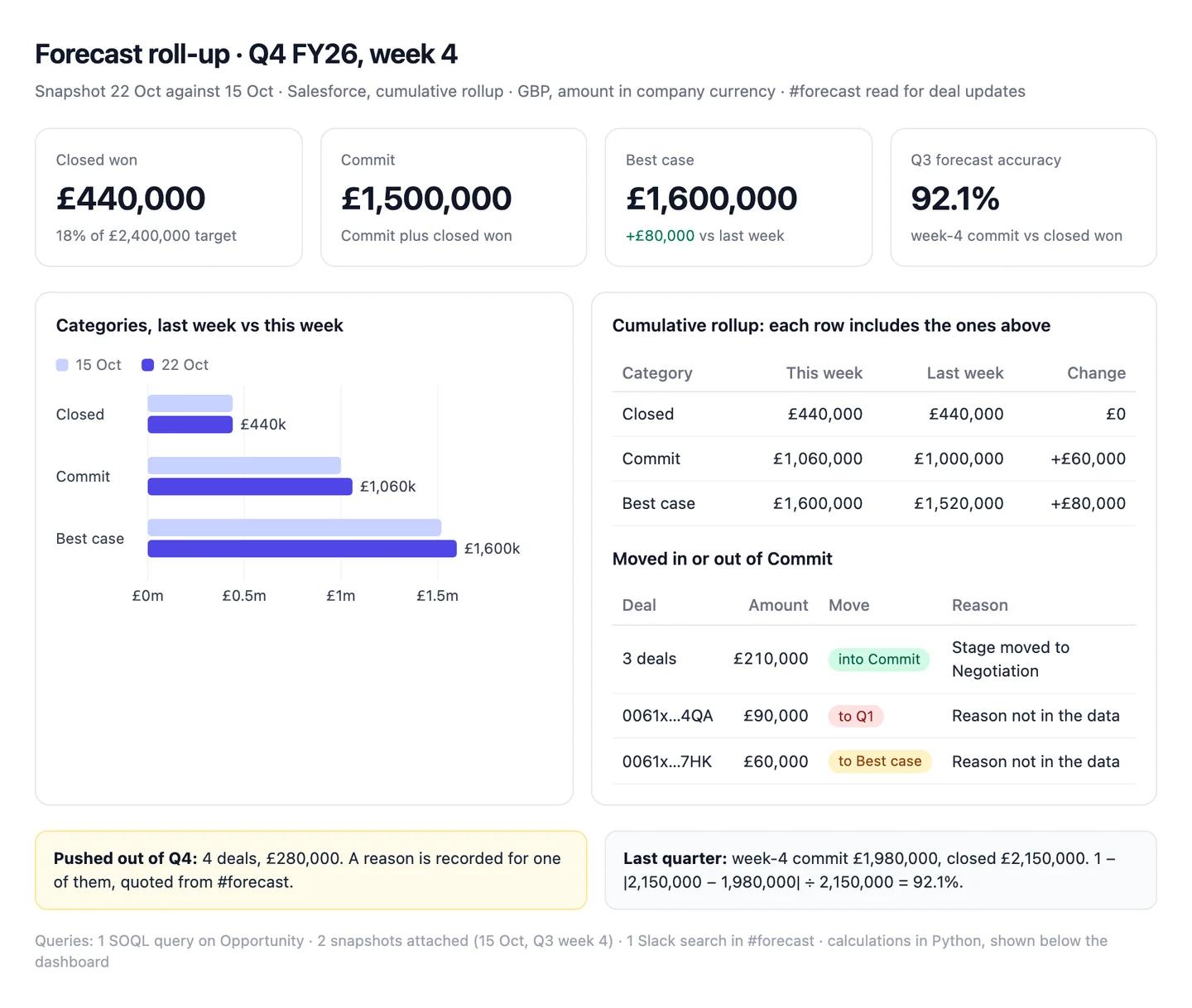
The numbers in this example
| Category | This week | Last week | Change |
|---|---|---|---|
| Closed | £440,000 | £440,000 | £0 |
| Commit (includes Closed) | £1,060,000 | £1,000,000 | +£60,000 |
| Best case (includes Commit) | £1,600,000 | £1,520,000 | +£80,000 |
- Into Commit: 3 deals, £210,000. Out of Commit: 2 deals, £150,000 (one pushed to Q1, one back to Best case).
- Pushed out of Q4: 4 deals, £280,000. Reason not in the data for 3 of them.
- Last quarter: week-4 commit £1,980,000 against £2,150,000 closed, so 92.1% accurate.
 AI output auditRuns on every answer
Commit stands at £1,500,000 Assumption once the £440,000 already closed is added. Two Enterprise deals left Commit because their legal review ran long Hallucination. Last quarter's week-4 commit landed within 8% of what closed Citation.
Assumption
Commit £1,500,000
Treats the rollup as single-category. It's cumulative, so the £1,060,000 Commit already includes the £440,000 closed, and adding it again counts it twice. Read out on the call, the team plans around £440,000 that doesn't exist.
Hallucination
Two deals slipped because of legal review
No field, note, activity or Slack message mentions legal review. Claude supplied a plausible cause, and a manager may chase the wrong blocker.
Citation
Q3 week-4 commit within 8% of actual
|£2,150,000 − £1,980,000| ÷ £2,150,000 = 7.9%, from the attached snapshot and Q3 closed won. Safe to share.
Sources
- Hyndman and Athanasopoulos, Forecasting: Principles and Practice (3rd ed.): 5.8 Evaluating point forecast accuracy
- Hyndman and Koehler (2006), Another look at measures of forecast accuracy, International Journal of Forecasting
- HubSpot Knowledge Base: Set up the forecast tool
- Salesforce Developers: ForecastingItem object reference
- Salesforce Developers: OpportunityHistory object reference