
Support ticket analysis
AI for data and analytics · Facts checked 28 October 2026
Support ticket analysis turns help desk exports into a few numbers you can act on: ticket volume by contact reason, median first reply and resolution time, escalation and reopen rates, and when tickets arrive. Done well, every figure keeps the ticket IDs behind it, so product and leadership can open the tickets and check.
What to pull from Zendesk or Intercom
Support ticket analysis starts with an export, and most of the errors start there too. Pull one row per ticket, with the ticket ID kept on every row from start to finish. Every number in the final readout should be traceable to a list of IDs that someone can open.
Zendesk
From the Tickets API you need id, created_at, status, via (the channel the ticket came in on), subject, description (the first comment), tags, group_id, assignee_id, custom_fields and satisfaction_rating. Status is one of new, open, pending, hold, solved or closed.
The timings live in a separate Ticket Metrics object: reply_time_in_minutes, first_resolution_time_in_minutes and full_resolution_time_in_minutes, each measured in both calendar and business hours, plus reopens, group_stations (how many groups the ticket passed through), assignee_stations and solved_at. For a full history, the incremental ticket export (/api/v2/incremental/tickets/cursor) pages through every ticket, and Zendesk documents sideloading the metrics with include=metric_sets. If you work in Explore instead, the Support - Tickets dataset has first reply and resolution times too.
Intercom
Each conversation has id, created_at, state (open, closed or snoozed), source (the first message), tags, team_assignee_id, admin_assignee_id, conversation_rating and ai_agent_participated. The timings sit in a statistics object: time_to_admin_reply, time_to_first_close, time_to_last_close, median_time_to_reply, count_reopens and count_assignments.
Two details matter. Intercom's durations are in seconds and already subtract time outside office hours. And they are measured from first_contact_reply_at, the customer's first message, so an outbound message nobody answered has no statistics at all. Filter those out before you count anything.
Zendesk reports minutes, Intercom seconds. Zendesk gives you calendar and business hours; Intercom gives you office hours only. If you ever combine the two, convert both and say which clock you used.
The six numbers in a ticket report
1. Volume by contact reason. Tickets per reason, with each reason's share of the total. This is the number product teams care about most, and the hardest to get right (see the next section).
2. First reply time. How long a customer waited for a human's first answer. Report the median, and the 90th percentile next to it.
3. Resolution time. Time to solved (Zendesk's full resolution time, or Intercom's time to last close). Again, the median.
4. Escalation rate. Escalated tickets ÷ all tickets. There is no standard definition, so pick one and print it: a ticket that passed through more than one group (group_stations > 1 in Zendesk), a ticket moved to a named tier-2 or engineering group, or a ticket carrying an escalated tag. Intercom's count_assignments is a looser proxy, since a reassignment inside one team counts too.
5. Reopen rate. Solved tickets with at least one reopen ÷ solved tickets. Zendesk's reopens and Intercom's count_reopens both give you the count.
6. The arrival heatmap. Tickets created by weekday and hour. Zendesk's own Explore recipe builds exactly this grid, with median first reply time in each cell, so you can see whether slow replies follow the busy hours or the thinly staffed ones.
Why the median, not the mean
Resolution times are skewed: most tickets close within hours, and a few sit open for weeks. Take nine tickets resolved in 0.5, 1, 1.5, 2, 2, 3, 4, 6 and 72 hours. The mean is 10.2 hours. The median is 2. One stuck ticket moved the mean fivefold, and a mean-based target would have you chasing it while telling you nothing about the typical customer. NIST's engineering statistics handbook puts it plainly: for data with extreme values in the tails, the median is the better estimate of the typical value. Keep the mean out of the readout, and list the long-tail tickets by ID instead.
A worked example
Here is a month for a software company with 4,200 tickets. The figures are invented to show the layout, not as a benchmark.
| Contact reason | Tickets | Share | Median first reply | Reopen rate |
|---|---|---|---|---|
| Billing and invoices | 1,134 | 27% | 1h 10m | 4% |
| Login and access | 882 | 21% | 45m | 9% |
| Data import errors | 714 | 17% | 2h 30m | 14% |
| How-to questions | 630 | 15% | 1h 05m | 3% |
| Bug reports | 504 | 12% | 3h 20m | 11% |
| Not themed | 336 | 8% | 1h 30m | 6% |
Billing is the biggest pile, but it's quick and rarely comes back. Data import errors are fewer, slower and reopen almost one time in seven. That second row is the one to take to product.
See the tickets behind every number
Connect your help desk export or warehouse, ask Count in plain English, and open the Reasoning Chain behind every figure: which tickets, which filters, which definition of escalated.
Tagging contact reasons with Claude, and checking it
Agent-applied tags are rarely good enough for this. Macros add tags automatically, agents pick whichever tag is quickest, and "other" quietly becomes the largest category. Reading the ticket text is better, and it's a task language models do well: Anthropic's own ticket routing guide covers classifying support tickets by intent with Claude.
What makes the tagging trustworthy is the setup around it:
- Write the rules first. For each reason, one line on what's in and what's out. "Login and access: can't sign in, SSO, 2FA, locked accounts. Not: billing-related account suspension."
- Allow "Not themed". A model told to pick one of six reasons will force a ticket into the nearest one. Give it a way out.
- Ask for the evidence. For each ticket, the reason plus the sentence that decided it.
- Keep the ticket ID on every row. Without it, nobody can check the tagging, and the counts become a matter of trust.
How to check the tagging
- Draw a sample. Take 200 tickets at random, stratified so each reason has at least 20.
- Label them blind. Someone on the support team tags the sample using the same rules, without seeing Claude's answer.
- Measure agreement. Report percent agreement, and Cohen's kappa, which corrects for agreement by chance: κ = (pₒ − pₑ) ÷ (1 − pₑ). Say you agree on 172 of 200 (pₒ = 0.86) and chance agreement from the label mix is 0.24. Kappa is (0.86 − 0.24) ÷ 0.76 = 0.82. McHugh's review of the statistic in Biochemia Medica recommends reporting both and treats any kappa below 0.60 as inadequate.
- Read the disagreements. They usually cluster in one or two pairs of reasons, such as "bug" against "how-to". Fix the rule, not the individual ticket.
- Re-check on a fresh sample. Run it again whenever you change the rules, ship a big release or add a channel.
Keep the sample, the labels and the IDs. When someone in a product review asks how you know import errors doubled, you can show them.
Asking Claude for your ticket analysis
Hand Claude a ticket export and ask for "an analysis", and you'll get a confident summary with averages, a top-five list and no way to check any of it. The prompt below asks for the opposite: one table, stated definitions, and the ticket IDs behind every cell.
It works on a CSV, through Intercom's connector (see Claude connectors), or against a warehouse table through Count's MCP server, which lets Claude query your data and show the query behind each number.
Analyse our support tickets created from [start date] to [end date],
in [time zone]. Read only: don't change, tag or reply to any ticket.

1. Retrieve every ticket in the period. Page until there's no next
   page, and report how many you retrieved.
2. Exclude spam, merged tickets and outbound messages the customer
   never answered. Give the count for each exclusion with five IDs.
3. Give each ticket one contact reason using these rules, and quote
   the sentence that decided it. Tickets that fit none go in
   "Not themed":
   [reason: what's in / what's out]
4. Build one table by contact reason: tickets, share, median and 90th
   percentile first reply time, median resolution time, escalation
   rate, reopen rate. Medians, not means. Say whether times are
   calendar or business hours.
5. Escalated means [group_stations > 1 / tagged "escalated"].
   Reopened means at least one reopen.
6. Build a heatmap of tickets created by weekday and hour, in
   [time zone].
7. For every number in the table, keep the list of ticket IDs it was
   calculated from, and give me that list as a file.
8. Pick 30 tickets at random, stratified by reason, and list their IDs
   without your labels, so I can tag them blind.
9. Show every query, filter and piece of code you used.

Don't explain why a reason grew unless the tickets say so.
Step 8 is the one people skip. It turns a check into a five-minute job, and it's the difference between "Claude says" and "we checked". For more on that habit, see how to check AI answers.
In Count, each figure comes with its Reasoning Chain: the query, the filters and the rows behind it, so the IDs travel with the number. The two workflows below go further: one sorts conversations into themes and matches them to open issues, the other turns ticket volume into a staffing plan.
Workflow 1
AI for customer feedback analysis: support conversations sorted into themes you can count
Support conversations are the largest pile of product feedback most teams have, and the least read. Claude can read all of them through Intercom's connector, sort them into themes with written rules, count each theme against the previous period and match it to the issue already open in Linear or Jira. Zendesk has no generally available official connector yet, so Zendesk teams export a view as CSV.
Uses
 Intercom
 Zendesk
 Linear
Before you run it
- Intercom connected, or a Zendesk view exported as CSV (with ticket descriptions)
- Linear or Jira connected, to match themes to existing issues
- Two periods of the same length, so counts compare like with like
Show the full prompt (22 lines)Hide the prompt
Sort our support conversations from [date] to [date] into themes, and
compare them with the [same length] period before.

1. From Intercom, search conversations in both periods. Page through
   every result until there's no next page. Report how many you
   retrieved for each period and confirm none were left.
2. Read each conversation's first customer message and the agent's
   reply. Assign it to one theme using written rules: give the rule for
   each theme (what's in, what's out) before the counts.
3. Conversations that fit no theme go in "Not themed". Don't force
   them into the nearest theme.
4. Build one table: theme, conversations this period, previous period,
   change (%), share of all conversations. Shares add up to 100%.
5. Say clearly that these are conversations, not customers. If you can
   count distinct companies per theme, add that column.
6. For each theme, search Linear for an open issue that matches it and
   give its ID, or "None".
7. Link five example conversations for each theme.
8. Show the search filters and the code you used for the counts.

Don't explain why a theme grew unless the conversations say so. Read
only: don't add notes or tags in Intercom or create issues in Linear.
 Support themes, 13 Sep to 12 OctArtifactExample from sample data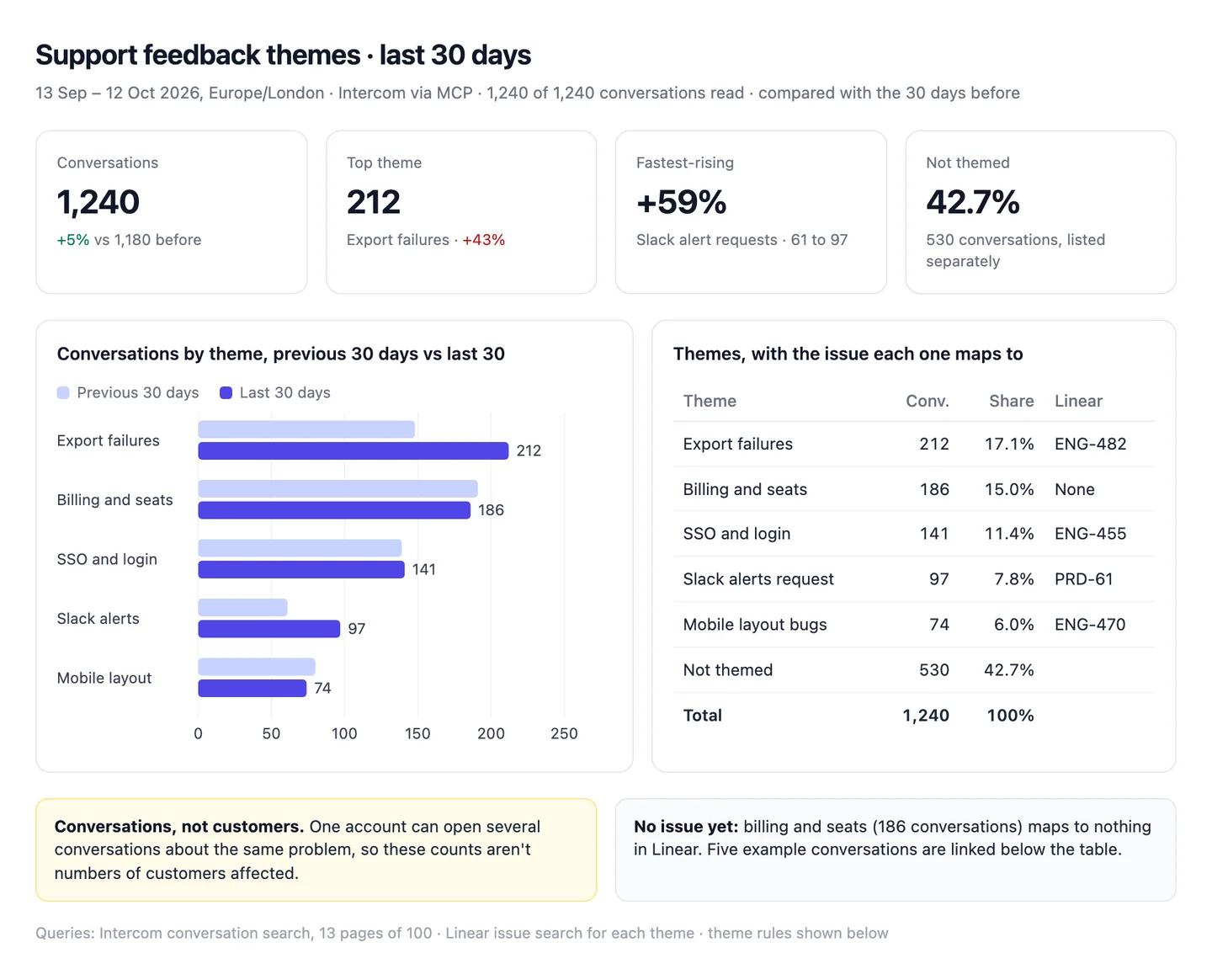
The numbers in this example
| Theme | Conversations | Before | Change | Share | Linear |
|---|---|---|---|---|---|
| Export failures | 212 | 148 | +43% | 17.1% | ENG-482 |
| Billing and seats | 186 | 191 | −3% | 15.0% | None |
| SSO and login | 141 | 139 | +1% | 11.4% | ENG-455 |
| Slack alerts request | 97 | 61 | +59% | 7.8% | PRD-61 |
| Mobile layout bugs | 74 | 80 | −8% | 6.0% | ENG-470 |
| Not themed | 530 | 561 | −6% | 42.7% | |
| Total | 1,240 | 1,180 | +5% | 100% |
- Conversations, not customers. One account can open several about the same problem.
- No issue yet: billing and seats, 186 conversations.
 AI output auditRuns on every answer
Export failures are the top issue, up 43% to 212 conversations, and affect about 17% of customers Assumption. Slack alert requests rose 59%, driven by the new Teams plan Hallucination. All 1,240 conversations in the period were retrieved Citation.
Assumption
Export failures affect 17% of customers
17.1% is the share of conversations, not customers. One account can open several conversations about the same bug, so the share of customers affected is likely far lower. Quoted to leadership, it overstates the problem.
Hallucination
The Teams plan drove Slack alert requests
No conversation, query or document in the chat mentions a Teams plan. The cause is invented.
Citation
1,240 of 1,240 conversations retrieved
Intercom returned 13 pages and no next page, so nothing is missing from the counts.
Workflow 2
AI capacity planning: support staffing for next quarter from ticket volume
Capacity planning is arithmetic on three numbers: how many tickets are coming, how long each takes, and how many productive hours an agent has. Claude is quick at the arithmetic. The risk is the inputs, because a model will fill a missing shrinkage rate or handle time with one it remembers. This workflow takes every input from your files and shows the plan's sensitivity to the one you're least sure of.
Uses
- Zendesk
 Google Sheets
Before you run it
- Twelve months of weekly ticket volume from Zendesk Explore, as CSV
- The roster sheet in Google Sheets: names, contracted hours, planned leave
- Your handle time and shrinkage figures, with where each came from, in the project instructions
Show the full prompt (23 lines)Hide the prompt
Plan support staffing for [Q1 2027].

1. From the attached Zendesk export, take tickets created per ISO week
   for the last 12 months. Report the weeks you got and any missing.
2. Forecast weekly tickets for each month of the quarter: the same
   month last year, times the year-on-year growth of the last full
   quarter. Show the growth calculation.
3. Read handle time and shrinkage from the project instructions. If
   either is missing, stop and ask me. Don't use a benchmark.
4. Productive hours per FTE per week = contracted hours x (1 -
   shrinkage). Required FTE = weekly tickets x handle time / productive
   hours.
5. From [roster sheet], count FTE available each month after planned
   leave. FTE = contracted hours / [37.5].
6. Build one table: month, forecast tickets a week, hours needed,
   required FTE, rostered FTE, gap. Then a dashboard: required against
   rostered FTE by month, and tiles for the largest gap.
7. Show how the largest gap changes if shrinkage is 5 points higher or
   lower, and if handle time is 2 minutes longer or shorter.
8. Don't recommend hiring, overtime or outsourcing. List the gaps; the
   decision is ours.

Show the code for every calculation and the cells you read.
Support capacity, Q1 2027 (18 min handle time, 30% shrinkage)ArtifactExample from sample data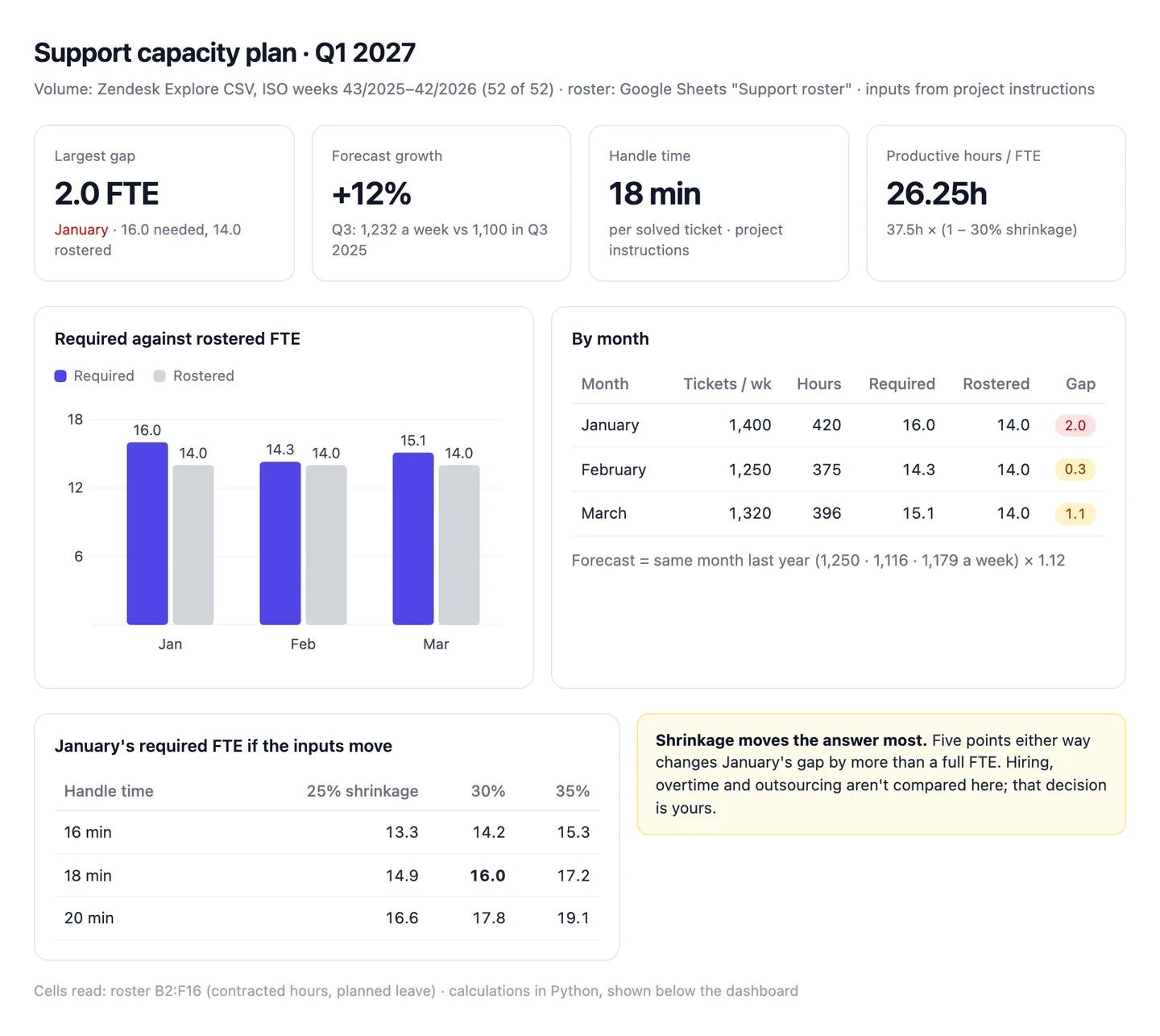
The numbers in this example
| Month | Tickets a week | Hours needed | Required FTE | Rostered FTE | Gap |
|---|---|---|---|---|---|
| January | 1,400 | 420 | 16.0 | 14.0 | 2.0 |
| February | 1,250 | 375 | 14.3 | 14.0 | 0.3 |
| March | 1,320 | 396 | 15.1 | 14.0 | 1.1 |
- Forecast: last year's weekly volume (1,250, 1,116 and 1,179) plus 12% growth, from Q3's 1,232 a week against 1,100 a year earlier.
- Sensitivity: at 35% shrinkage January needs 17.2 FTE, a gap of 3.2.
AI output auditRuns on every answerJanuary needs 16.0 FTE against 14.0 rostered, a gap of 2.0. The forecast uses last January's 1,250 tickets a week Citation plus 12% growth Assumption. Support teams typically run at about 30% shrinkage Model knowledge, so each agent gives 26.25 productive hours a week.
Model knowledge
Shrinkage is about 30%
Not your figure; Claude filled the gap with a benchmark it remembers. If yours is 35% in January, the month needs 17.2 FTE and the gap is 3.2, not 2.0. That's a hire, not a rota change.
Assumption
January grows 12% on last year
Claude applied Q3's year-on-year growth to January. If last January was inflated by a one-off outage, the plan builds the outage in twice.
Citation
Last January averaged 1,250 tickets a week
Read from the Zendesk export, four ISO weeks averaged. Safe to use.
Turning it into a readout for product and leadership
The same analysis makes two different documents.
For product, lead with reasons that point at the product: bugs, import errors, confusing settings. For each one, give the count this period and last, the reopen rate, the linked issue if one exists, and five example tickets with a quoted line each. Product managers act on a sentence from a customer far faster than on a percentage. Count conversations, not customers, and say so; one account with a broken integration can file forty tickets.
For leadership, keep it to one page:
- Ticket volume against the previous period, and per 1,000 active customers if you have that number, so growth in customers isn't mistaken for a worse product.
- Median and 90th percentile first reply and resolution time, against your own targets.
- Escalation and reopen rates, with the definition in a footnote.
- The three reasons that moved most, and who owns each.
- What tickets can't tell you. Customers who leave without writing in don't show up here.
Put the ticket ID lists in an appendix or a linked sheet. They rarely get opened. When they do, it's because someone doubts a number, and that's exactly the moment you need them. The business operations guide covers the weekly review this readout usually feeds.
Where ticket numbers go wrong
Open tickets drop out of resolution time. Only solved tickets have a resolution time, so last week always looks fast: its slow tickets are still open. Report resolution time by the week tickets were created, and say how many are still open.
Merged and spam tickets inflate volume. Exclude them, and report how many you excluded.
Bots change what "first reply" means. If an AI agent answers first, decide whether that counts. Intercom marks these conversations with ai_agent_participated.
Calendar and business hours get mixed. A 16-hour first reply in calendar time can be 1 hour in business time. Pick one per report.
Time zones move the heatmap. API timestamps are in UTC. Convert to your team's local time, and watch the weeks where the clocks change.
The mix shifts. If median first reply time improved because billing questions (fast) grew while bug reports (slow) shrank, nothing got better. Compare reasons with themselves, period on period, before you compare the total.
Sources
- Zendesk Developer Docs: Ticket Metrics
- Zendesk Developer Docs: Tickets
- Zendesk Developer Docs: Incremental Exports
- Zendesk Help: Explore recipe: First reply time heatmap
- Intercom Developers: Conversation statistics
- Intercom Help: Reporting metrics for REST API and CSV exports
- Claude Docs: Ticket routing
- McHugh (2012), Interrater reliability: the kappa statistic, Biochemia Medica
- NIST/SEMATECH e-Handbook of Statistical Methods: Measures of location