
Cost per acquisition (CPA)
AI for data and analytics · Facts checked 23 October 2026
Cost per acquisition is what you pay in advertising for each conversion: a sale, a sign-up, a lead, whatever you've told the platform to count. Spend £5,000, get 125 conversions, and your CPA is £40.
What is cost per acquisition (CPA)?
Google Ads says you paid £42 for each trial last month. Meta says £31. Your own database, counting the same month, says £48. None of them has the arithmetic wrong. They're counting different conversions.
Google Ads shows it as Cost / conv.: your cost divided by your conversions. Meta calls it cost per result, where the result is whatever the campaign is optimising for. The names differ; the division is the same.
CPA is not Customer Acquisition Cost. CPA is per conversion, from one channel's spend. CAC is per new paying customer, usually from all your sales and marketing costs. A business can have a £40 CPA on sign-ups and a £600 CAC on customers, and both are right.
CPA moves with two other numbers. Cost Per Click (CPC) is what each visit cost, Conversion Rate is how many visits converted, and CPA = CPC ÷ conversion rate. Return on Ad Spend (ROAS) tells you whether those conversions were worth what you paid.
How to calculate CPA
Formula: CPA = ad spend ÷ conversions
At a CPC of £1.20 and a conversion rate of 3%, CPA is £1.20 ÷ 0.03 = £40. That second form is the useful one when CPA rises, because it tells you which half moved.
One month, three CPAs
Here's a month for a software company running Google Ads and Meta to a free-trial sign-up. The figures are invented to show the arithmetic, but every line is a choice real teams make. Spend is £8,000 on Google Ads and £6,000 on Meta.
| Who's counting | Trials counted | CPA |
|---|---|---|
| Google Ads, 30-day click | 190 | £42 |
| Meta, 7-day click, 1-day view and 1-day engagement | 195 | £31 |
| Your product database, trials with a paid-ad source | 290 across both | £48 |
Add the two platforms together and you get 385 trials for £14,000, a CPA of £36. Your database recorded 290. The other 95 are trials both platforms claimed, or that Meta counted from a view or an engagement without a click.
None of these is wrong. They answer different questions: what each platform thinks it caused, and what your business saw.
The four choices inside the number
- What counts as an acquisition. A lead, a trial, a first purchase. Say which: CPA on leads and CPA on paying customers can differ tenfold.
- How conversions are counted. A Google Ads conversion action counts either every conversion after a click or only one per click. One suits leads; every suits purchases.
- Which window. A longer attribution window credits more conversions to the ad and lowers CPA.
- Whose count. Each platform claims its own conversions, so platform totals double-count. Your own database counts each customer once.
Averaging CPA is the quiet mistake
One campaign has a £20 CPA on 10 conversions; another has a £60 CPA on 200. Their average is £40. Together they spent £200 + £12,000 = £12,200 for 210 conversions, a CPA of £58. Add up the spend, add up the conversions, then divide.
See why Google Ads says £42 and your database says £48
Connect your ad platforms and your own conversion data, ask Count in plain English, and open the Reasoning Chain behind every number: which conversions, which window, which platform claimed them.
Asking Claude or ChatGPT for your CPA
Give Claude or ChatGPT exports from two ad platforms and ask for CPA by channel, and you'll get a tidy table. It may also add the conversions together for a blended figure. That's the double count above, presented as a total.
The arithmetic is rarely the problem. The choices are, and an AI makes them without saying so: which column is a conversion, which window applies, whether two platforms' counts can be added.
A two-minute check
After any AI-calculated CPA, ask:
- "Which column did you use as conversions, and which conversion action is it?"
- "What attribution window is each platform using?"
- "Did you add conversions across platforms? Could the same customer be counted twice?"
- "Did you divide total spend by total conversions, or average CPAs across rows?"
If it can't answer the first two from your data, it was guessing.
The workflow below is the monthly channel report from our marketing guide. It prints each platform's attribution setting next to its numbers and won't total conversions across platforms. The Count audit under it shows the kind of claim that slips through anyway.
Workflow 1
AI for campaign reporting: a monthly channel report you can defend
The report most teams rebuild by hand every month. Claude pulls spend and conversions from Google Ads, GA4 and Meta, reads the LinkedIn export, and lays them side by side with each platform's attribution setting printed next to its numbers. What you get is a table you could send, plus the queries behind it.
Uses
 Google Ads
 Google Analytics
 Meta
Meta LinkedIn
Before you run it
- Google Ads, Google Analytics and Meta connected (setup steps 3 and 5), or their CSV exports
- The LinkedIn Campaign Manager export for the month, as CSV, with the conversion window in the file name
- Last month's sent report attached, so Claude can match its layout
Show the full prompt (26 lines)Hide the prompt
Build last month's paid channel report.

Date range: [1 Month YYYY] to [last day], in our reporting time zone.

1. From Google Ads, pull spend, clicks, conversions and conversion value
   by campaign type (Search, Performance Max, Display, YouTube). Read the
   conversion window for the primary conversion action and print it.
2. From GA4, pull sessions, engaged sessions and key events by session
   default channel group, using the property's reporting attribution
   model and lookback. Print both.
3. From Meta, pull spend, results and result value by campaign, and
   print the attribution setting each campaign uses. Say whether the
   results include modelled conversions.
4. From the attached LinkedIn export, take spend, conversions and
   conversion value. The conversion window is in the file name; print
   it. If it isn't there, write [WINDOW UNKNOWN].
5. Build one table: channel, spend, conversions, conversion value, ROAS
   (ratio, from totals), attribution setting. Add a total row for spend
   only. Don't total conversions across platforms.
6. Under the table, list the three biggest month-on-month changes against
   the attached report, with the numbers both months.
7. Show the GAQL, the GA4 report definition, the Meta call and the code
   you used for the calculations.

Don't explain why a number moved unless the data shows it. Write
"Cause not in the data" instead.
 Paid channels, September (Europe/London)ArtifactExample from sample data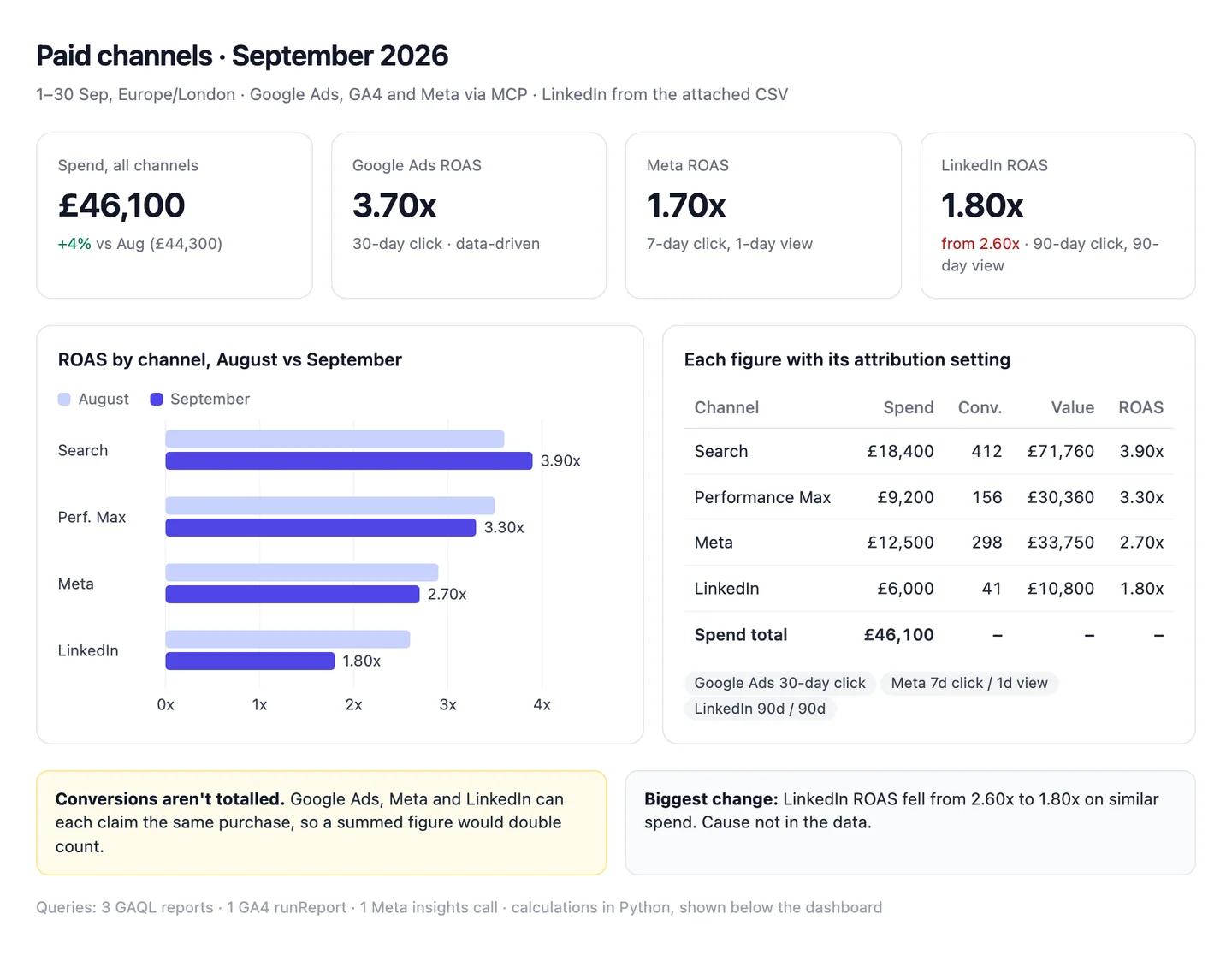
The numbers in this example
| Channel | Spend | Conv. | Conv. value | ROAS | Attribution setting |
|---|---|---|---|---|---|
| Google Ads: Search | £18,400 | 412 | £71,760 | 3.90x | 30-day click |
| Google Ads: Performance Max | £9,200 | 156 | £30,360 | 3.30x | 30-day click |
| Meta | £12,500 | 298 | £33,750 | 2.70x | 7-day click, 1-day view |
| £6,000 | 41 | £10,800 | 1.80x | 90-day click, 90-day view | |
| Spend total | £46,100 |
- Not totalled: conversions. Meta and Google Ads can both claim the same purchase.
- Biggest change: LinkedIn ROAS 1.80x, down from 2.60x in August on similar spend. Cause not in the data.
 AI output auditRuns on every answer
Paid spend was £46,100 in September. Search returned 3.90x ROAS Citation, Meta 1.70x Assumption and LinkedIn 1.80x. Meta is reported on a 7-day click, 1-day view setting Model knowledge, so its conversions are counted on the same basis as last month.
Assumption
Meta ROAS 1.70x
Worked out as (value − spend) ÷ spend, which is ROI, not ROAS. ROAS is value ÷ spend: £33,750 ÷ £12,500 = 2.70x, as the table says. Shared as it is, Meta looks 37% worse than it is.
Model knowledge
Meta: 7-day click, 1-day view
The model didn't read this from your Meta account; it's the setting it expected. If yours is 1-day click, Meta is counted differently from everything else in the report.
Citation
Search ROAS 3.90x
£71,760 ÷ £18,400, both straight from Google Ads. Safe to share.
What's a good CPA?
A good CPA is one below what a conversion is worth to you. For a first purchase, that's the gross profit on the order:
Formula: Break-even CPA = average order value × gross margin
An £80 average order at a 40% margin gives a break-even CPA of £32. Pay more and each first order loses money.
For leads and trials, work back from what a customer is worth. If a customer brings £1,200 of gross profit in their first year and 8% of trials become customers, a trial is worth £96. That's your ceiling, before any other sales costs.
We don't publish average CPA by industry. Those tables mix lead CPAs with purchase CPAs, different windows and different counting, so they can't tell you whether your £40 is good. Your break-even can.
If you use Target CPA bidding in Google Ads, set the target from that break-even, with room for profit, rather than from last month's average.
Why is my CPA rising?
Split it into its two halves first: CPA = CPC ÷ conversion rate.
CPC rose, conversion rate held. You're paying more for the same visits. Check Cost Per Click (CPC) by campaign: new competitors, a broader match type or a bid strategy change are the usual causes.
Conversion rate fell, CPC held. Visits stopped converting. Look at the landing page, the offer, page speed and stock before the ads. Conversion Rate by landing page shows where.
The platform and your database disagree. If CPA rose in the ad platform but trials or sales held steady in your own data, the counting changed: a tag stopped firing, a consent banner changed, or someone edited the conversion action or its window.
The mix shifted. More budget went to a campaign with a higher CPA. The total moves even though no campaign got worse.
The last two are measurement and mix, not performance, and they're the quickest to rule out.
How to lower CPA
Cut the segments above break-even. Campaign CPA averages good and bad keywords, audiences and placements. Break it down and pause what's over the line.
Fix the landing page. Conversion rate is half of CPA, and it's often cheaper to raise on the page than in the auction.
Tighten match types and add negatives. Search terms that never convert raise spend without adding conversions.
Set Target CPA from your break-even, then give the bid strategy enough conversions to learn from before you judge it.
Optimise for the conversion you value. If you count leads but want customers, the platform will find you cheap leads. Send it the later event if you can, even if the CPA looks higher.
And check Return on Ad Spend (ROAS) alongside it. A lower CPA on smaller orders can make less money.