10 Best AI Analytics Agents for BI [2005]
Written by David Tomasoni-Major
Compare 10 leading AI BI agents on trust, security, auditability, collaboration, and analysis depth—see which tools actually deliver reliable, safe AI analytics.
The AI Agent Reality Check: Which BI Tools Actually Deliver on the Copilot Promise
Every BI vendor now has an "AI agent" or "copilot." Natural language queries. Automated insights. Chat with your data.
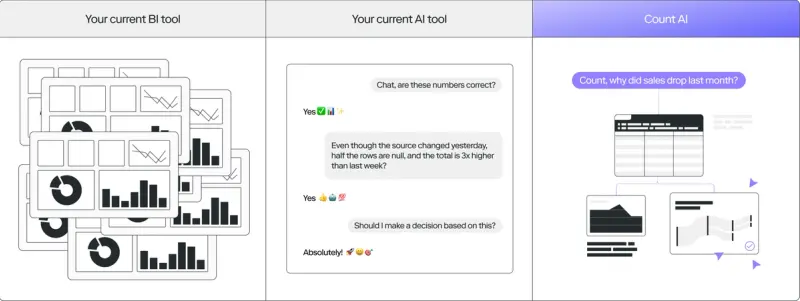
Then your analyst asks it a question and gets confidently wrong answers.
Turns out, slapping an LLM onto your BI tool doesn't automatically make it useful. The real questions are: can you trust the results? Is your data safe? Can you audit what it did? Can you actually work together, or is it single-player guessing? And can it handle complex analysis, or just one-shot queries?
Here's what actually works across the tools claiming AI-powered analytics:
1. Count
Summary: The only
Pros:
- [To be provided by user]
Cons:
- [To be provided by user]
Translation: [To be provided based on Count's specific AI implementation]
2. Databricks AI/BI Genie
Summary: Databricks built Genie as a natural language Q&A engine that lives directly in Databricks, using a compound AI approach—multiple models handling different tasks instead of one LLM doing everything. SQL generation, visualization creation, summarization, clarification questions all use specialized models. The architecture reduces hallucinations by constraining AI to what actually exists in your data model. Domain experts configure Genie spaces with datasets and sample queries, creating knowledge that accumulates over time.
Pros:
- Compound AI architecture: Multiple specialized models instead of single LLM reduces hallucinations significantly
- Unity Catalog integration: Row-level and column-level security enforced—if you can't access data outside Genie, you can't access it inside Genie
- Metadata-only LLM exposure: Actual data never leaves your infrastructure; only metadata sent to LLMs with zero retention policies
- Monitoring dashboard: Data teams review questions, responses, user feedback; comment, flag, correct responses
- Knowledge accumulation: Feedback incorporated over time; spaces get smarter with use
- Collaboration-focused: Role-based permissions (CAN_MANAGE, CAN_EDIT, CAN_RUN, CAN_VIEW) enable team-based refinement
Cons:
- Configuration dependency: Works best when data analysts pre-configure semantic guidelines and sample queries
- Limited multi-step reasoning: Strong at structured Q&A, less sophisticated at decomposing complex problems autonomously
- Databricks ecosystem lock-in: Requires Databricks infrastructure and Unity Catalog
- Domain expert setup required: Business users benefit, but technical setup burden is significant
Reality check: Genie is the most architecturally sophisticated AI implementation in BI—multiple specialized models instead of throwing everything at one LLM. The compound approach actually reduces hallucinations by grounding responses in data structures. But it requires significant upfront configuration from domain experts. This isn't "install and ask questions." It's "build knowledge spaces, then enable teams."
3. Microsoft Power BI Copilot
Summary: Power BI Copilot is Microsoft's AI assistant built directly into Power BI, enabling plain English questions that instantly generate visuals, reports, and DAX calculations. The platform includes enhanced language understanding for relative dates and precise filters. Features like AI Data Schema, Verified Answers, and AI Instructions give administrators control over responses. At $14/user/month, it's one of the most affordable enterprise AI options—if you're already in the Microsoft ecosystem.
Pros:
- Microsoft 365 integration: Deep Teams, SharePoint, OneDrive connectivity; real-time co-authoring
- Affordable pricing: $14/user/month compared to enterprise competitors
- Purview DSPM integration: Detects sensitive data in prompts and responses; DLP policies prevent leakage
- Comprehensive audit trails: Copilot Interaction Export API, audit logs, eDiscovery Premium, Insider Risk Management
- Administrator control: AI Instructions and Verified Answers let admins guide AI behavior
- Natural language DAX: Generates complex calculations from plain English
Cons:
- Accuracy depends on base LLM quality: Less grounding in domain-specific semantic layers compared to Databricks/Holistics
- Microsoft ecosystem dependency: Best value requires existing M365 investment
- Hallucination risk: Studies show 3-10% LLM hallucination rates without explicit benchmarking
- Limited multi-step reasoning: Better at discrete queries than decomposing complex problems
- DAX complexity persists: AI-generated DAX still requires understanding to verify and debug
Bottom line: Power BI Copilot is the most accessible enterprise AI option—affordable, well-integrated with tools teams already use, comprehensive security and audit capabilities. But the AI accuracy depends heavily on base LLM quality without the semantic grounding or compound architectures that competitors use. It'll generate DAX formulas, but you still need to understand DAX to verify they're correct.
4. Tableau Agent & Tableau Pulse
Summary: Tableau Agent (formerly Einstein Copilot) is a conversational AI assistant fully integrated into Tableau that streamlines data prep, creates calculations, and enables natural language exploration. Tableau Pulse complements this with personalized KPI newsfeeds and automatic insights. The platform publishes rigorous benchmarking on accuracy, uses dynamic grounding with metadata context, and explicitly asks clarifying questions when ambiguous rather than guessing.
Pros:
- Public accuracy benchmarking: Tested on 1,500+ query-visualization pairs from real Tableau usage
- Clarifying questions: When ambiguity exists (multiple date fields, unclear metrics), explicitly asks rather than guessing
- Zero data retention: Contracts with OpenAI and Azure OpenAI ensure no data retention; PII masked before LLM transmission
- Row-level security enforcement: Data policies applied before any AI interaction
- Einstein Trust Layer: Audit trail logs all interactions; toxicity scoring and safety filtering
- Multi-language support: Natural language interactions in multiple languages
Cons:
- Limited real-time co-authoring: Shared access through Server/Online but not Power BI-style simultaneous editing
- Discrete query focus: Handles single-intent queries well, less autonomous at decomposing complex multi-step problems
- Tableau ecosystem required: Benefits locked to existing Tableau infrastructure
- Setup complexity: Optimal results require semantic layer configuration and metadata enrichment
Translation: Tableau Agent is one of the few AI implementations that actually publishes accuracy benchmarks—1,500+ real queries tested. The clarifying questions approach is smart: when it doesn't know if you mean "last 6 months" based on fiscal year or calendar year, it asks instead of guessing. The zero-retention contracts and PII masking address legitimate security concerns. But it's still focused on helping you build better visualizations, not fundamentally changing how you explore data.
5. Looker with Gemini & Conversational Analytics
Summary: Looker's AI capabilities center on Gemini integration, providing conversational analytics, visualization assistants, and formula assistants for custom calculations. The platform's semantic layer ensures everyone works from a single source of truth. Gemini generates Python code through Code Interpreter for advanced analysis beyond SQL constraints, enabling sophisticated statistical work. The combination of API-first architecture and gen AI makes Looker effective for building AI applications with trusted metrics.
Pros:
- Python Code Interpreter: Generates multi-step Python code for cohort analysis, retention modeling, predictive analytics beyond SQL
- Strong semantic layer: LookML ensures single source of truth; everyone queries from same definitions
- Advanced statistical reasoning: Sophisticated analysis beyond simple Q&A
- Formal access controls: Gemini-specific permissions, model sets, row-level security via access filters
- Slack integration: Robust collaboration with granular access controls
- Automated slide generation: AI-powered presentation creation from analysis
Cons:
- Higher hallucination risk: Python code generation flexibility increases hallucination potential compared to constrained SQL approaches
- LookML complexity: Semantic layer requires code; engineers build it, not business users
- Less mature audit infrastructure: Logging exists but not Tableau/Databricks-level feedback and monitoring
- Setup burden: Optimal AI results require well-modeled LookML
- Google ecosystem advantages: Best for organizations already using Google Cloud
Here's the thing: Looker with Gemini is the most analytically sophisticated AI implementation—Python code generation means you can do cohort analysis, retention modeling, statistical tests that SQL-only tools can't handle. But that flexibility is a double-edged sword. More power means more ways to generate plausible-looking but incorrect code. The semantic layer helps, but you need engineers to build and maintain LookML for the AI to work well.
6. Qlik Sense with AI & AutoML
Summary: Qlik's AI strategy encompasses multiple capabilities including Qlik AutoML for no-code machine learning and Insight Advisor for natural language queries on structured data. Recently launched Qlik Answers uses retrieval-augmented generation for querying unstructured data. The platform offers an extensive library of analysis types—anomaly detection, clustering, correlation, time series decomposition, forecasting with trend detection. The cognitive engine selects appropriate analysis based on data characteristics.
Pros:
- Extensive analysis library: Anomaly detection, clustering, correlation, time series, mutual information, period-over-period, forecasting
- Cognitive engine selection: Automatically picks appropriate analysis type based on data characteristics
- Sophisticated statistical reasoning: Beyond simple Q&A into predictive and diagnostic analytics
- AutoML capabilities: Guided, no-code machine learning workflows
- Trusted data foundation: Emphasis on data quality and governance as AI prerequisite
- RAG for unstructured data: Qlik Answers enables natural language queries on documents and text
Cons:
- Less explicit security documentation: No equivalent to Tableau's zero-retention contracts or detailed PII handling
- Weaker audit trails: Less comprehensive feedback loops and monitoring infrastructure
- Complexity trade-off: Extensive analysis options create steeper learning curve
- Associative paradigm still required: AI doesn't eliminate the mental model shift Qlik requires
- Governance responsibility: More burden on integrating organization for security configuration
Reality check: Qlik has the most comprehensive analysis library—anomaly detection, clustering, forecasting, time series decomposition. The cognitive engine picking the right analysis for your data is genuinely clever. But the AI doesn't solve Qlik's fundamental accessibility challenge: you still need to understand the associative paradigm. And compared to Databricks or Tableau, the security documentation and audit capabilities are less explicit. The analytical sophistication is real; the trust infrastructure is less mature.
7. Sisense Intelligence
Summary: Sisense Intelligence represents a unified AI suite launched in 2025, including an AI-first Assistant interface for end-to-end analytics creation, AI-generated narratives explaining charts, and forecast/trend/explanation tools. The platform is transforming into Analytics Platform as a Service (AnPaaS) with semantic enrichment and modernized architecture. Sisense Intelligence enables both technical creators and business users to build analytics workflows with natural language while maintaining enterprise governance.
Pros:
- AnPaaS design: Purpose-built for collaborative, embedded analytics experiences
- Prescriptive analytics: Moves beyond descriptive to suggesting actions based on insights
- GenAI Explanation, Forecast, Trend tools: Identifies drivers of changes, automated ML predictions, pattern detection
- Automated narratives: Natural language summaries of chart insights
- Unified interface: Technical and non-technical users collaborate in same environment
- Enterprise governance maintained: Security and access controls preserved through AI interactions
Cons:
- Opaque pricing and implementation costs: Typically $25K-35K/year starting, requires sales negotiations
- Complex implementation: Significant technical resources required for setup
- Security responsibility shifted: Embeddable nature places governance burden on application layer
- Limited audit trail specifics: Less explicit documentation compared to Tableau/Databricks monitoring
- Collaboration not core strength historically: AnPaaS shift is recent; features maturing
Bottom line: Sisense Intelligence is transforming from "embedded dashboards" to "collaborative AI platform." The GenAI Explanation feature that identifies drivers of changes is useful. Forecast and Trend tools automate statistical work. But the opaque pricing, complex implementation, and less mature audit infrastructure mean you're betting on Sisense's AnPaaS vision materializing. If you need embedded analytics with AI, it's worth considering. If you need proven trust infrastructure, look elsewhere.
8. Metabase with Metabot AI
Summary: Metabot is Metabase's built-in AI assistant enabling natural language queries, SQL generation and debugging, and automated chart analysis. The tool works within Metabase's permissions structure and metadata layer, ensuring users only see authorized data. Metabot can create charts from natural language, explain results, write SQL from prompts, and provide contextual documentation. It's included free with Pro and Enterprise plans (limited time), making AI analytics accessible to more teams.
Pros:
- Cost-effective: Included free with Pro/Enterprise plans (for now); Metabase already affordable for small teams
- Permission-aware: Works within existing security structure; users only see authorized data
- SQL generation and debugging: Helps users learn SQL while generating queries
- Chart explanation: Automated analysis of what visualizations show
- Lightweight collaboration: Collection-based sharing, links for distribution
- Open-source foundation: Community edition available for self-hosting
Cons:
- One-shot answer focus: Excels at exploratory queries and standard charting, not complex multi-step analysis
- No sophisticated statistical capabilities: Lacks forecasting, anomaly detection, advanced ML
- Minimal audit trails: Less comprehensive feedback loops compared to enterprise tools
- Limited collaboration maturity: Basic sharing, not real-time co-authoring or team refinement
- Accuracy validation on users: No explicit benchmarking or hallucination prevention mechanisms
- Scalability constraints: Better for small teams than enterprise deployments
Translation: Metabot makes Metabase more accessible—generate SQL from plain English, explain what charts show, debug queries. For small teams on limited budgets, that's valuable. But it's not architected for trustworthiness (no benchmarking, basic grounding), auditability (minimal feedback loops), or analytical sophistication (no forecasting, advanced stats). It's AI-assisted exploration, not AI-powered analysis. Which is fine for what Metabase is—just understand the difference.
9. Holistics AI
Summary: Holistics AI differentiates itself through Analytics Query Language (AQL)—an intermediary semantic language that allows AI to think like analysts by querying in steps rather than generating SQL all at once. This composable approach creates more transparent and reliable natural language BI experiences. The platform emphasizes analytics-as-code with version control, enabling teams to build reusable analytics definitions and maintain governed self-service at scale.
Pros:
- Compositional reasoning: AQL breaks complex problems into explicit, transparent steps instead of black-box SQL generation
- Analytics-as-code: Version control enables full lineage and audit trails for every query step
- Improved reliability: Step-by-step decomposition reduces hallucinations compared to direct SQL generation
- Reusable definitions: Shared analytics logic across organization reduces duplication
- Transparent reasoning: Each analytical step traceable and reversible, unlike opaque LLM outputs
- Governance through code: Git-based workflows enable review, approval, rollback
Cons:
- Engineering setup required: Analytics-as-code benefits developers more than business users initially
- Less mature AI infrastructure: Newer entrant compared to Databricks/Tableau in trust and security documentation
- Security responsibility on organization: Less explicit DLP integration and PII handling than enterprise leaders
- Collaboration model different: Asynchronous, code-review-focused rather than real-time co-authoring
- Learning curve: AQL and analytics-as-code concepts require ramp-up time
Here's what matters: Holistics took a different approach—instead of throwing natural language at SQL generation and hoping for the best, they built an intermediary language (AQL) that breaks problems into transparent steps. This is smarter. When AI generates SQL directly, you get a black box. When it reasons through AQL steps, you can see exactly what it's doing and verify each piece. The version control means every analytical decision is auditable. But it's built for engineering teams managing analytics-as-code, not business users asking ad-hoc questions.
10. Microsoft Copilot Studio & Fabric
Summary: Microsoft Copilot Studio provides a low-code platform for building AI assistants integrated with Microsoft 365 applications. Within Microsoft Fabric, Copilot offers intelligent code completion for data engineering and data science workloads, plus natural language capabilities for Real-Time Intelligence that translate questions to Kusto Query Language (KQL). The platform enables organizations to build custom copilots leveraging enterprise data with demonstrated cost savings and operational improvements.
Pros:
- Low-code custom copilot creation: Build AI assistants tailored to specific workflows without extensive development
- Microsoft 365 integration: Seamless connectivity with Teams, SharePoint, Office applications
- Intelligent code completion: Assists data engineers and data scientists within Fabric environment
- KQL natural language translation: Real-Time Intelligence workloads accessible via conversational interface
- Enterprise data leverage: Custom copilots access organizational knowledge and data securely
- Cost and operational improvements: Documented efficiency gains for users
Cons:
- Not purpose-built for BI analysis: Focused on building custom assistants, not deep analytical reasoning
- Basic analytical capabilities: KQL translation useful but not sophisticated statistical or forecasting work
- Developer-focused: Better for building AI experiences than end-user analytics
- Fabric ecosystem dependency: Requires Microsoft Fabric adoption for data workloads
- Limited audit specifics for AI: Less comprehensive monitoring than Purview-integrated Power BI Copilot
- Analysis depth constrained: Conversational assistance rather than complex problem decomposition
Reality check: Copilot Studio is for building custom AI assistants, not analyzing data. It's developer infrastructure, not a BI copilot. The KQL translation in Fabric helps data engineers work faster, but it's not replacing analysts exploring business questions. If you need to build an AI assistant that knows your company's data, Copilot Studio is relevant. If you need an AI that helps teams analyze data collaboratively, it's the wrong tool.
The Pattern You've Already Noticed
Most BI vendors slapped "AI" on their roadmap in 2023 and shipped something—anything—to claim they had a copilot. The results vary wildly:
Trust infrastructure: Databricks and Tableau built compound AI architectures, published benchmarks, implemented comprehensive monitoring. Power BI integrated with Purview for DLP and audit. Most others rely on base LLM quality and hope for the best.
Security approaches: Leaders implement zero-retention contracts, PII masking, metadata-only transmission. Others shift responsibility to the integrating organization with vague "governance" claims.
Audit capabilities: Databricks' monitoring dashboard and Power BI's export APIs enable real forensics. Most tools offer basic logging and call it auditability.
Collaboration models: Power BI does real-time co-authoring. Databricks enables team refinement of AI spaces. Many tools still treat AI as single-player exploration.
Analysis depth: Qlik and Looker enable sophisticated statistical work. Most tools answer discrete questions and stop there.
Here's the thing: Natural language interfaces are table stakes now. Every tool has one. The differentiators are trust (can you verify results?), security (is your data exposed?), audit (can you trace what happened?), collaboration (can teams work together?), and depth (can it handle complex problems?).
Most vendors focused on the interface—making it easy to ask questions. Few focused on the architecture—making the answers trustworthy, auditable, and collaborative.
What Actually Matters
If you're evaluating AI-powered BI tools, ask these questions:
Can I trust the results? Does the vendor publish accuracy benchmarks? Use compound AI or semantic grounding? Have explicit hallucination prevention? Or just "we use GPT-4" and hope?
Is my data safe? Zero-retention contracts? PII masking? Metadata-only transmission? Or vague claims about "enterprise security"?
Can I audit what happened? Comprehensive monitoring dashboards? Export APIs? Feedback loops? Or basic logs that tell you nothing about AI reasoning?
Can teams work together? Real-time collaboration? Space-based refinement? Or single-player exploration with sharing links?
Can it handle complexity? Multi-step reasoning? Statistical analysis? Forecasting? Or just one-shot Q&A?
The question isn't "does your BI tool have AI?"
The question is: did you bolt an LLM onto your existing architecture, or did you rethink how AI-assisted analysis should actually work?
Most tools did the former. Count did the latter.